How to Build a Generative AI Application: Process, Tech Stack, Cost, and Use Cases
Table of Contents
Subscribe To Our Newsletter
Summarize with AI
Not enough time? get the key points instantly.
Generative AI is no longer a future-forward concept. It is live infrastructure that businesses are using to automate operations, reduce costs, and serve customers better. If your team is wondering how to build a generative AI application without wasting months or a six-figure budget going in the wrong direction, this guide gives you the full picture.
From architecture decisions and tech stack selection to realistic AI app development costs and high-ROI enterprise use cases, here is everything you need to move from idea to production.
What You Will Learn
- Generative AI applications solve focused business problems with measurable outcomes.
- RAG helps AI apps answer using verified business data.
- Python is widely used for generative AI development because of its AI libraries, frameworks, and model ecosystem.
- Generative AI MVP development costs often start around $25,000 and increase with features, integrations, and complexity.
- Enterprise AI app costs rise with system integrations, security, compliance, and scalability needs.
- Healthcare, legal, finance, retail, and customer support are common areas for Generative AI application adoption.
- Small businesses can start with API-based AI applications before investing in custom enterprise platforms.
- Future AI apps are expected to simulate, reason, and act with stronger business and real-world context.
Did You Know?
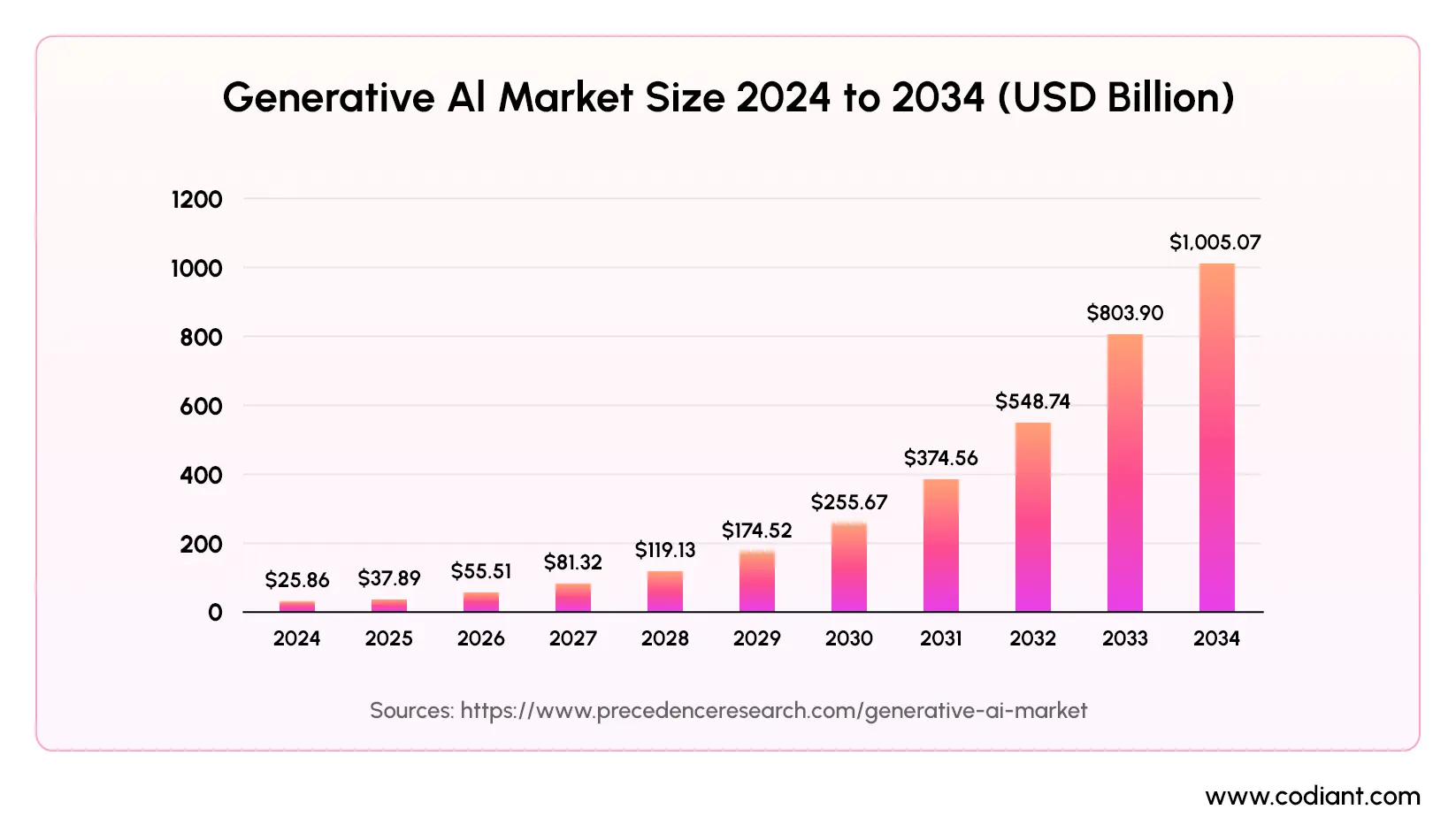
The generative AI market was valued at $37.89 billion in 2025 and is projected to skyrocket past $1 trillion by 2034, expanding at an extraordinary compound annual growth rate of 44.20%.
What is a Generative AI Application and How is It Different From Traditional AI?
A generative AI application is software that uses large language models or generative models to create new content, responses, summaries, code, images, audio, or structured data from user inputs. Unlike traditional AI, which usually predicts, classifies, or detects patterns, generative AI produces contextual outputs and can support open-ended tasks.
Traditional AI applications are built for narrow, predefined tasks such as spam detection, fraud scoring, demand forecasting, or image classification. Generative AI applications are built for flexible tasks such as AI copilots, document assistants, content generation tools, chatbot systems, code assistants, and RAG-based knowledge platforms.
| Feature | Traditional AI Application | Generative AI Application |
| Output Type | Predefined categories or predictions | New, contextual content or responses |
| Architecture | Supervised ML models | Foundation models, LLMs, and RAG |
| Flexibility | Task-specific automation | Open-ended reasoning and generation |
| Common Use Cases | Fraud detection, churn prediction, forecasting | AI copilots, document assistants, chatbots |
| Data Handling | Structured data patterns | Structured and unstructured data inputs |
Build Generative AI Apps That Deliver Real Business Outcomes
Turn your AI idea into a scalable application with the right architecture, stack, and roadmap.
What Are the Steps to Create a Generative AI Application?
Building a production-grade generative AI application follows a structured seven-phase process. Skipping key stages, especially discovery, data readiness, architecture planning, or evaluation, is one common reason AI projects fail to move beyond pilot mode.
While a general AI application follows a broader planning and development lifecycle, generative AI apps need additional layers such as prompt engineering, RAG, fine-tuning, vector databases, guardrails, and output evaluation.
For a wider view of AI product planning, you can also read our Step-by-Step Guide to AI App Development.
1. Define the problem with precision
Do not start with “we want to use AI.” Start with a clear business problem and measurable outcome. For example: “Our support team spends four hours daily answering repetitive policy questions, and we want to automate a large share of those queries while keeping errors low.”
Specific problems help teams define the right users, data, model, workflow, success metrics, and risk controls. Vague goals often lead to unclear outputs, weak adoption, and abandoned AI pilots.
2. Assess your data and design the architecture
Generative AI applications are only as useful as the data and systems they can access. Before development begins, map what proprietary data your app needs, where that data lives, what format it is in, how often it changes, and who should be allowed to access it.
This may include PDFs, SQL databases, SharePoint files, CRM records, product catalogs, support tickets, APIs, or internal knowledge bases. This step creates the AI application architecture blueprint, including data flow, access control, model layer, vector database, APIs, and user interface.
3. Select your tech stack
The tech stack defines how your generative AI application will be built, deployed, secured, and scaled. Key choices include the foundation model, orchestration framework, vector database, backend technology, frontend framework, cloud infrastructure, monitoring tools, and security layer.
These decisions affect long-term cost, response quality, latency, scalability, and maintenance. For example, an internal knowledge assistant may need a different stack than an AI image generation app, an AI image detection system, or a customer-facing chatbot.
4. Build your RAG pipeline or fine-tune
Most enterprise generative AI applications need business-specific knowledge. This is usually handled through Retrieval-Augmented Generation, known as RAG, or fine-tuning.
RAG connects the AI model to approved business documents or databases. The system breaks documents into smaller chunks, converts them into vector embeddings, stores them in a vector database, and retrieves the most relevant information when a user asks a question. This helps the model generate answers grounded in company data instead of relying only on general training knowledge.
Fine-tuning is different. It adjusts a model using specific examples so it can better follow a domain, tone, task, or output format. RAG is often the better starting point when business information changes frequently, while fine-tuning is useful when consistent behavior or specialized formatting is required.
5. Engineer your prompts and configure guardrails
Prompt engineering helps control how the AI model responds. System prompts define the model’s role, boundaries, tone, and task rules. Few-shot examples show the model what a good output should look like.
Guardrails are equally important. They help prevent off-topic responses, unsafe answers, fabricated claims, data exposure, or actions outside the allowed scope. This is especially important for regulated or sensitive industries such as healthcare, finance, insurance, legal, and education.
6. Integrate with existing systems and build APIs
A generative AI application becomes more valuable when it connects with real business systems. This may include CRMs, ERPs, document management platforms, eCommerce systems, ticketing tools, learning platforms, healthcare systems, or internal databases.
Frameworks such as LangChain and LlamaIndex can help orchestrate data flow between the LLM, vector database, external tools, APIs, and user interface. Integration complexity is often one of the most underestimated cost drivers in custom generative AI application development because every business system has different data structures, access rules, and workflow requirements.
7. Evaluate, deploy, and iterate
Generative AI applications require a different testing approach from traditional software. Along with functionality, teams must evaluate output quality, accuracy, response consistency, hallucination rate, latency, security, and user experience.
Important evaluation checks include faithfulness, which means whether the response stays grounded in retrieved context, and relevance, which means whether the answer matches the user’s intent. Once tested, the application can be deployed using scalable infrastructure such as Docker and Kubernetes. After launch, tools such as LangSmith or Arize Phoenix can support monitoring, debugging, and performance evaluation.
The process does not end at deployment. A reliable generative AI application needs continuous improvement through user feedback, prompt updates, data refreshes, model evaluation, security checks, and workflow optimization.
Which Programming Language is Best for Generative AI?
Python is the widely used programming language for generative AI development because it supports major AI frameworks, model orchestration tools, machine learning libraries, and backend AI workflows. Most generative AI applications use Python for LLM integration, RAG pipelines, embeddings, vector search, prompt engineering, API development, and model evaluation.
Python works well with LangChain, LlamaIndex, Hugging Face Transformers, FastAPI, PyTorch, TensorFlow, and major LLM APIs. This makes it suitable for building AI copilots, knowledge assistants, document AI tools, chatbot systems, and enterprise generative AI applications.
TypeScript and JavaScript are also useful for frontend interfaces, dashboards, chat experiences, and full-stack AI products. For most development teams, the practical choice is Python for AI logic and backend workflows, and TypeScript for frontend application development.
Generative AI Tech Stack for Production Applications
A production-ready generative AI tech stack usually includes a foundation model, orchestration framework, vector database, backend API layer, frontend framework, cloud infrastructure, and monitoring tools.
Common stack choices include:
- Foundation models: GPT-4o, Claude, Gemini, Llama, or Mistral
- Orchestration frameworks: LangChain, LlamaIndex, or Semantic Kernel
- Vector databases: Pinecone, Weaviate, Milvus, Chroma, or pgvector
- Backend development: Python, FastAPI, Node.js, or Django
- Frontend development: React, Next.js, TypeScript, or JavaScript
- Cloud infrastructure: AWS, Azure, Google Cloud, Docker, or Kubernetes
- Monitoring tools: LangSmith, Arize Phoenix, observability dashboards
For early RAG prototypes, pgvector can work well when the team already uses PostgreSQL. For larger applications with high query volume, Pinecone, Weaviate, or Milvus can support better scalability, retrieval performance, and enterprise-grade vector search.
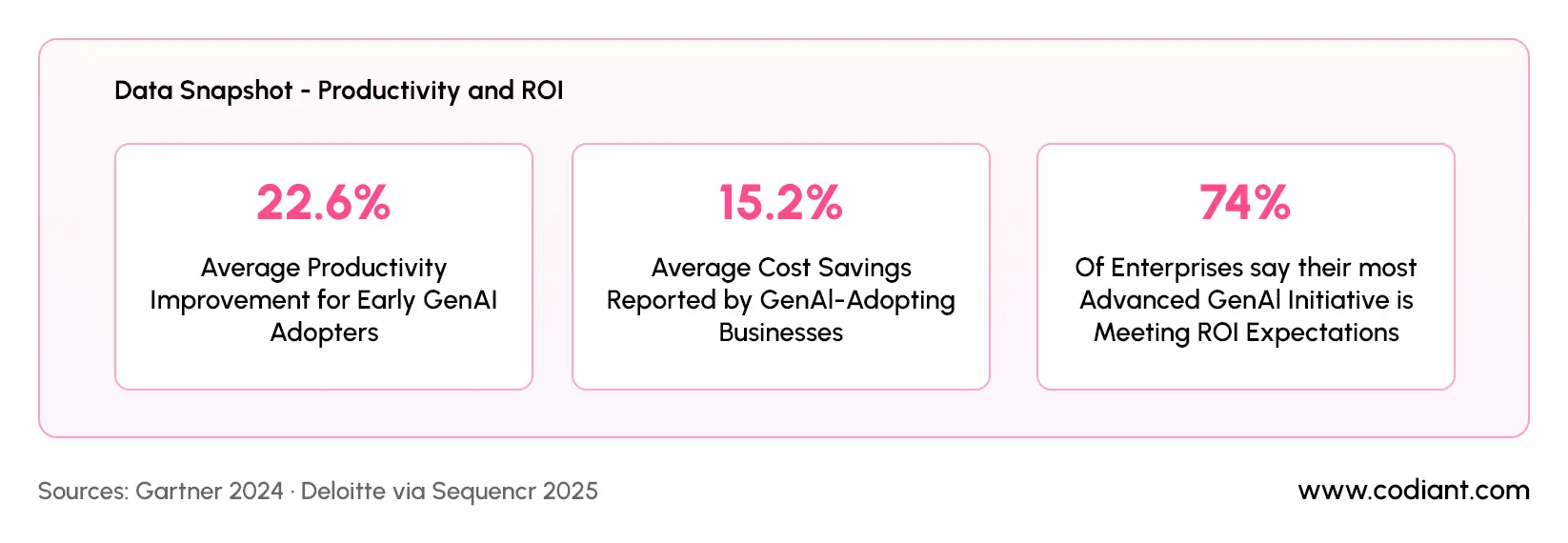
Sources: Gartner 2024 · Deloitte via Sequencr 2025
How Much Does It Cost to Develop a Generative AI Application?
The cost to develop a generative AI application usually ranges from $25,000 to $50,000 for an MVP and can reach $500,000 to $2M+ for a full enterprise platform with deep integrations. The final cost depends on application complexity, data preparation, RAG pipeline setup, model integration, compliance needs, UI/UX, cloud infrastructure solutions, and ongoing AI usage. A simple AI knowledge assistant costs less than an enterprise AI copilot connected to CRMs, ERPs, databases, and internal workflows.
AI app development cost is the question every business asks before committing.
This table shows estimated generative AI app development costs based on application type and complexity.
| Application Type | Estimated Development Cost | Estimated Timeline |
| Proof of Concept / MVP | $20,000–$50,000 | 4–8 weeks |
| Single Use-Case Production App | $50,000–$120,000 | 8–16 weeks |
| RAG-Based Knowledge Assistant | $40,000–$150,000 | 10–20 weeks |
| AI Copilot with Workflow Automation | $100,000–$250,000 | 4–7 months |
| Multi-Feature Enterprise Application | $150,000–$500,000+ | 6–12 months |
| Agentic AI Platform | $150,000–$500,000+ | 6–12 months |
| Full Enterprise Platform with Deep Integrations | $500,000–$2M+ | 9–18+ months |
Cost by Development Stage
This table breaks down generative AI development costs by project stage, deliverables, and budget range.
| Development Stage | What It Includes | Estimated Cost Range |
| Discovery & Requirement Analysis | Use case planning, feasibility study, user flows, technical roadmap | $3,000–$15,000 |
| UI/UX Design | Wireframes, prototypes, design system, dashboard screens | $5,000–$30,000 |
| AI Model Integration | LLM API setup, prompt engineering, embeddings, response tuning | $10,000–$80,000 |
| Backend & Frontend Development | User roles, dashboards, admin panel, APIs, database setup | $20,000–$150,000 |
| Data Preparation | Document processing, cleaning, chunking, vectorization, metadata setup | $10,000–$100,000 |
| Testing & Quality Assurance | Functional testing, AI response testing, security testing, performance checks | $8,000–$50,000 |
| Deployment & Maintenance Setup | Cloud hosting, monitoring, logging, CI/CD, production release | $5,000–$40,000 |
What Drives the Cost Up?
- Integration complexity is one of the single biggest cost driver. Connecting your generative AI application to legacy CRMs, ERPs, proprietary databases, and internal APIs adds significant engineering time.
- Compliance requirements in regulated industries HIPAA for healthcare, SOC 2 for enterprise SaaS, PCI-DSS for fintech add security architecture, audit logging, and access control layers.
- Custom model fine-tuning costs more than RAG-only approaches, both in upfront engineering and ongoing compute costs.
- Team location dramatically affects cost. Teams in the US/UK/Australia typically charge $150–$250/hour for hire dedicated AI engineers. Teams in India with equivalent expertise typically charge $40–$80/hour.
Ongoing Operational Costs
Beyond development, budget for:
- LLM API costs: Token-based pricing (GPT-4o at ~$0.015/1K output tokens means 1M queries/month at 500 tokens each = ~$7,500/month)
- Vector database hosting: $70–$700/month depending on scale
- Cloud infrastructure: $500–$5,000/month for production systems
- Maintenance and iteration: 20–25% of initial build cost annually
Not Sure What Your AI App Should Cost First?
Get a clear development estimate based on features, integrations, compliance, and business complexity.
How Do Generative AI Models Work?
Generative AI models work by learning patterns across billions of words and then predicting, one word at a time, what the most useful next response is. They do not “think” or “know” things the way humans do they generate statistically plausible, contextually relevant text based on everything they were trained on and everything you have told them in the current conversation.
But if you are building a generative AI application or deciding whether to invest in one you need a slightly deeper understanding. Here is the step by step process how it works.
Step 1: Training on a massive dataset
Before a model can respond to anything, it has to be trained. Training means feeding the model an enormous amount of text books, websites, research papers, code, conversations and teaching it to predict the next word in any sequence.
GPT-4 was trained on hundreds of billions of words. Claude was trained on trillions of tokens. This training process runs for weeks or months on thousands of specialist chips (GPUs and TPUs), at a cost of millions of pounds.
The result is a model that has compressed the statistical patterns of human language into billions of numerical parameters the model’s “weights.” These weights are what the model consults every time it generates a response.
Simple Analogy
Think of it like a student who has read every book in a library. They have not memorised every sentence word for word but they have internalised enough patterns to write a plausible essay on almost any topic. Generative AI is that student, but trained on a library the size of the internet.
Step 2: Turning words into numbers (tokenisation and embeddings)
Computers cannot read words they work with numbers. So the first thing a generative AI model does when it receives your input is convert it into tokens. A token is a chunk of text usually a word or part of a word. “Unbelievable” might become three tokens: “Un”, “believ”, “able.”
Each token is then converted into an embedding a list of hundreds or thousands of numbers that represents its meaning and relationship to other words. Words with similar meanings end up with similar embeddings. “Cat” and “kitten” are numerically closer together than “cat” and “aeroplane.”
This numerical representation is what allows the model to understand context, synonyms, and the relationship between ideas without ever needing to “read” text the way a human does.
Tokenisation
Splits text into small chunks (tokens). “Hello world” → [“Hello”, ” world”]. The model processes tokens, not letters or words directly.
Embeddings
Converts each token into a list of numbers (a vector). Semantically similar words cluster close together in this numerical space.
Attention
The mechanism that lets the model decide which words to focus on when predicting the next token. It is why context matters so much in AI responses.
Context window
The maximum amount of text the model can “see” at once. GPT-4o has a 128,000-token context window roughly 100,000 words.
Sources: AmplifAI 2026 · Gartner via Fullview · Sequencr AI 2025
Step 3: The attention mechanism how the model “understands” context
The breakthrough that powers modern generative AI is called the Transformer architecture, introduced by Google researchers in 2017. Its key innovation is the attention mechanism.
When the model is processing a sentence, attention allows every word to “look at” every other word and decide how relevant each one is to the current prediction. In the sentence “The bank next to the river was flooded,” the model uses attention to understand that “bank” here refers to a riverbank, not a financial institution because it is paying strong attention to the word “river.”
Modern models like GPT-4o and Claude use multi-head attention meaning they run many attention calculations in parallel, each catching different kinds of relationships between words simultaneously.
Step 4: Generating the response (inference)
When you send a message to a generative AI application, here is what happens in the fraction of a second before you see a response:
- Your input is tokenised: Your message is split into tokens and converted into numerical embeddings the model can process.
- Context is assembled: The model combines your message with the system prompt (instructions set by the developer), any retrieved documents (in a RAG system), and the conversation history all within its context window.
- Attention weights are calculated: The Transformer runs its attention mechanism across all tokens in the context, deciding which are most relevant for generating the next token in the response.
- The model predicts the next token: It produces a probability distribution across its entire vocabulary tens of thousands of possible next tokens and samples one based on a setting called “temperature” (higher temperature = more creative, lower = more predictable).
- This repeats until the response is complete: The model generates one token at a time, feeding each new token back into its own context to predict the next one. A 200-word response might require 250+ individual predictions all happening in milliseconds.
Step 5: How RAG grounds the model in your data
A foundation model trained on public internet data does not know anything about your business, your products, or your internal policies. This is the problem that Retrieval-Augmented Generation (RAG) solutions solve.
In a RAG-powered generative AI application, before the model generates a response, a retrieval system first searches your proprietary knowledge base documents, databases, manuals and injects the most relevant information directly into the model’s context window. The model then generates a response grounded in that specific information rather than guessing from general training data.
This is why RAG is the default architecture for most enterprise generative AI solutions: it is cheaper than fine-tuning, keeps responses current, and dramatically reduces hallucination.
Generative AI Use Cases: Where Enterprises Are Deploying Today
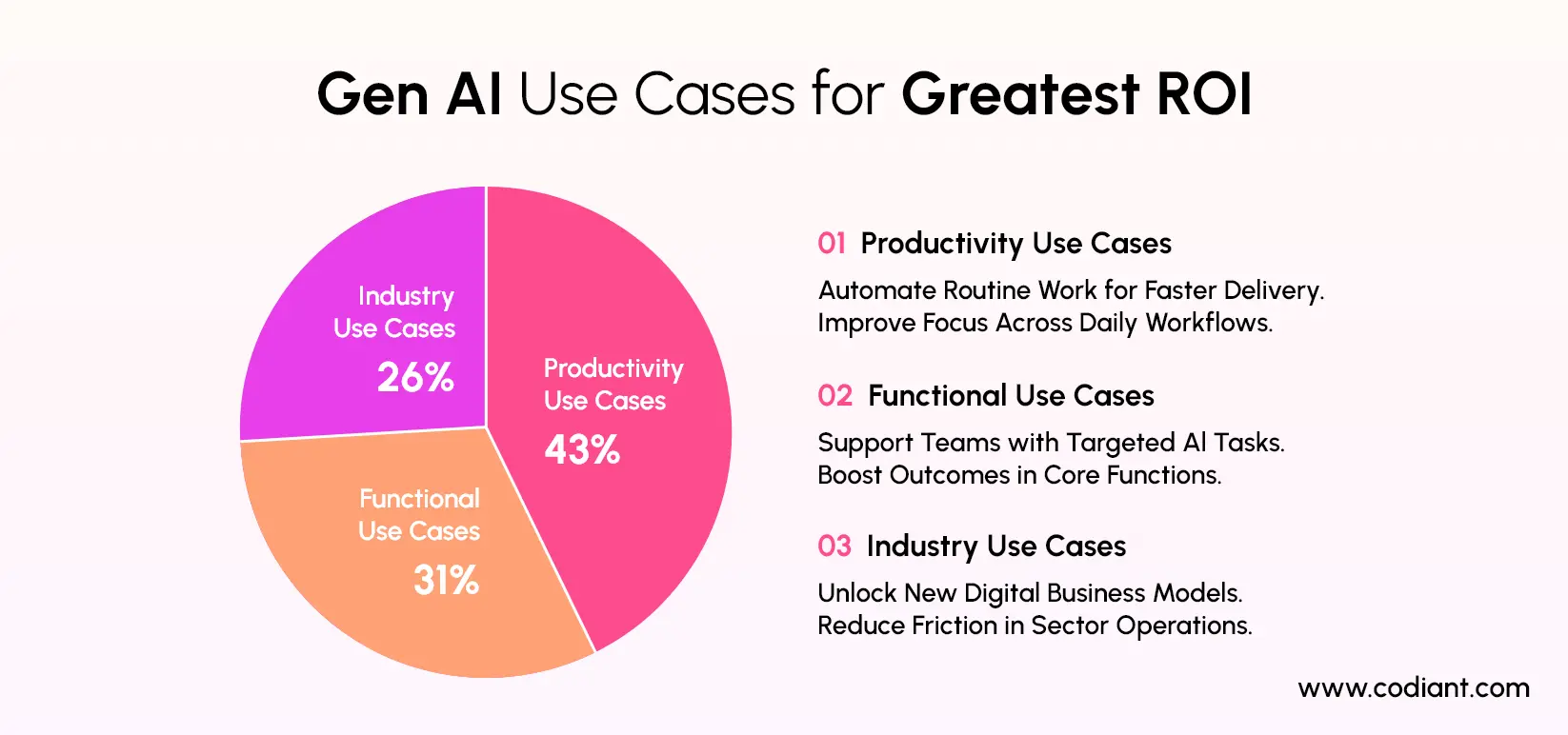
Generative AI applications are being built across industries to automate content-heavy tasks, improve decision-making, personalize user experiences, and reduce manual effort in daily workflows. The most successful generative AI use cases are not generic AI tools. They are purpose-built applications designed around a specific business problem, user role, data source, and workflow.
A generative AI application can work as a medical scribe, product content generator, claims assistant, legal document reviewer, AI tutor, finance reporting assistant, customer support chatbot, recruitment evaluator, marketing content engine, or enterprise knowledge assistant. Each use case depends on the right AI model, data pipeline, security controls, and human review process.
For a beginner-friendly explanation of Generative AI, its working, models, and broad industry use cases, read our guide on What is Generative AI and How Does it Work?
| Use Case | What the App Does | Key Features Needed | Complexity |
| AI Medical Scribe App | Converts doctor-patient conversations into structured notes | Audio capture, transcription, SOAP note generation, review workflow, compliance controls | High |
| AI Product Content Generator | Creates SEO titles, descriptions, tags, and metadata for eCommerce products | Product data import, prompt templates, bulk generation, Shopify integration | Medium |
| AI Customer Support Assistant | Answers customer questions using company knowledge base | RAG pipeline, chatbot UI, escalation flow, ticketing integration | Medium to High |
| AI Legal Document Review Tool | Summarizes contracts and extracts key clauses | Document upload, clause extraction, risk flags, human review | High |
| AI Knowledge Search App | Helps employees find answers from internal documents | Vector database, role-based access, source citation, feedback system | Medium |
Can Small Businesses Build Generative AI Applications?
Yes, but the path is different from enterprise builds. Small businesses should not attempt to build large-scale custom AI software from scratch. The practical approach is:
- Start with a single, focused use case one operational problem, not a platform
- Use API-based foundation models (OpenAI, Anthropic, Google Gemini) rather than self-hosted infrastructure
- Use low-code RAG tools like Flowise, Langflow, or Dify for rapid prototyping
- Partner with a generative AI integration services provider for production builds
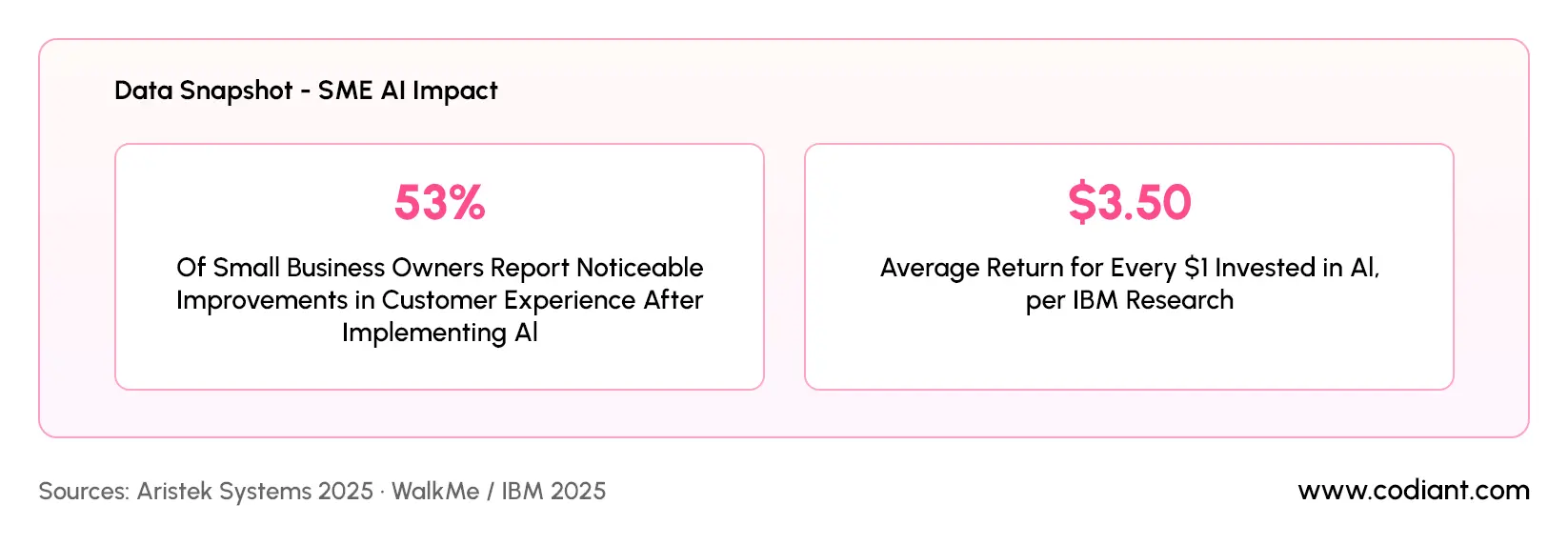
A small business can build a functional AI knowledge assistant for $15,000–$50,000 using API-based models and lightweight vector infrastructure. ROI usually appears within three to six months through support ticket deflection, faster internal onboarding, reduced manual documentation, or quicker access to company knowledge.
Sources: Aristek Systems 2025 · WalkMe / IBM 2025
Future Trends in Generative AI: World Simulation
Generative AI is moving beyond text, images, and code into world simulation. Google DeepMind’s Genie represents this shift. It is a family of generative models designed to create interactive environments where AI agents can understand how actions may change the world around them.
This matters because future AI systems will not only answer questions. They may test actions, predict outcomes, and improve decision-making before real-world execution.
Key future applications include:
- Robotics training in simulated environments
- Self-driving vehicle scenario testing
- Digital twins for factories and warehouses
- Safer testing for autonomous AI agents
- Enterprise workflow simulation before deployment
For businesses, this shows the next phase of generative AI: applications that simulate, reason, and act with stronger real-world context. To explore more upcoming shifts like multimodal AI, AI agents, enterprise copilots, and world simulation, read our detailed guide on generative AI trends in 2026.
How to Choose the Right Generative AI Development Partner
Choosing the right generative AI development partner is important because building a GenAI application is not only about connecting an AI model to an interface. A reliable partner should understand business workflows, data quality, model selection, system integration, security, scalability, and long-term optimization.
The right partner helps you move from an idea to a working application with a clear roadmap, realistic cost planning, and measurable outcomes.
If you are still comparing vendors, this curated list of top generative AI development companies in USA can help you evaluate experienced GenAI partners before making a decision.
1. Check Their Generative AI Development Experience
Start by reviewing whether the company has real experience building generative AI applications, not just basic AI demos. A good partner should understand large language models, prompt engineering, RAG pipelines, vector databases, model evaluation, cloud deployment, and AI application architecture.
They should also be able to explain how different GenAI applications are built, such as AI chatbots solutions, document summarization tools, knowledge search systems, content generation platforms, AI copilots, and workflow automation tools.
2. Evaluate Their Understanding of Your Business Use Case
A strong generative AI partner should not begin with technology first. They should begin with your business problem. Before suggesting models or tools, they should understand your users, workflows, data sources, expected outputs, risk areas, and success metrics.
For example, an AI customer support assistant requires a different approach from an AI medical scribe, legal document review tool, or eCommerce product content generator. The right partner will shape the solution around your actual workflow, not a generic AI template.
3. Review Their Data and Integration Capabilities
Generative AI applications often need access to business data, documents, databases, APIs, CRMs, ERPs, eCommerce platforms, ticketing systems, or internal knowledge bases. Your development partner should know how to prepare, structure, secure, and connect this data properly.
They should also understand when to use RAG, when fine-tuning is required, and how to design secure data retrieval flows. Poor data preparation can lead to inaccurate responses, weak personalization, and unreliable AI outputs.
4. Look for Strong Security and Compliance Practices
Security is one of the most important factors in generative AI app development. The partner should follow secure development practices, role-based access control, data privacy safeguards, API security, audit logging, and responsible AI usage policies.
This becomes even more important for industries such as healthcare, finance, insurance, legal, education, and enterprise operations, where sensitive information and compliance requirements are involved.
5. Assess Their UI/UX and Product Development Skills
A generative AI application must be easy to use, not just technically advanced. The right partner should know how to design user-friendly interfaces, prompt-based workflows, dashboards, review screens, approval flows, and feedback mechanisms.
For example, a document summarization tool should let users upload files, review generated summaries, check sources, edit outputs, and save results. A chatbot should provide clear answers, escalation options, and conversation history. Good UI/UX improves adoption and makes the AI system more practical for real users.
6. Ask About Testing, Evaluation, and Monitoring
Generative AI applications need a different testing approach than traditional software. Your partner should test output quality, hallucination risks, response relevance, data grounding, latency, security, usability, and edge cases.
After deployment, they should also monitor model performance, user feedback, response accuracy, API usage, cost, and system behavior. Continuous monitoring helps improve the application over time and keeps it aligned with business goals.
7. Check Post-Launch Support and Scalability
A reliable development partner should support the application after launch. Generative AI systems need updates, data refreshes, prompt improvements, model upgrades, security reviews, and performance optimization.
As usage grows, the application may need better infrastructure, more integrations, additional user roles, multilingual support, analytics dashboards, or advanced automation features. Choose a partner who can help you scale beyond the first version.
Final Checklist Before Choosing a Partner
Before selecting a generative AI development partner, ask these questions:
- Have they built real generative AI applications before?
- Do they understand RAG, LLMs, prompt engineering, vector databases, and AI architecture?
- Can they connect the AI solution with your existing systems?
- Do they follow strong data security and privacy practices?
- Can they design a user-friendly AI product experience?
- Do they test AI outputs for accuracy, relevance, and safety?
- Do they provide post-launch monitoring and optimization?
- Can they explain cost, timeline, and technical decisions clearly?
The best generative AI development partner is one that understands both technology and business outcomes. They should help you build an application that is useful, secure, scalable, and aligned with real user needs.
How Codiant Can Help Build Generative AI Applications?
Codiant is a leading generative ai development company that builds generative AI applications around defined use cases, structured data pipelines, and measurable workflow outcomes. For enterprise AI development, this means connecting foundation models with business documents, internal systems, APIs, and role-based user interfaces instead of relying on generic chatbot responses.
A generative AI application developed by Codiant can include:
- RAG-based knowledge assistants that retrieve answers from company documents, policies, manuals, and databases.
- AI copilots that support sales, HR, customer service, finance, and operations teams with task-specific assistance.
- Document AI workflows that summarize files, extract structured data, and reduce manual review effort.
- Healthcare, legal, finance, and retail AI solutions designed around industry-specific workflows and compliance needs.
- Enterprise integrations with CRMs, ERPs, cloud platforms, databases, and ticketing systems.
This approach helps businesses move beyond AI experimentation and build production-ready generative AI solutions that improve response accuracy, reduce repetitive work, and support faster decision-making.
Final Thoughts
Building a generative AI application is no longer experimental it’s operational infrastructure for competitive enterprises. But the gap between a demo and a production system that delivers measurable business value is significant.
The teams that succeed treat large language model development as an engineering discipline, not a technology experiment. They define precise use cases, choose architecture based on requirements, measure output quality rigorously, and iterate with discipline.
If you’re evaluating custom generative AI application development for your organization, the starting point isn’t the technology it’s the operational problem you’re solving and the business outcome you’re measuring against.
Get those two things right, and the technical implementation follows.
Move from AI Idea to Production-Ready Application Faster
Build secure, business-ready generative AI solutions powered by RAG, automation, and enterprise integrations.
The Author

Frequently Asked Questions
Building a generative AI application involves seven phases: precise problem definition, data assessment and architecture design, tech stack selection, RAG pipeline or fine-tuning implementation, prompt engineering and guardrail configuration, API and system integration, and production deployment with continuous monitoring. The most common failure point is skipping the discovery and evaluation phases.
Costs range from $20,000–$50,000 for a focused MVP to $500,000–$2M+ for a full enterprise platform with deep system integrations. The primary cost drivers are integration complexity, compliance requirements, custom fine-tuning needs, AI model usage, data preparation, and the location of the development team.
The production-standard generative AI tech stack in 2025 is: Python with LangChain or LlamaIndex for orchestration, Pinecone or Weaviate as the vector database, GPT-4o or Claude 3.5 Sonnet as the foundation model, FastAPI for the API layer, and LangSmith for observability. Python is widely used for AI logic and backend workflows, while TypeScript is commonly used for frontend AI interfaces.
Healthcare (clinical documentation, prior authorisation), legal (contract review, research), financial services (claims triage, underwriting), retail (conversational search), and enterprise operations (internal knowledge assistants, HR automation) are seeing the strongest production ROI from generative AI integration services in 2025.
A focused MVP takes 4–8 weeks. A single use-case production application with system integrations takes 2–4 months. Full enterprise generative AI platforms with multi-system integrations and compliance requirements typically take 8–18 months from discovery to production launch.
Featured Blogs
Read our thoughts and insights on the latest tech and business trends
How to Outsource Mobile App Development? A Comprehensive Guide
- August 7, 2026
- Mobile App Development
To outsource mobile app development successfully, define the product scope, budget range, target platforms, delivery responsibilities, security requirements, and acceptance criteria before evaluating development partners. This preparation helps CTOs, product leaders, and founders compare proposals... Read more
How The 1-Week Free Trial Works When Hiring Full Stack Developers
- August 6, 2026
- Staff Augmentation
A 1-week free trial gives US mid-market CTOs 7 working days to evaluate a full stack developer through real project tasks before confirming a paid engagement. This trial matters when a development roadmap requires immediate... Read more

How Mobile Apps Improve Logistics and Supply Chain Management in Australia?
- July 31, 2026
- Mobile App Development
Mobile apps improve logistics and supply chain management in Australia by digitising five high-friction workflows: dispatch, route planning, driver communication, proof of delivery, and inventory updates. For founders, CEOs, CTOs, CIOs, and operations leaders, that... Read more