How to Choose the Right AI Solutions for Your Existing App
Table of Contents
Subscribe To Our Newsletter
Businesses today are under pressure to move faster, deliver personalized experiences, and operate with greater accuracy. This is why many enterprises and startups are now looking for ways to add AI features to their mobile app or modernize their existing platforms with intelligent automation. AI integration for existing applications means enhancing your current software with capabilities like prediction, personalization, automation, chatbots, smart search, and real-time insights—without rebuilding the entire system.
Legacy apps and traditional rule-based automation often struggle to keep up with changing user expectations. They require manual work, lack personalization, and cannot make data-driven decisions on their own. As competition increases, companies need AI solutions for business apps that can improve performance, reduce effort, and unlock new growth opportunities.
However, choosing the right AI technology is not always easy. With hundreds of models, tools, and frameworks available, teams often struggle to choose the right AI solution for app performance, scalability, and long-term success.
This guide will help you understand how to evaluate AI options, what factors matter before integration, the steps required to enable AI in your app, and how to make the right decision for your product’s future.
A Step-by-Step Framework to Select the Right AI Solution for Your Application
Choosing the right AI solution for your existing app is one of the most important decisions you can make in your modernization journey. Every application has different goals, users, data, and technical constraints. So, the best way to approach AI integration is by analyzing what your app needs today and what you want it to achieve in the future.
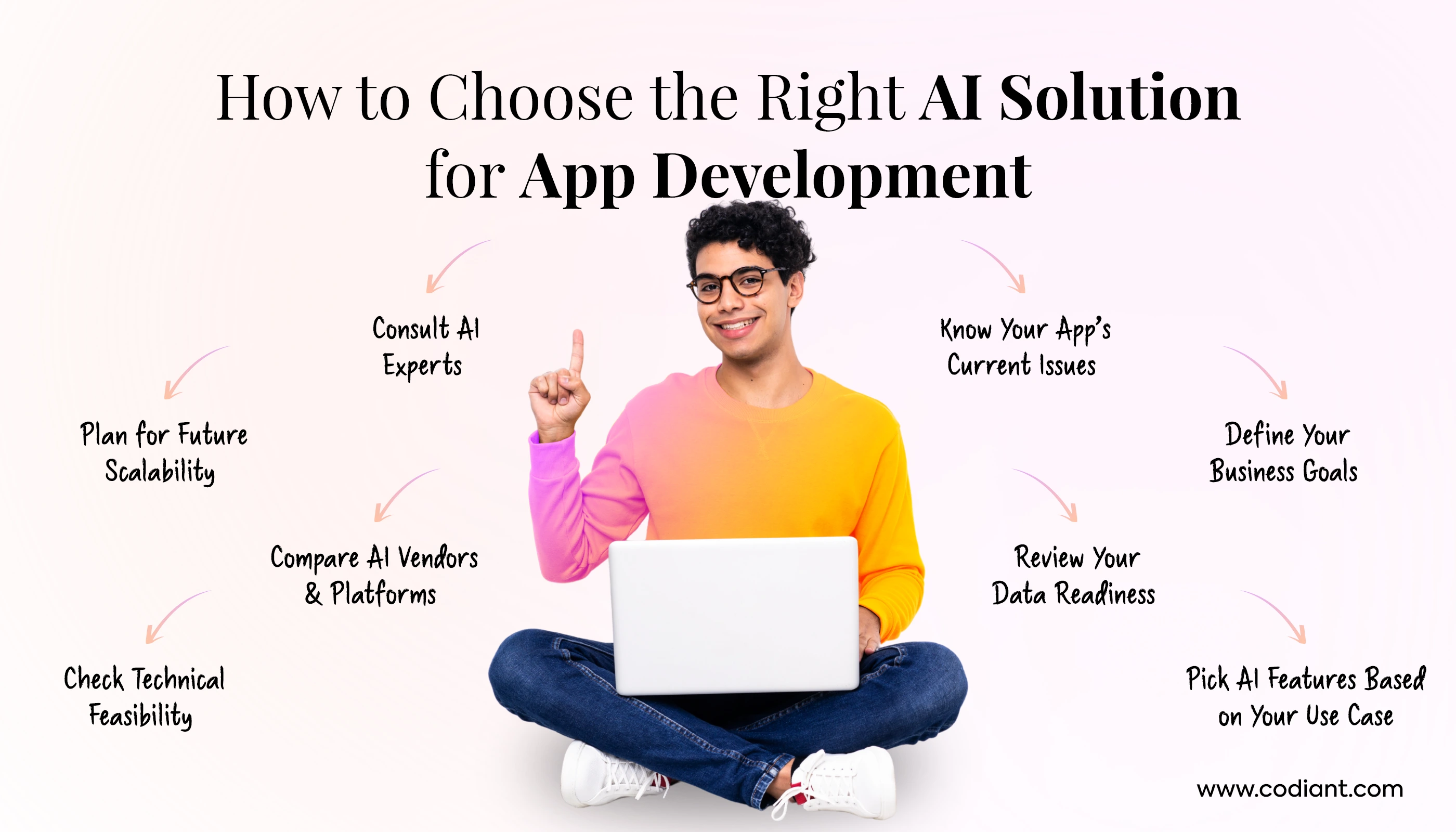
This section explains every major step businesses should follow before they choose the right AI solution for an app—from technical review to vendor selection and long-term scalability planning.
1. Understand Your App’s Current Limitations
Before you begin planning AI integration for existing applications, you must know where your app stands today. A clear assessment helps you avoid compatibility issues, unexpected delays, and unnecessary development costs.
Technical Analysis
Start by reviewing your app’s architecture, APIs, backend frameworks, hosting environment, and third-party integrations. Check if the codebase supports upgrades or if it requires refactoring. AI features like NLP, machine learning integration for apps, or image processing often need high-performing backend systems, so understanding the technical baseline is essential.
Data Readiness
AI systems depend on data. Evaluate whether your app currently collects meaningful data such as user behavior, product interactions, transactions, or support tickets. If your app lacks structured data, you may need a data collection layer before adding AI features to a mobile app or web platform.
Infrastructure Review
Inspect your servers, cloud environment, and storage capacity. Many AI features require scalable GPUs or cloud services for training and inference. If you rely on outdated on-prem infrastructure, it may slow down AI adoption.
Legacy Constraints
Older apps may not support modern tools and SDKs. Legacy systems often need APIs, microservices, or partial re-architecture before they can support AI-driven app optimization. Identify these constraints early to avoid development roadblocks.
2. Be Clear About Business Goals
AI adoption works best when it aligns with business outcomes. Instead of adding AI because competitors are doing it, define what you want to achieve. Clear goals help you determine which AI capability is most suitable.
Reduce Costs
AI-powered automation can replace manual tasks in customer support, data entry, reporting, or scheduling. If reducing operational workload is your goal, solutions like chatbots, AI voice agents, or workflow automation tools make sense.
Personalize Customer Journeys
If you want users to receive personalized feeds, recommendations, or notifications, then recommendation engines, predictive models, and personalization algorithms are the right choice.
Boost Automation
Apps with many repetitive processes—like onboarding steps, approvals, or classification tasks—benefit from AI automation. This helps reduce time-to-service and speeds up business operations.
Increase Retention
Predictive analytics can identify user drop-off patterns and help improve engagement. AI-driven reminders, smart suggestions, and tailored content can create better user experience and retention.
Improve App Performance
AI can optimize load balancing, detect anomalies, improve search accuracy, and enhance decision-making. If you want smoother performance, choose AI features that support intelligent tracking and optimization.
3. Evaluate Your Available Data
Your data decides how well AI performs. Before you choose an AI solution for business apps, review the data your system currently holds and how easily it can be used.
Data Volume
Predictive models require historical data. Recommendation engines need user-item interactions. Chatbots need past conversation records. If you have limited data, choose lighter AI models or pre-built APIs.
Data Quality
AI requires clean, structured, and labeled datasets. Incorrect or incomplete data leads to inaccurate predictions. Check if you need preprocessing or data cleaning before integrating AI into existing systems.
Data Accessibility
If your data is stored in multiple systems or is not accessible through APIs, integration becomes complex. Ensure you can pull data in real time for AI processing.
Data Compliance
If your app handles sensitive data—financial, health, personal, biometric—you must follow regulations like GDPR, HIPAA, or CCPA. Choose AI development solutions that meet your compliance requirements from day one.
4. Choose AI Capabilities Based on Use Case
AI is broad. The right capability depends entirely on what your app needs. Here are some common AI use cases for existing applications:
Recommendation Engines
Ideal for eCommerce, entertainment, fitness, and learning apps. They personalize content, products, or activities based on user behavior.
Chatbots & NLP Assistants
Useful for support-heavy apps. You can integrate text-based bots, voice assistants, multilingual NLP, or FAQ automation.
Predictive Models
Great for forecasting demand, predicting user churn, detecting anomalies, estimating delivery times, or suggesting next steps.
Fraud Detection
For banking, fintech, insurance, and marketplace apps. AI models detect unusual transactions, fake identities, or high-risk behavior.
Vision-Based Automation
Apps with images or documents can use OCR, image classification, object detection, and smart scanning to improve accuracy and speed.
(Include 3–4 more if needed: sentiment analysis, smart search, auto-tagging, AI-powered analytics dashboards.)
Choosing capabilities based on your goals ensures you add AI features to mobile apps that genuinely improve user experience.
5. Evaluate the Feasibility & Integration Complexity
Not every AI capability fits every app. Before committing to development, assess how easily AI can integrate.
APIs
Most AI features—NLP, OCR, recommendations—can be integrated using APIs from platforms like OpenAI, AWS, or Google Cloud. APIs reduce development time and cost.
SDKs
If your AI needs edge computing (e.g., offline face detection), SDKs like CoreML or TensorFlow Lite may be required. Check whether your app supports them.
Backend Compatibility
Ensure your backend frameworks can process AI requests efficiently. Some AI workloads require async processing, queue systems, or microservices.
Cloud Infrastructure
If you plan long-term scalability, choose a cloud-based approach. Cloud platforms offer GPUs, model hosting, logging tools, and scaling capabilities that legacy systems lack.
6. Compare AI Technologies & Vendors
Once you know what kind of AI you need, the next step is selecting the right AI vendor or technology stack. Every platform offers different strengths. Choosing correctly ensures better performance, lower cost, and long-term scalability.
Below is a balanced breakdown.
OpenAI (ChatGPT, GPT-4o, Embeddings, Vision Models)
- Best for conversational AI, text generation, summarization, and reasoning.
- Ideal for chatbots, support assistants, content automation, and AI agents.
- Fast to integrate using APIs.
Use when you need scalable NLP and generative AI without training your own model.
AWS AI & ML Services
Includes SageMaker, Rekognition, Polly, Comprehend, and more.
- Strong for computer vision and predictive analytics.
- Best for enterprise-ready MLOps pipelines.
- Good if your app already uses AWS.
Google Cloud AI
Includes Vertex AI, Vision AI, Translation, and generative models.
- Ideal for speech-to-text, translation, document AI, and intelligent search.
- Strong in multimodal workflows.
Azure Cognitive Services
- Perfect if your app uses Microsoft tools, .NET, or Azure hosting.
- Good for text, vision, speech, and anomaly detection.
Anthropic Claude
- Known for safer, more controlled AI behavior.
- Useful for enterprise-grade conversational AI and reasoning tasks.
Open-Source AI Models (LLaMA, Mistral, Falcon, Gemma)
Choose open-source when:
- You want to run AI on-premise.
- You need full data privacy.
- You want to reduce long-term API cost.
- You want to customize models deeply.
Open-source offers flexibility but requires strong in-house ML capabilities.
Custom AI Model Development
Choose custom models when:
- You have unique use cases.
- You need private data training.
- Off-the-shelf models do not fit your workflows.
Custom AI requires more time and budget but delivers maximum accuracy.
Selecting the right vendor ensures your AI integration for existing applications aligns with your technical and business needs.
7. Check for Scalability & Future Features
AI should not just fix current problems—it should prepare your app for the next 5–7 years. That’s why scalability matters as much as initial performance.
Here’s how to assess future readiness.
Multi-Model Support
Most apps today use more than one AI capability:
- NLP for support
- Vision for automation
- Predictive analytics for retention
- Recommendations for personalization
Choose an AI stack that allows integrating multiple models without major rework.
Model Versioning & Updates
AI models evolve quickly. Your app must allow:
- Updating models without downtime
- Rolling back to older versions
- A/B testing model performance
- Fine-tuning based on new data
This ensures your app stays accurate and up-to-date.
Continuous Learning Pipelines
For AI features that depend on user behavior or trends, continuous learning is essential.
This includes:
- Data pipelines for real-time tracking
- Automated retraining
- Feedback loops
- Performance monitoring dashboards
Without these, AI accuracy drops over time.
Scaling Infrastructure Smoothly
Your AI should scale automatically when traffic increases.
Look for:
- Auto-scaling in AWS/GCP/Azure
- GPU availability
- Load balancers
- Kubernetes or container orchestration
This ensures your app can grow without disruptions.
8. Consult an AI Solution Provider
If you are unsure which AI capability suits your business, consult experts. AI consulting for app development helps you evaluate feasibility, cost, timelines, and expected ROI. A reliable AI solution provider for startups or enterprises can guide you through:
- AI readiness assessment
- Model selection
- Data preparation
- Integration architecture
- Deployment roadmap
- Compliance and security strategy
- Performance monitoring
They ensure your AI upgrade for existing software is smooth, efficient, and aligned with your long-term goals.
Not Sure Which AI Tech Matches Your Use Case?
Let our experts evaluate your app and recommend the ideal AI features, models, and architecture.
When Should You Add AI to Your App? Key Indicators
As user expectations continue to rise, mobile and web apps that rely only on rule-based logic or manual workflows start falling behind. If your current product is facing performance issues, user drop-offs, or operational inefficiencies, it may be the right time to choose the right AI solution for your app.
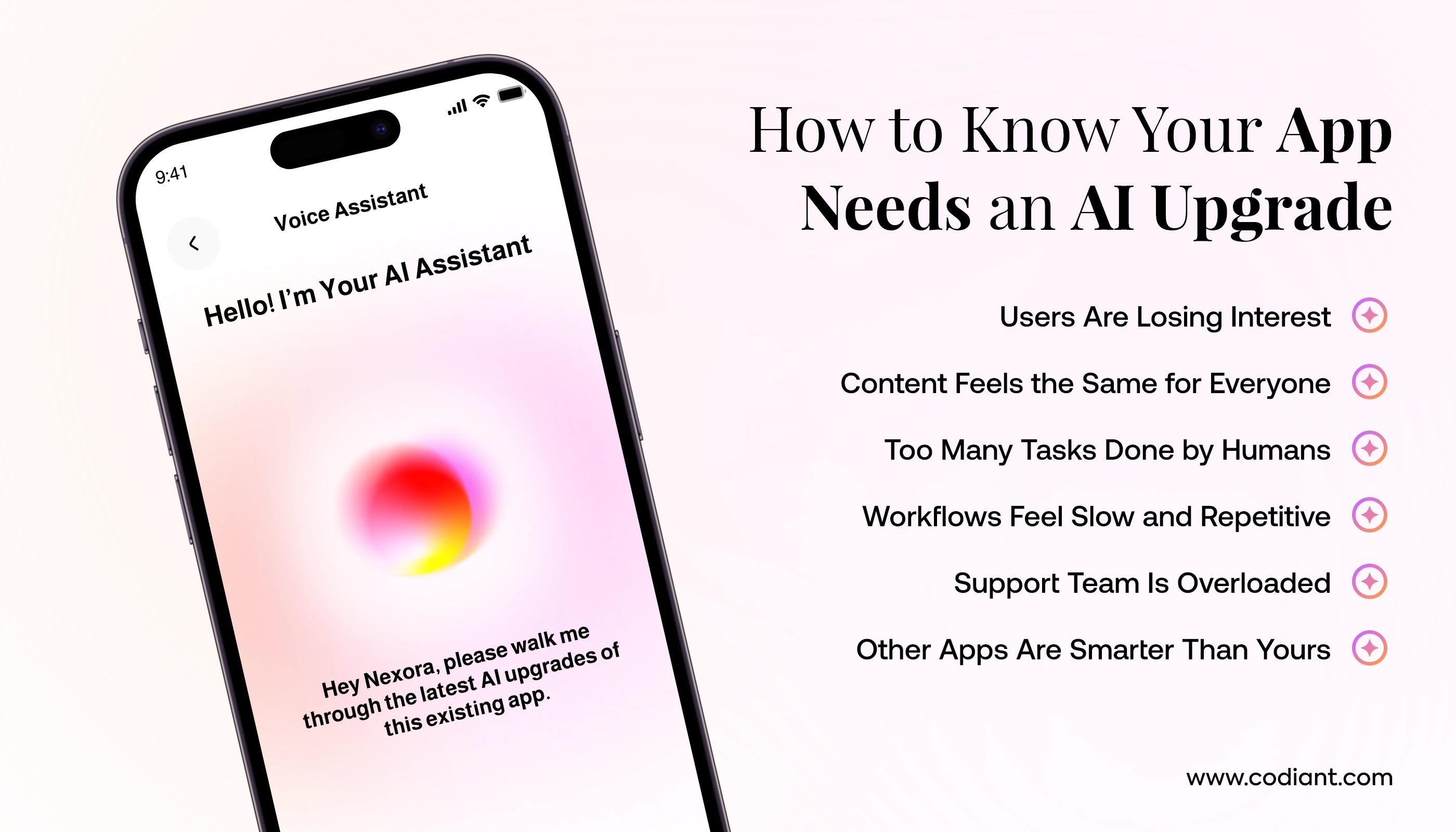
Below are the most common indicators that your platform is ready for an AI upgrade for existing software.
1. User Engagement Is Dropping
If your app is seeing lower session times, declining retention, or fewer returning users, the experience may no longer feel relevant or adaptive. AI-driven recommendations, personalized onboarding, and predictive nudges help re-engage users by understanding their behavior and tailoring content in real time.
2. Personalization Is Weak or Non-Existent
Modern users expect apps to behave intelligently. If your product shows generic content to every user, it’s a strong sign that you need AI integration for existing applications. Machine learning models can personalize feeds, offers, search results, and notifications based on real usage patterns.
3. Teams Still Rely on Manual Decision-Making
When decisions like approvals, categorization, routing, or forecasting still depend on human staff, your operations become slow and error-prone. AI helps automate these decisions by analyzing historical data, detecting patterns, and predicting outcomes. This improves accuracy and reduces operational delays.
4. Your Processes Are Slow and Repetitive
If your app takes too long to process data, generate insights, or respond to users, it’s time to consider app modernization with AI. Intelligent automation eliminates repeated tasks, shortens workflows, and boosts overall system responsiveness.
5. Customer Support Load Is Increasing
Growing ticket volumes, long response times, or repeated queries indicate that your support system needs help. AI chatbots, language models, and smart knowledge bases can handle FAQs, troubleshoot issues, and guide users instantly – freeing your support team to focus on complex cases.
6. Competitors Have Already Adopted AI
If similar apps in your industry have launched AI-powered features – such as recommendations, voice search, conversational support, predictive analytics, or automated workflows – your product risks falling behind. AI is now a competitive advantage and a key part of AI solutions for business apps.
When multiple signs appear together, it’s clear your product has outgrown traditional functionality. By leveraging AI app enhancement services, you prepare your platform for smarter decision-making, real-time personalization, and long-term scalability. This is the right stage to evaluate your system, assess data readiness, and plan the most effective AI upgrade for existing software.
Core AI Solutions Every Business App Needs
AI can be added to an app in many different ways depending on your use case, data availability, and business goals. When choosing the right AI solution for your app, it’s important to first understand the categories of AI technologies available today.
These capabilities help businesses automate workflows, personalize user experiences, improve decisions, and modernize old systems without rebuilding everything from scratch.
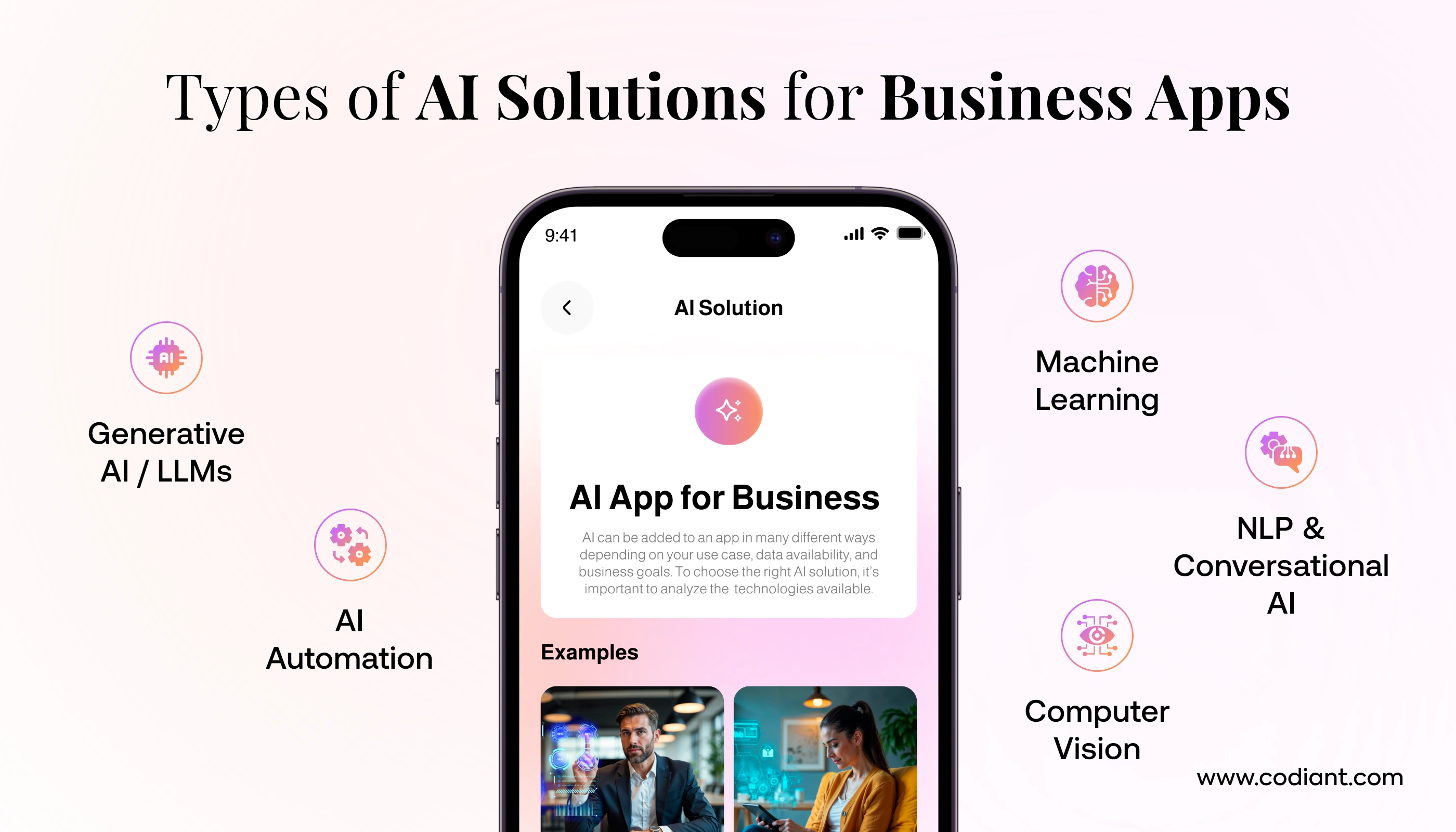
Below are the most common AI solutions used in existing business apps, along with how they enhance performance, scalability, and user engagement.
1. Machine Learning Integration for Apps
Machine learning (ML) is one of the best AI technologies for mobile apps because it allows your system to learn from data and improve performance automatically over time. For businesses with customer, sales, or operational data, ML becomes a high-impact upgrade.
Predictive Analytics
Predictive analytics helps your app forecast user behavior, sales, demand, churn, or future outcomes using historical data. For example, an eCommerce app can predict which users are likely to buy again or which product categories may trend in the next week. This is one of the most commonly used elements of AI integration for existing applications.
Recommendation Models
Recommendation systems provide personalized product, content, or service suggestions. Apps like Netflix, Amazon, and Spotify rely on ML-based recommendations to boost user engagement and conversions.
Forecasting
Forecasting models allow your app to estimate future values such as inventory needs, staffing requirements, or budget plans. This is especially useful for retail, logistics, and SaaS platforms where accurate planning reduces costs.
Anomaly Detection
Anomaly detection models flag unusual patterns in data. Businesses use it to detect fraud, identify suspicious activity, catch operational errors, or find abnormal spikes in usage. It improves security and reliability without needing manual monitoring.
2. NLP & Conversational AI
Natural Language Processing (NLP) helps apps understand and respond to human language. It powers communication-based features that feel more natural and intuitive to users.
Chatbots
AI chatbots handle support queries, bookings, FAQs, or order-related questions instantly. They reduce manual workload and offer 24/7 availability.
Voice Assistants
Voice AI allows users to perform actions using simple speech commands—whether it’s searching items, navigating the app, or requesting information. Voice assistants make apps more accessible and user-friendly.
Sentiment Analysis
Sentiment analysis evaluates user emotions from reviews, chats, feedback, or support tickets. It helps businesses understand customer mood and respond proactively.
Document Understanding
Modern AI solutions now make it easy to extract text, generate summaries, classify documents, and uncover insights from PDFs, forms, contracts, and business reports. These capabilities are especially useful across legal, finance, insurance, and HR workflows—where accuracy and speed matter most. With the rise of legal services AI chatbots, organizations can streamline document handling while improving decision-making and overall efficiency.
FAQ Automation
AI automatically generates answers to common queries, reducing support load and improving response time. This works well for apps that receive repetitive questions daily.
3. Computer Vision Enhancements
Computer Vision (CV) helps apps process and understand images or videos. It brings powerful automation features that previously required manual review or data entry.
OCR (Optical Character Recognition)
OCR extracts text from images, receipts, identity cards, invoices, or handwritten notes. It’s widely used in image to text converter apps, fintech, HR, education, and expense management apps.
Image Processing
AI can clean, classify, enhance, or label images automatically. For example, a real estate app can auto-enhance property photos or categorize them by room type.
Visual Search
Visual search lets users upload a photo and find similar items. This is popular in retail, fashion, and lifestyle apps where product discovery matters.
Object/Face Recognition
Used for authentication, surveillance, attendance systems, or safety applications. It adds an extra layer of security and intelligence to existing software.
4. AI Automation & Intelligent Workflows
AI can simplify and automate repetitive processes that consume time and resources.
Workflow Automation
Apps can automate backend tasks like assigning tickets, sorting requests, approving actions, or generating reports. This reduces manual work and speeds up operations.
RPA + AI
Robotic Process Automation (RPA) combined with AI handles rule-based processes such as invoice validation, form submissions, data transfers, and compliance checks. It’s ideal for businesses that still depend on spreadsheets or legacy systems.
Auto-Tagging & Summarization
AI can automatically tag documents, categorize images, or summarize long content—making information easier to manage and search.
5. GenAI & LLM Capabilities
Generative AI and Large Language Models (LLMs) are the latest and most impactful upgrades in modern apps. These technologies create new text, images, or actions, making the app significantly smarter and more efficient.
Content Generation
AI can generate product descriptions, emails, messages, reports, and marketing copy instantly. This saves hours of manual writing and ensures consistency.
Personalization
LLMs can analyze user behavior and personalize app experiences in real time—showing tailored recommendations, notifications, or content.
Code Assistants
Apps designed for developers can use AI to generate code, debug errors, or suggest improvements.
AI Agents for Customer Service
AI agents can hold human-like conversations, resolve issues, escalate complex cases, and perform actions autonomously—offering a powerful upgrade to traditional chatbots.
By choosing the right combination of these AI solutions, businesses can modernize their apps, improve performance, and deliver high-quality experiences without complete redevelopment. These categories represent the best AI technologies for mobile apps today and form the core of successful AI integration for existing applications.
Step-by-Step Guide: How to Integrate AI into Existing Systems
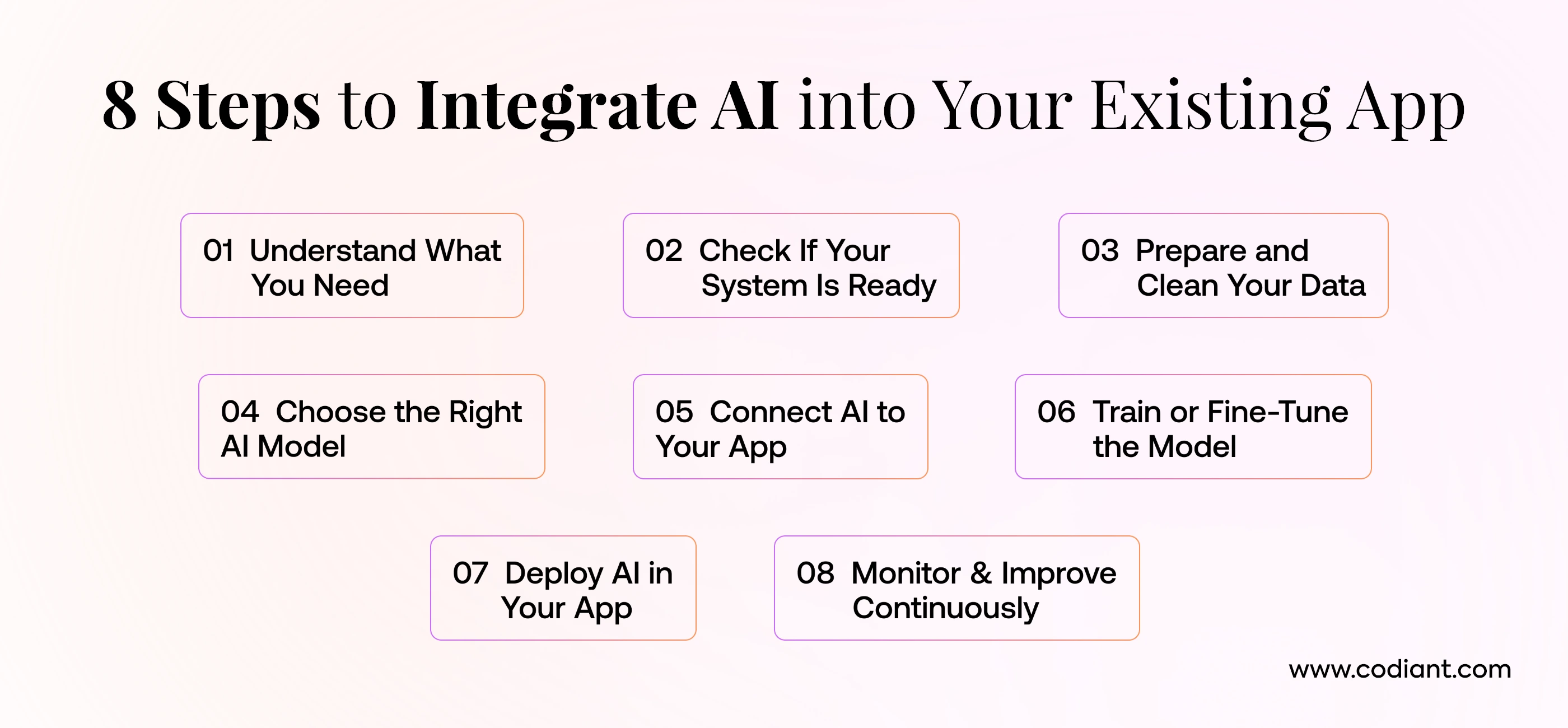
Integrating AI into an existing application is not a one-day activity. It requires a structured plan, a clear understanding of your system, and a step-by-step workflow that ensures the AI solution fits smoothly into your current architecture. Below is a practical guide that explains each stage in simple terms. These are the essential steps to enable AI in your app and ensure everything works reliably after integration.
Step 1: Requirement Analysis
The first step is understanding why you want AI in your app. This involves gathering business needs, technical needs, and user expectations. During this stage, you identify the main problem you want to solve and decide what kind of AI capability aligns with it. For example:
- Do you want to add personalized recommendations?
- Do you want a chatbot to reduce support load?
- Do you want predictive insights for better decision-making?
- Do you want automation to reduce manual work?
You also need to define how success will be measured—whether through reduced costs, improved conversions, higher engagement, faster workflows, or better user experience. A well-defined requirement analysis helps you avoid unnecessary features and choose the right direction from day one.
Step 2: AI Readiness Assessment
Once you know the goals, the next part is checking how ready your current system is for AI. This stage covers:
- Infrastructure readiness: Can your current backend support AI workloads?
- API compatibility: Can external or custom AI models connect with your system?
- Cloud readiness: Are you using AWS, Azure, or GCP for scalable AI processing?
- Codebase quality: Is your app built on a modern tech stack or a legacy one?
AI models require memory, compute power, and real-time data. If your system is old or unoptimized, you might need minor modernization before integrating AI. This stage makes sure your system can handle the added intelligence without performance issues.
Step 3: Data Preparation & Cleansing
AI models depend heavily on the quality of the data they receive. This is why data preparation is one of the most crucial stages. It includes:
- Collecting existing data from your app (user actions, behavior patterns, transactions, searches, support tickets, etc.).
- Cleaning and removing duplicates, errors, or incomplete items.
- Structuring the data in a format that an AI model can understand.
- Enriching the data when necessary using external sources or synthetic data.
If the data is unorganized or inconsistent, AI accuracy drops. Proper preparation ensures the model makes correct predictions, responses, and recommendations once live.
Step 4: Choose the Right AI Model/Technology
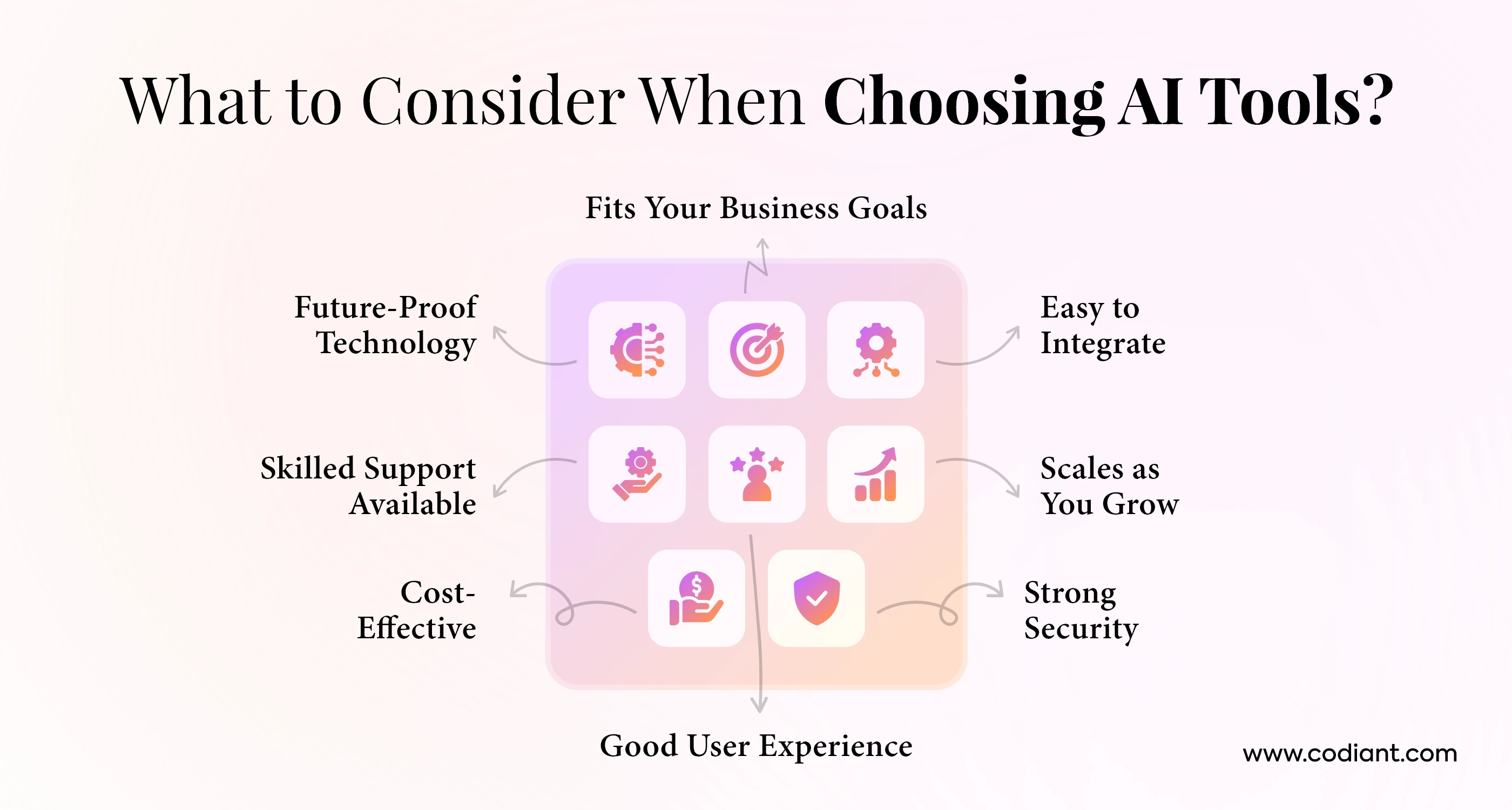
This step helps you determine what type of AI will best fit your needs. Options include:
- Pre-built APIs or LLMs (OpenAI, Google Gemini, AWS Bedrock)
- Custom ML models built specifically for your use case
- Open-source models (Llama 3, Whisper, Rasa, spaCy, YOLO, etc.)
- Industry-specific models for healthcare, finance, retail, logistics, etc.
Different projects require different approaches. If you want quick results with lower cost, pre-built AI models are ideal. But if you need something unique or highly secure, customized models are better.
You also decide the type of model based on your use case—NLP, computer vision, predictive analytics, recommendation engines, or generative AI. This choice becomes the core foundation of your AI upgrade.
Step 5: Build or Integrate AI APIs
Once the AI model is selected, the next task is connecting it to your existing app. This can be done in two ways:
- Integration using ready-made AI APIs
These APIs handle complex AI processing on the cloud. You only need to send data and receive results. - Building custom AI modules
These are developed and trained in-house, then connected to your app through internal endpoints.
During this stage, developers work on:
- API authentication
- Routing and data flow
- Backend logic adjustments
- Request/response structure
- Latency optimization
This ensures the model communicates smoothly with your app and returns results in real time.
Step 6: Model Training or Fine-Tuning
If you use a pre-trained model, fine-tuning helps it understand your business better. If you build a model from scratch, the training stage teaches the model how to behave.
Training or fine-tuning includes:
- Feeding labeled data
- Setting parameters
- Running iterations to refine accuracy
- Testing predictions
- Improving the model performance
Examples:
- A chatbot learns from previous conversations.
- A recommendation engine learns from user behavior.
- A fraud detection model learns from past transactions.
This step ensures the AI becomes more relevant to your app and delivers accurate output.
Step 7: Deploy AI into the App Architecture
Deployment means pushing the AI feature into the real environment where your users can interact with it. Deployment planning includes:
- Updating backend services
- Creating new APIs or microservices
- Adding necessary caching layers
- Ensuring compatibility with mobile and web frontends
- Managing GPU or cloud-based compute requirements
- Implementing security and compliance checks
AI might run on the cloud, on your server, or in a hybrid setup. The deployment strategy ensures your app stays stable, secure, and fast even with new AI workloads.
Step 8: Monitor, Optimize & Scale
AI systems improve over time, but only if they are continuously monitored. Once deployed, you need to track:
- App performance after AI integration
- Accuracy of predictions or responses
- Errors, latency issues, or incorrect outputs
- User interactions with AI features
- Storage and compute usage
- Cost per request
- Model drift over time
Based on real-world usage, developers optimize the AI model to improve accuracy, reduce costs, and boost performance. When your app grows, you can also scale the AI to handle more traffic, add new AI features, or integrate multi-model pipelines.
Planning to Add AI Power to Your Existing App?
Transform your current platform with intelligent automation, smarter predictions, and personalized user experiences built for real impact.
Essential AI Features to Upgrade Your Existing App
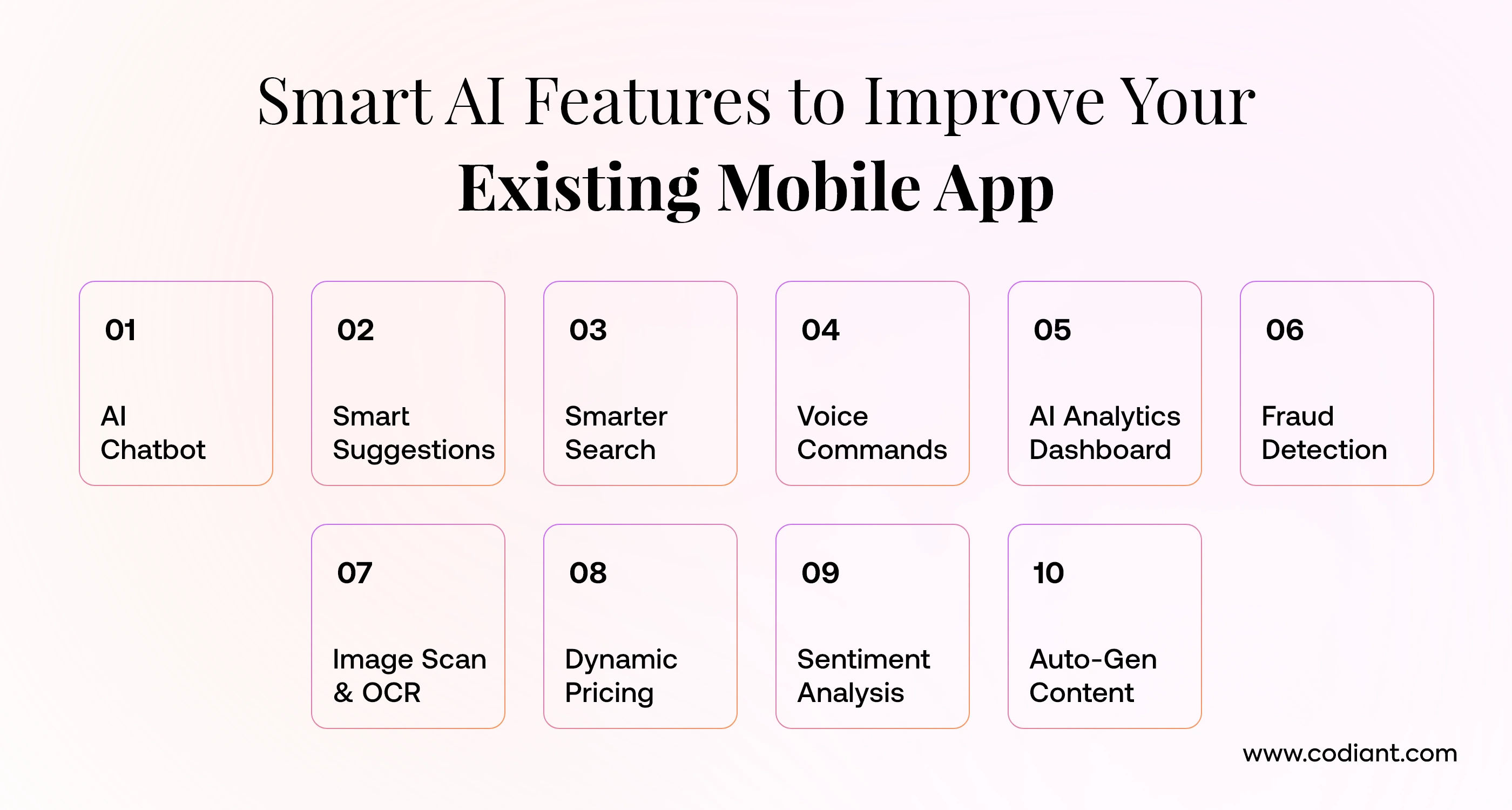
When businesses plan an AI upgrade for existing software, the first step is choosing the right features that deliver immediate value.
Today, AI capabilities are not limited to large enterprises – any mobile or web app can be enhanced with powerful automation, personalization, and intelligence.
Below are some of the most commonly added AI features that help modernize business apps, improve user experience, and strengthen operational efficiency. These capabilities are also widely included in AI app enhancement services used by startups and enterprises.
1. ChatGPT-Powered Chatbot
A conversational AI chatbot is one of the easiest and fastest features to integrate into an existing app. It helps handle customer queries, answer FAQs, process requests, and guide users without human involvement.
Unlike traditional rule-based chatbots, a ChatGPT-powered assistant understands context, remembers previous messages, and provides natural, human-like responses.
Businesses use it to reduce support workload, speed up response times, and improve customer satisfaction. It can also assist with product discovery, transactions, and after-sales support, making it a highly practical AI addition.
2. Recommendation Engines
Recommendation engines help personalize user experiences by suggesting relevant products, services, courses, or content.
They analyze user behavior, previous purchases, browsing patterns, and interests to make intelligent suggestions. This AI feature is widely used in eCommerce, OTT platforms, education apps, and online marketplaces.
By delivering personalized experiences, businesses can boost conversions, improve retention, and increase overall engagement without changing the core app structure.
3. Smart Search
Traditional search relies on exact keywords and often fails when users type incomplete queries or misspell words. Smart search uses AI to understand intent, context, and semantic meaning.
It returns more accurate results, improves product discovery, and makes navigation smoother. Features like auto-suggestions, voice search, and filtered results enhance the overall experience, especially for apps with large inventories or content libraries.
4. Voice Commands
Voice commands allow users to interact with your app hands-free. This is useful for fitness apps, productivity tools, travel apps, and home-service platforms.
Voice AI can perform tasks like booking an appointment, playing content, filling forms, or searching information. It’s especially helpful for accessibility, reducing friction, and enhancing multitasking.
Integrating voice features also positions your app for the growing trend of conversational interfaces.
5. AI Analytics Dashboards
AI-powered dashboards help businesses understand user behavior, detect trends, and make data-driven decisions.
Instead of relying only on manual analytics, AI systems automatically highlight patterns, predict outcomes, and identify key insights.
These dashboards can show forecasted revenue, churn risk, peak engagement periods, and common user journeys. They turn raw data into actionable information that helps product owners improve features and optimize performance.
6. Fraud Detection
Fraud detection is essential for apps handling payments, bookings, identity verification, or sensitive data. AI systems analyze real-time patterns and flag suspicious activity much faster than manual checks.
They detect unusual logins, fake profiles, duplicate accounts, invalid transactions, and risky user behavior. Adding AI-driven fraud monitoring protects revenue, reduces chargebacks, and strengthens user trust.
7. Image Scanning & OCR
Image scanning and Optical Character Recognition (OCR) are powerful features for apps that deal with documents, receipts, IDs, or packaging labels. Users can upload an image and AI extracts meaningful information automatically.
This is widely used in expense management apps, logistics, healthcare, and automotive services. It eliminates manual data entry, speeds up verification, and improves accuracy.
8. Dynamic Pricing
Dynamic pricing uses AI to adjust prices based on demand, seasonality, user behavior, and market trends. It is commonly used in travel, eCommerce, food delivery, and real estate platforms.
AI ensures pricing stays competitive while maximizing revenue. Businesses can set rules, monitor profit margins, and automate pricing strategies without manual intervention.
9. Sentiment Analysis
Sentiment analysis helps businesses understand how users feel about their products, services, or support interactions.
AI can analyze reviews, messages, surveys, and social comments to categorize opinions as positive, negative, or neutral.
This gives product teams real-time insights into customer satisfaction, common complaints, and opportunities for improvement.
10. Auto-Generated Content
AI can generate product descriptions, emails, notifications, marketing messages, social media captions, and onboarding copy automatically.
This is useful for apps with high-volume content requirements. It keeps content consistent, fast, and personalized.
Auto-generated content also helps reduce manual workload for teams and speeds up publishing cycles.
How AI Improves Performance of Mobile & Web Apps
AI is no longer just an advanced add-on feature. It has become a practical way to boost the performance, reliability, and user experience of mobile and web applications.
When used correctly, AI-driven app optimization helps apps run faster, respond smarter, and deliver more value to users – without redesigning the entire system.
Here’s how AI improves performance across different layers of an existing digital product.
1. AI reduces load time by predicting user actions and caching content more intelligently.
Traditional caching works with fixed rules, but AI-powered caching studies user behavior, frequently visited screens, and recurring patterns.
For example, if your analytics show that users often open the “Recommended Items” or “Recent Orders” page, AI can pre-load and cache this content before the user taps anything.
This leads to noticeably faster loading speeds, lower server stress, and a smoother browsing experience—especially for eCommerce, streaming, or content-heavy apps.
2. AI cuts down manual tasks that slow down workflows.
Many apps still rely on manual input for tasks like data entry, categorization, verification, or content updates.
AI automates these repetitive backend tasks through OCR, NLP, and recommendation algorithms.
This reduces human intervention, minimizes errors, and improves operational speed. In customer-facing apps, AI-based auto-fill, smart search, and virtual assistants also reduce friction and help users’ complete tasks faster.
3. AI enhances smart automation to streamline business processes.
Service-based apps – such as home services, logistics, healthcare, or travel – benefit the most from AI automation.
Instead of routing tasks manually, AI assigns jobs dynamically based on availability, proximity, performance history, and skill. Similarly, support requests can be handled by AI chatbots before reaching a human agent.
This leads to faster response times, reduced workload on staff, and higher overall productivity.
4. AI predicts user behavior to personalize experiences instantly.
Predictive analytics is one of the biggest drivers of app performance. AI studies user journeys, purchase patterns, previous clicks, and contextual data to show highly relevant content.
Personalizing home screens, product lists, notifications, and recommendations keeps users engaged, reduces drop-offs, and increases session depth.
It also prevents server overload by delivering only what users are likely to need at that moment.
5. AI improves decision-making by delivering insights in real time.
Apps that rely heavily on dynamic data – pricing, stock levels, wait times, routing, or engagement metrics can benefit from AI’s real-time decision-making. Instead of waiting for manual updates or daily reports, AI engines adjust outputs instantly.
This results in quicker actions, more accurate results, and a seamless experience for both users and admins.
6. AI elevates user experience by making apps feel more responsive and intuitive.
Smarter search, voice input, auto-recommendations, image recognition, and intelligent navigation reduce friction across the user journey.
Features like typo correction, contextual suggestions, and location-based personalization make the app easier to use and more enjoyable.
Overall, AI improves app performance by making interactions faster, responses smarter, and processes more efficient.
With the right strategy, AI-driven app optimization turns an ordinary app into a high-performing, intelligent product that adapts to every user’s needs in real time.
How long does it take to integrate AI solutions into an existing platform?
AI integration isn’t a one-size-fits-all process. The timeline depends on what kind of AI feature you want, how your current app is built, and how much clean data you already have. But in most cases, the time required fits into three clear buckets:
1. Simple AI Add-Ons (1–2 weeks)
If you’re just adding a basic AI layer like a chatbot, FAQ assistant, sentiment analyzer, or a simple recommendation engine – the work is fairly quick.
These usually rely on plug-and-play APIs or pre-trained models, so your team mostly focuses on integration, testing, and UI adjustments.
Use cases:
- ChatGPT-style support bot
- FAQ automation
- AI-generated replies
- Basic product recommendations
2. Machine Learning Features (3–6 weeks)
ML features take longer because they require data preparation, model training, and multiple accuracy tests.
This is ideal when you want your AI to make predictions, detect patterns, or personalize content based on user behavior.
Use cases:
- Predictive analytics
- Fraud detection
- Dynamic personalization
- Forecasting models
3. Advanced AI Systems (2–3 months)
Complex AI solutions need deeper system changes. These projects include custom models, GenAI, advanced workflows, multi-step automation, and integrations that require new backend logic or cloud setup.
Use cases:
- AI agents
- Custom LLM-based features
- Computer vision pipelines
- Large-scale recommendation engines
- End-to-end AI automation
In Short:
- Simple AI: 1–2 weeks
- ML Features: 3–6 weeks
- Advanced AI: 2–3 months
Your exact timeline will always depend on the app’s architecture, data quality, and the complexity of the AI capability you want to build.
Real-World Examples of Successful AI App Modernization
AI modernization is not limited to big tech companies. Businesses in almost every sector are updating their existing apps with AI to improve efficiency, reduce manual work, and deliver better user experiences.
Here are six clear examples from major industries.
1. eCommerce: Smarter Product Discovery & Personalized Shopping
An eCommerce marketplace upgraded its older mobile app by adding an AI-powered recommendation engine. The system analyzed user behavior, past purchases, and browsing patterns to show personalized products.
They also added visual search, allowing shoppers to upload a picture and find similar products instantly. After the upgrade, product discovery became faster, abandoned carts dropped, and overall conversions increased by nearly 20%.
2. FinTech: Fraud Detection & Intelligent Transaction Monitoring
A digital wallet app integrated machine learning models into its existing payment system to detect unusual or high-risk transactions.
The AI system scanned thousands of data points in real time — such as location, spending history, and device fingerprint — to flag suspicious activity. This reduced fraudulent transactions by up to 60% and helped the app build stronger user trust without changing its core interface.
3. Healthcare: Automated Medical Notes & Patient Insights
A telemedicine company modernized its consultation app using NLP-based transcription. Instead of manually writing medical notes, doctors used AI to convert live conversations into structured summaries.
The app also used predictive models to highlight health risks based on patient history. This upgrade saved doctors several hours each week, reduced paperwork errors, and improved the quality of remote consultations.
4. Travel & Hospitality: Real-Time Itinerary Assistance
A travel booking platform added an AI travel assistant to its existing app. Users could ask questions, check flight delays, get recommendations, and plan itineraries using a chatbot powered by large language models.
The assistant monitored real-time data like weather, location, and airline updates. This resulted in higher repeat bookings, faster customer support response, and fewer abandoned journeys.
5. Logistics: Route Optimization & Predictive Delivery Estimates
A logistics delivery app modernized its operations with AI-driven routing. Machine learning models analyzed traffic, distance, vehicle capacity, and delivery urgency to find the fastest route for drivers.
The app also offered predictive ETAs based on past delivery patterns. These upgrades reduced fuel costs, improved on-time delivery rates, and helped logistics teams manage larger delivery volumes without hiring more staff.
6. SaaS Startup: Smart Automation for User Workflows
A SaaS productivity tool integrated AI automation into its existing workflow dashboard. Users could generate reports, summarize long documents, categorize tasks, and automate notifications using AI instead of manual inputs.
The upgrade also included personalized suggestions based on user activity. This significantly improved adoption, reduced churn, and positioned the startup as a more advanced alternative to competitors.
How to Choose Right AI Development Partner?
Finding the right AI-powered app development company is just as important as choosing the right AI technology.
The partner you select will determine how smoothly the integration happens, how scalable the solution becomes, and how quickly your business sees real ROI. Here are the key factors you should evaluate before making a decision.
1. Proven Portfolio
Start by reviewing the company’s past AI projects. A strong portfolio should include AI chatbots, recommendation systems, predictive analytics, NLP-driven apps, automation solutions, or GenAI features. This shows they can handle real-world complexity and build solutions that work at scale. Look for case studies that demonstrate measurable results.
2. Strong AI & ML Expertise
Your partner must have hands-on experience with machine learning, computer vision, NLP, LLM-based tools, and AI agents. They should be comfortable working with both cloud AI services (AWS, Google, Azure) and custom model development. The goal is to work with a team that understands not just the technology but the business value behind it.
3. End-to-End Capability
AI integration is not just building a model; it includes research, data preparation, development, deployment, optimization, and maintenance. Choose a partner that can manage the full lifecycle—so you don’t have to coordinate between multiple vendors.
4. Cloud & Infrastructure Strength
AI requires strong cloud architecture. Your partner should have experience with scalable cloud setups, GPU-based model training, API orchestration, and secure deployment. This ensures your AI features run fast, reliably, and without bottlenecks.
5. Compliance & Security Knowledge
If your app handles sensitive data, make sure the company is well-versed in GDPR, CCPA, HIPAA (for healthcare), and SOC 2 practices. Compliance must be built into the architecture from day one—not added later as a fix.
6. Transparent Pricing & Cost Control
AI development can get expensive if not managed well. Look for a team that provides clear cost breakdowns, model usage estimates, and guidance on optimizing token/API costs. Predictability in pricing is crucial.
7. Long-Term Support & Maintenance Models
AI models evolve, and your systems must evolve with them. A reliable partner should offer continuous monitoring, retraining, updates, and scaling support to keep your app competitive.
Why Codiant is a Strong Fit?
Codiant checks all these boxes with a dedicated AI engineering team, a proven portfolio across industries, and deep expertise in ML, NLP, cloud AI, and GenAI integrations.
As a full-stack AI-powered app development company, Codiant delivers end-to-end solutions from strategy to deployment to long-term optimization – helping startups and enterprises modernize their apps with confidence.
Conclusion
Choosing the right AI solution for your existing app is not just a technical decision – it’s a strategic move that directly impacts user experience, operational efficiency, and long-term growth.
The key is to focus on what your app truly needs instead of adding AI for the sake of trends. Start by identifying problems you want to solve, understanding your data readiness, and evaluating which AI capabilities align with your business goals.
From improving personalization to automating workflows, AI can strengthen both the performance and value of your product when implemented correctly.
Working with the right AI development partner also matters. A trusted team helps you analyze your current system, select suitable technologies, integrate models smoothly, and ensure security and scalability.
When all these elements come together, AI becomes a powerful upgrade that modernizes your product and prepares it for the future.
Turn Your App Into an AI-Ready Product.
If you’re planning your next upgrade, we can help you map the right AI features that actually make an impact.
The Author

Frequently Asked Questions
Start by knowing what problem you want to solve. If you need chat support, choose NLP. If you need predictions, choose machine learning. If your app needs image understanding, choose computer vision. Pick the technology that fits your goal, your data, and your app’s current structure.
You should check your business goal, data quality, and app backend. Make sure you have enough data, your system can support AI, and your use case is clear. Also consider cost, security, and how much time the integration will take.
AI can make your app faster, smarter, and more personalized. It can automate manual work, show better recommendations, improve search, detect issues early, and help users get what they need quicker. This leads to better performance and user satisfaction.
Popular AI features include chatbots, recommendations, smart search, voice assistants, document scanning, fraud detection, sentiment analysis, and predictive analytics. These features make the app more helpful and efficient.
You can add AI by choosing a use case, preparing your data, selecting the right AI tool or API, and integrating it into your backend. You can use ready-made services like OpenAI, AWS, or Google Cloud, or work with an AI development company for custom solutions.
Yes. AI makes your product smarter by helping it learn from data, make suggestions, automate tasks, and understand users better. It upgrades your app without changing its core features.
Featured Blogs
Read our thoughts and insights on the latest tech and business trends
Top 15 AI Application Development Companies in the USA in 2026
- April 13, 2026
- Artificial Intelligence
In a Nutshell AI is transforming how modern applications are designed and delivered. Businesses are actively investing in AI-driven digital transformation strategies. Choosing the right AI development partner is critical for success. US-based companies offer... Read more
Hire Dedicated AI Engineers- Cut AI Development Costs by 45%
- April 10, 2026
- Staff Augmentation
In a Nutshell Hiring dedicated AI engineers significantly reduces development costs and timelines. Offshore teams provide global talent access without high local salary costs. Dedicated AI teams eliminate long hiring cycles and recruitment overhead. No... Read more
How to Hire the Right Healthcare Software Development Company – Complete Guide
- April 8, 2026
- Healthcare
In a Nutshell Choosing the right healthcare software partner ensures long-term success outcomes. Healthcare software requires domain expertise, compliance knowledge and technical capabilities. Always prioritize HIPAA compliant software development for secure patient data. Evaluate company... Read more