AI Browser Agents Development: Steps, Costs, and Key Challenges
Table of Contents
Subscribe To Our Newsletter
Summarize with AI
Not enough time? get the key points instantly.
AI browser agent development is the process of building intelligent systems that can understand user goals, navigate websites, interact with page elements, and complete multi-step web tasks. A production-ready browser agent combines AI reasoning with browser control, task planning, memory, validation, permissions, security safeguards, and human approval.
Enterprise interest in action-oriented AI is already moving beyond early experimentation. McKinsey’s 2025 State of AI global survey found that 23% of respondents said their organizations were scaling an agentic AI system in at least one business function, while another 39% had begun experimenting with AI agents.
At Codiant, we’ve been building agentic AI systems for clients automating high-friction web workflows, and this breakdown covers exactly that: the development process, realistic cost ranges, and the engineering challenges that decide whether a browser agent performs in production or just in a demo.
Key Takeaways
- AI browser agents interpret goals and perform actions on websites.
- They combine AI reasoning with browser automation and validation tools.
- Common uses include research, data entry, testing and workflow automation.
- Production systems require permissions, monitoring and human approval controls.
- Development cost depends on workflow complexity, integrations and security requirements.
- Dynamic interfaces and prompt injection remain major development challenges.
- Browser agents should be tested for safety, not only task completion.
- High-impact actions should never run without appropriate confirmation.
What Are AI Browser Agents?
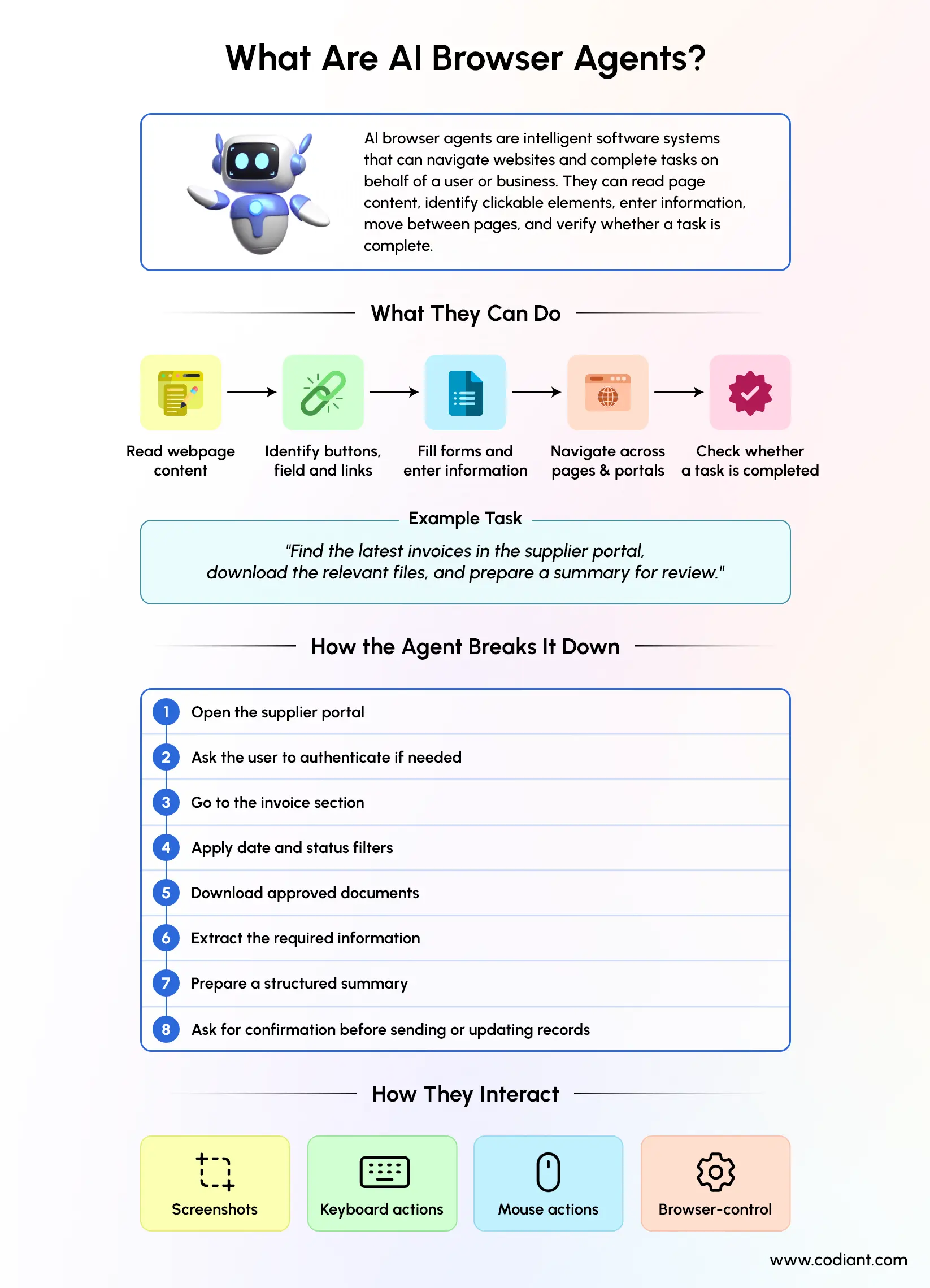
AI browser agents are software systems that use artificial intelligence to navigate and interact with websites on behalf of a user or business. They can read page content, identify interactive elements, select actions, enter information, move between pages and verify whether a task has been completed.
A typical instruction might be:
“Find the latest invoices in the supplier portal, download the relevant files and prepare a summary for review.”
An AI-powered web agent may divide this goal into smaller steps:
- Open the supplier portal.
- Ask the user to complete authentication when required.
- Navigate to the invoice section.
- Apply the required date and status filters.
- Download approved documents.
- Extract the requested information.
- Prepare a structured summary.
- Ask for confirmation before sending or updating records.
Computer-use systems can interact with graphical user interfaces through screenshots, keyboard actions, mouse actions, or custom browser-control tools. Official computer-use guidance recommends running these systems in isolated browsers or virtual machines, treating website content as untrusted and keeping users involved in high-impact decisions.
Move Beyond Scripts with Reliable AI Browser Automation Solutions Today
Design agents that navigate websites, validate actions, and support employees with greater accuracy safely.
How Are AI Browser Agents Different From Traditional Browser Automation?
Traditional browser automation follows predefined instructions, while AI browser agents can interpret goals and adapt their actions according to the page state.
A conventional script may be programmed to:
- Open a specific URL
- Locate an element with a fixed selector
- Enter predefined information
- Click a known button
- Download a file
This approach works well when the website structure and workflow remain stable. However, the automation may fail when an element name changes, a pop-up appears, the order of steps shifts, or the page presents an unexpected condition.
An AI web automation agent adds a reasoning layer. It can observe the current environment, compare it with the intended goal, choose an action, review the result and adjust its next step.
This distinction becomes clearer when comparing AI, generative AI, and agentic AI: traditional AI primarily analyzes or predicts, generative AI creates new outputs, and agentic AI plans and executes multi-step actions across connected tools.
Traditional Browser Automation vs AI Browser Automation
| Comparison Factor | Traditional Browser Automation | AI Browser Automation |
| Instruction method | Uses predefined rules, scripts, and selectors | Interprets natural-language goals |
| Workflow | Follows a fixed sequence of actions | Adjusts actions according to the current page |
| Page understanding | Relies mainly on predefined page elements | Can use screenshots, page structure, and accessibility data |
| Adaptability | Performs best in stable website environments | Can respond to changing layouts and unexpected page states |
| Error handling | Often stops when an element or step changes | Can review results and attempt an alternative action |
| Planning capability | Executes actions already defined by developers | Plans the next step based on the task objective |
| Memory | Has limited awareness of previous actions unless specifically programmed | Can track task history, collected information, and completed steps |
| Maintenance | Requires manual updates when website interfaces change | May handle minor interface changes without immediate code updates |
| Human involvement | Usually requires intervention after an unexpected failure | Can escalate uncertain or sensitive decisions to a human |
| Best suited for | Stable, repetitive, and predictable workflows | Dynamic, multi-step, and context-dependent workflows |
AI agents do not make conventional automation unnecessary. A production system often combines both approaches. Deterministic code can handle predictable actions, while an AI model handles interpretation, planning and exceptions.
How Do AI Browser Agents Work?
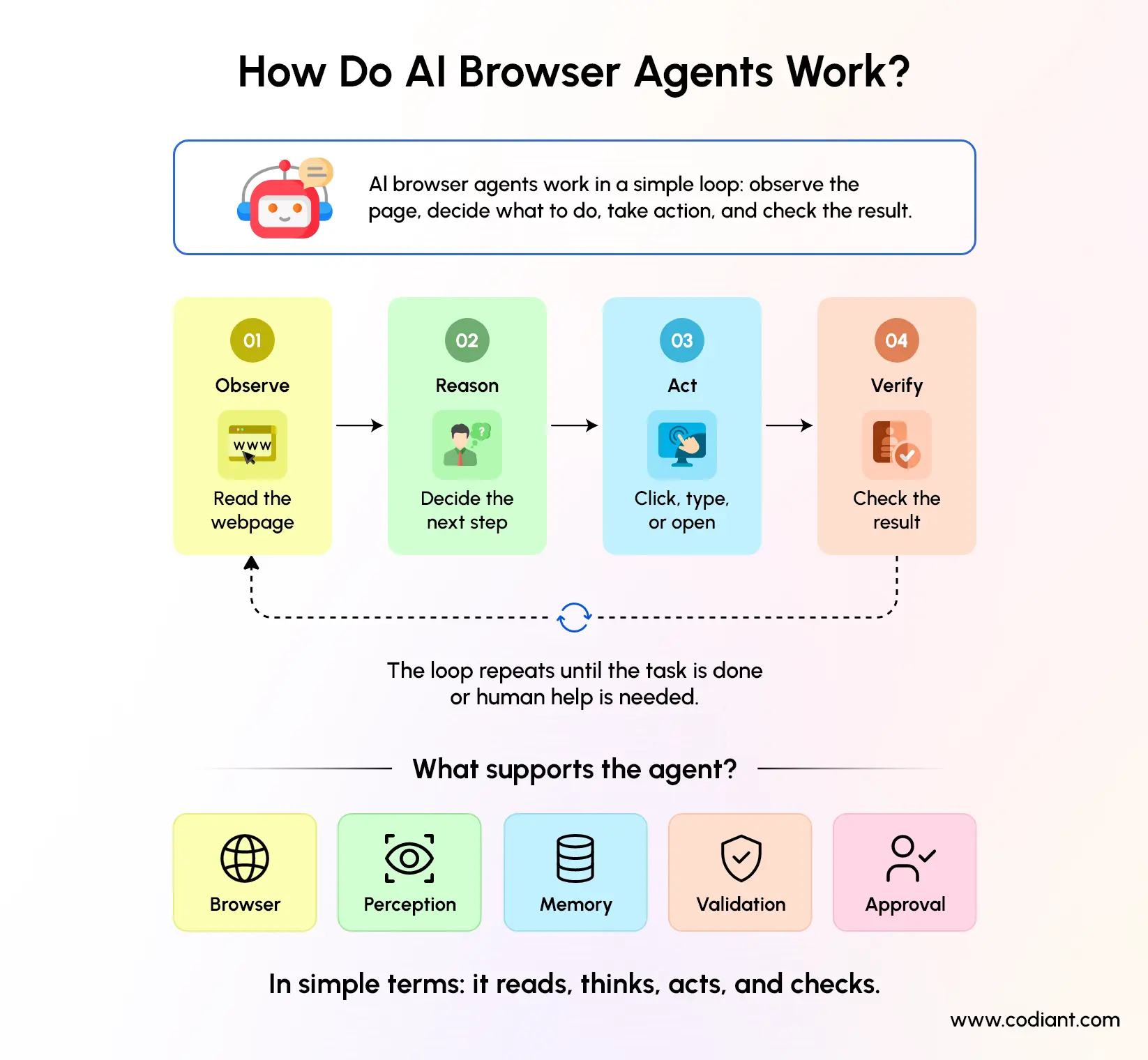
AI browser agents work through a continuous observe, reason, act and verify cycle. The agent receives a goal, examines the webpage, plans the next step, performs an action and checks whether that action moved the task closer to completion.
The following components usually form an agentic AI browser system.
1. User Instruction Layer
The process begins with a natural-language request or a structured workflow trigger.
Examples include:
- Compare prices across approved supplier websites.
- Update candidate information in a recruitment portal.
- Check the status of unresolved service requests.
- Test a checkout workflow across supported browsers.
The system should convert broad instructions into a defined goal, success conditions, permitted actions and restricted actions.
2. Browser Environment
The agent needs a browser or virtual environment in which it can open websites and perform actions. The browser may run locally, in a container, or within a secured cloud environment.
Browser automation tools such as Playwright can operate Chromium, Firefox and WebKit. Playwright can also expose structured accessibility snapshots that describe page elements, roles, labels and text to an AI system.
3. Perception Layer
The perception layer helps the agent understand the current webpage. It may use one or more of the following inputs:
- Document Object Model, or DOM, data
- Accessibility tree data
- Screenshots
- Optical or visual understanding
- Network responses
- Structured page metadata
- Application programming interfaces
Accessibility-based interaction can be efficient because it gives the agent a structured description of buttons, text fields, headings and other elements. Screenshot-based interaction is useful when visual layout, images, charts, or canvas elements matter.
A hybrid system can use structured page data for efficiency and screenshots for visual confirmation.
4. Reasoning and Planning Engine
The reasoning engine translates the user’s objective into a sequence of actions. It considers the current page, available tools, task history, business policies and expected result.
For a procurement workflow, the agent may reason that it must-
- Search an approved vendor catalogue.
- apply product criteria.
- collect relevant options.
- compare total prices.
- avoid placing an order.
- send the findings to an employee for approval.
The planner should avoid generating a complete rigid sequence at the beginning. Websites can change during execution, so the agent may need to plan one or several actions at a time.
5. Action Layer
The action layer converts the selected step into an executable browser command.
Common actions include:
- Opening a URL
- Clicking a link or button
- Typing into a field
- Selecting an option
- Uploading or downloading a file
- Scrolling
- Switching tabs
- Accepting or rejecting a dialog
- Extracting text
- Calling an approved API
The system should expose only the actions required for the intended workflow. Giving every agent unrestricted browser, code-execution, file-system and API access creates unnecessary risk.
6. Memory and State Management
Browser agents need task memory to track completed steps, collected information, encountered errors and pending decisions.
Memory may include-
- Current task objective
- Visited pages
- Completed actions
- Extracted values
- Failed attempts
- User preferences
- Approval status
- Remaining subtasks
Long workflows can become unstable when the agent loses track of earlier actions. State summaries and structured memory can reduce repeated steps and help the agent maintain progress.
7. Validation Layer
The agent should verify the outcome after every important action. A click should not be treated as successful merely because the command was executed.
Validation may check whether-
- The expected page opened
- A record was updated
- A file was downloaded
- A confirmation message appeared
- The correct information was entered
- The requested output was generated
Research environments such as WebArena evaluate agents through the functional result of their actions rather than merely comparing their action sequences with a predefined path.
8. Human Approval Layer
A browser agent should pause before actions that create financial, legal, administrative, privacy, or reputational consequences.
Approval may be required before-
- Submitting a payment
- Sending an external message
- Publishing content
- Deleting information
- Updating account settings
- Accepting contractual terms
- Sharing personal data
- Confirming an order
Human approval is not only a user-interface feature. It should be enforced through the workflow and permission architecture so the agent cannot bypass it.
How Much Does AI Browser Agent Development Cost?
AI browser agent development may cost approximately $45,000 for a limited proof of concept to $900,000 or more for an enterprise-grade system. The final cost depends on workflow complexity, number of websites, integrations, security requirements, user roles, testing scope, and level of autonomy.
The following estimates use an illustrative blended development rate of $75 per hour. They are planning ranges, not fixed market prices or project quotations.
AI Browser Agents Development Cost by Project Type
| Project Type | Typical Scope | Estimated Effort | Estimated Timeline | Illustrative Cost |
| Proof of Concept | One website, one narrow workflow, basic browser actions, limited authentication, manual review, and basic monitoring | 600 to 1,000 hours | 6 to 10 weeks | $45,000 to $75,000 |
| Focused MVP | One or two workflows, multiple website states, authentication support, human approval, basic integrations, and an evaluation dashboard | 1,200 to 2,000 hours | 10 to 16 weeks | $90,000 to $150,000 |
| Production-Grade Browser Agent | Multiple websites, resilient browser control, role-based access, business integrations, policy enforcement, audit logs, security testing, and continuous evaluation | 2,500 to 5,000 hours | 4 to 8 months | $187,500 to $375,000 |
| Enterprise Agentic Browser System | Multiple departments, several workflows, high-volume execution, identity integration, compliance controls, private data environments, advanced monitoring, and ongoing evaluation | 6,000 to 12,000 hours | 8 to 14 months or longer | $450,000 to $900,000 |
How These Cost Estimates Were Calculated
The illustrative budget is calculated using the following formula:
Estimated development effort × assumed blended hourly rate
For example:
- 600 hours × $75 = $45,000
- 1,000 hours × $75 = $75,000
- 2,000 hours × $75 = $150,000
- 5,000 hours × $75 = $375,000
- 12,000 hours × $75 = $900,000
Important Cost Considerations
| Cost Factor | How It Affects the Budget |
| Number of websites | Each website requires separate navigation, authentication, testing, and maintenance |
| Workflow complexity | Longer and more conditional workflows require additional planning and validation |
| Level of autonomy | Agents performing actions independently need stronger controls and testing |
| Integrations | CRM, ERP, identity, ticketing, and document-system integrations increase development effort |
| Security requirements | Credential protection, access controls, audit logs, and security testing add implementation work |
| Interface stability | Frequently changing websites require more resilient browser-control methods |
| Compliance needs | Regulated workflows require additional governance, documentation, and review |
| Reliability target | Business-critical systems require more extensive testing, monitoring, and error recovery |
These estimates should not be treated as a final quotation. An accurate development cost can only be confirmed after defining the workflows, target websites, integrations, architecture, security model, user roles, and acceptance criteria.
What Are the Main Steps in Browser Agent Development?
Browser agent development begins with workflow analysis and continues through architecture, implementation, security testing and controlled deployment. A production system should be built around a defined task rather than the broad goal of creating a general autonomous agent.
The steps below focus specifically on browser-enabled systems. The broader process of building AI agents may also include business-goal definition, data preparation, model selection, system integrations, deployment planning, and ongoing performance monitoring.
Step 1- Define the Workflow and Success Criteria
Document the exact process the agent will automate.
Identify:
- Starting trigger
- Required websites
- User roles
- Input data
- Expected output
- Permitted actions
- Restricted actions
- Approval points
- Failure conditions
- Escalation process
A task such as “manage supplier orders” is too broad. A safer initial scope is “collect prices for an approved list of products and prepare a comparison without submitting an order.”
Step 2- Assess Whether Browser Automation Is Necessary
Determine whether the workflow should use a browser, an API, or a hybrid approach.
Before automating the browser, determine whether the business problem requires a standalone large language model, retrieval-augmented generation, an action-taking AI agent, or a coordinated agentic system. A structured approach to choosing the right GenAI solution can prevent unnecessary technical complexity and help align the architecture with the intended outcome.
Use an API when:
- A supported integration exists
- Structured data is available
- Authentication can be managed securely
- High reliability is required
- The workflow does not depend on visual content
Use browser interaction when:
- No suitable API is available
- The task depends on visual layout
- Employees currently use a web portal manually
- Multiple external websites must be accessed
- The system requires human-like UI interaction
A hybrid agent can retrieve data through APIs and use the browser only for steps that cannot be completed programmatically.
Step 3- Select the Interaction Method
Choose how the agent will perceive and control websites.
The main options are:
- DOM-based control: Uses page structure and selectors. It is efficient but can be sensitive to interface changes.
- Accessibility-based control: Uses labelled page roles and elements. It provides structured context and can reduce dependence on visual models.
- Vision-based control: Uses screenshots and coordinates. It works with visual interfaces but may require more processing and careful verification.
- Hybrid control: Combines structured page information, screenshots, deterministic selectors and APIs.
The correct method depends on the websites, visual complexity, reliability requirements and operating cost.
Step 4- Design the Agent Architecture
A production architecture may include:
- Task intake service
- Instruction parser
- Planner
- Browser controller
- Model gateway
- Tool permission layer
- Session manager
- Short-term task memory
- Validation engine
- Policy engine
- Human approval service
- Audit logging
- Monitoring dashboard
- Integration layer
The architecture should separate planning from execution. The model may recommend an action, but a policy-controlled execution service should decide whether the action is permitted.
Step 5- Create Tools and Permission Boundaries
Define the minimum browser and system tools required for the task.
For example, a research agent may receive permission to:
- Open approved websites
- Search pages
- Extract public text
- Save findings
- Create a draft report
It may be blocked from:
- Entering payment information
- Downloading executable files
- Changing account settings
- Sending messages
- Visiting unapproved domains
- Running arbitrary code
Least-privilege access reduces the potential effect of mistakes, compromised pages and malicious instructions.
Step 6- Build the Agent Loop
The core loop generally follows these stages:
- Read the task and policies.
- Observe the current page.
- identify the next permitted action.
- Execute the action.
- Capture the new page state.
- Validate the result.
- Update task memory.
- Continue, stop, or request human help.
The loop should include limits for total actions, repeated actions, model usage, elapsed time and failed attempts. These controls prevent the agent from continuing indefinitely.
Step 7- Add Security and Human Controls
Security must be designed before production deployment.
Important controls include:
- Isolated browser environments
- Domain allowlists
- Restricted downloads
- Secure credential storage
- Short-lived authentication tokens
- Role-based permissions
- Confirmation for high-impact actions
- Prompt-injection detection
- Data minimization
- Session recording
- Redacted logs
- Rate and spending limits
- Emergency termination controls
Website content must be treated as untrusted because a page can contain instructions intended to manipulate the agent.
Step 8- Develop Evaluation Scenarios
Create test cases that represent normal, unexpected and adversarial conditions.
Evaluate whether the agent can:
- Complete the intended task
- Select the correct records
- Recover from navigation errors
- Recognize uncertainty
- Respect permission boundaries
- Reject malicious page instructions
- Request approval at the right time
- Stop when the task cannot be completed safely
Step 9- Run a Controlled Pilot
Deploy the agent with a small user group, limited websites and low-risk workflows.
During the pilot, measure:
- Task completion rate
- Correct completion rate
- Average actions per task
- Average processing time
- Cost per completed task
- Human takeover rate
- Policy violation rate
- Repeated-action rate
- User correction rate
A successful click sequence is not enough. The final business result must be accurate and policy-compliant.
Step 10- Improve and Scale Gradually
Review failed sessions and classify their causes.
Common categories include:
- Incorrect page understanding
- Wrong element selection
- Poor task planning
- Missing business context
- Authentication failure
- Website change
- Tool failure
- Policy conflict
- Prompt injection
- Validation failure
Add new workflows only after the existing workflow reaches an acceptable level of accuracy, safety, observability and human control.
AI browser agents are built using AI models, browser automation tools, orchestration frameworks, backend technologies, data-storage systems, and monitoring solutions. The technology stack depends on how the agent understands webpages, performs actions, stores task context, connects with business systems, and verifies results.
AI Browser Agent Technology Stack
AI browser agents development combine AI models, browser automation tools, backend services, memory systems, and security controls. The exact technology stack depends on how the agent reads webpages, performs actions, connects with business software, and handles sensitive information. Most production systems use a hybrid architecture rather than relying on a single framework.
Browser Agent Technology Stack
| Technology Layer | Common Technologies | Primary Role |
| AI and reasoning | Large language models, multimodal models, RAG, tool calling | Understands instructions, interprets webpages, and plans actions |
| Browser automation | Playwright, Selenium, Puppeteer, Chrome DevTools Protocol | Controls browser navigation, clicks, typing, scrolling, and downloads |
| Agent orchestration | State machines, agent graphs, task queues, approval workflows | Coordinates steps, tools, decisions, and human approvals |
| Backend | Python, TypeScript, Node.js, FastAPI, Django | Runs business logic and connects the agent with other systems |
| Data and memory | PostgreSQL, Redis, vector databases, object storage | Stores task history, session data, and extracted information |
| Integrations | REST APIs, GraphQL, webhooks, CRM and ERP connectors | Connects the agent with enterprise applications and third-party platforms |
| Security | Role-based access, secret management, encryption, isolated browsers | Protects credentials and prevents unauthorized actions |
| Monitoring | Session recording, tracing, error logs, evaluation tools | Measures performance, identifies failures, and supports audits |
The selected technologies should match the workflow complexity, website environment, security requirements, and required level of autonomy. Adding more models or frameworks does not automatically make an AI browser agent more reliable.
What Are the Use Cases of Browser AI Agents?
Browser AI agents can support workflows that require employees to move between websites, interpret page content, enter data and make limited decisions. The best initial use cases are repetitive, measurable, reversible and governed by clear rules.
1. Web Research and Information Collection
AI browser agents can search approved sources, open relevant pages, extract required information and organize the findings.
Possible applications include:
- Competitor monitoring
- Market research
- Product comparison
- Vendor research
- Property research
- Public-record collection
- Industry-news monitoring
The output should include source references and timestamps so users can verify the collected information.
2. Sales and Lead Research
An AI browser assistant can collect publicly available company information and prepare account summaries for sales teams.
For workflows that begin with phone conversations, voice AI agents for appointment and lead generation can qualify inquiries or schedule meetings, while browser agents record approved information in a CRM, booking system, or web portal. Together, these systems can connect customer conversations with the administrative actions that follow them.
It may gather:
- Company descriptions
- Industry categories
- Product information
- Recent public announcements
- Relevant decision-making roles
- Existing CRM information
The agent should operate within applicable privacy requirements, website terms and company data policies.
3. Data Entry Across Web Portals
Many organizations still transfer information manually between systems that do not provide suitable integrations.
Intelligent browser automation can help employees enter approved data into:
- Customer portals
- Supplier platforms
- Government systems
- Recruitment platforms
- Insurance portals
- Property-management systems
- Internal administrative applications
However, direct API integration should usually be preferred when a secure and reliable API is available. Research comparing browser and API-based agents indicates that direct service interaction can avoid some of the uncertainty associated with graphical interfaces.
4. Customer Support Operations
Browser agents can assist support teams by gathering account information, checking order status, locating relevant policies and preparing suggested responses.
A support agent may:
- Read the customer’s request.
- Open the relevant internal systems.
- collect order or account information.
- check the applicable support policy.
- prepare a response.
- ask an employee to review it.
- update the ticket after approval.
The browser agent should not be allowed to issue unauthorized refunds, expose private data, or change account settings without policy checks.
5. Recruitment and HR Administration
AI-powered web agents can assist with repetitive recruitment and onboarding activities.
Examples include:
- Transferring approved candidate data
- Checking interview availability
- Updating application statuses
- Preparing onboarding checklists
- Collecting documents from authorized systems
- Sending reminders after approval
Employment decisions should not be delegated to an uncontrolled browser agent. The agent can support administration, while responsible employees retain decision authority.
6. Finance and Procurement Support
Browser agents can retrieve invoices, compare supplier information, check transaction statuses and prepare procurement summaries.
High-risk activities such as approving payments, changing bank details, or placing orders should require strong authentication and human confirmation.
7. Software Testing and Quality Assurance
AI browser agents can explore user flows, generate test steps, enter data, identify unexpected behaviour and collect screenshots or logs.
They can support:
- Regression testing
- Cross-browser testing
- Form validation
- Navigation testing
- Checkout testing
- Accessibility checks
- Visual comparisons
AI exploration can supplement deterministic tests, but it should not replace repeatable automated test suites for critical product behaviour.
8. Compliance and Policy Monitoring
Browser automation AI can review approved websites or portals for defined changes.
An agent may monitor:
- Policy updates
- Licence status
- Public notices
- Product disclosures
- Regulatory publications
- Supplier certification status
A domain expert should validate any conclusion that affects regulatory or legal decisions.
Launch Secure Browser Agents Without Compromising Control or Compliance Standards
Create governed browser workflows with permissions, monitoring, human approvals, and enterprise-grade security built in.
What Challenges Are Involved in Building Browser Agents?
The biggest browser agent development challenges are unreliable page interpretation, changing websites, long-task errors, security threats and the difficulty of verifying whether the business objective was completed correctly.
1. Dynamic Website Interfaces
Websites change text, layouts, navigation, identifiers and interactive elements. Pop-ups, cookie notices, experiments and personalised content may produce different page states for different sessions.
A resilient agent needs multiple ways to identify and verify page elements.
2. Long-Horizon Task Failure
An agent may complete the first few steps correctly and then lose track of the objective, repeat an action, or use incorrect information later in the workflow.
Structured state, checkpointing, task summaries and bounded planning can reduce this problem.
3. Visual Understanding Limitations
Some interfaces depend on charts, images, maps, canvas elements, or spatial relationships. Text-only page representations may not provide enough information.
4. Prompt Injection
A malicious or compromised webpage may contain instructions designed to override the user’s request or manipulate the agent.
Prompt injection can cause an agent to:
- Reveal information
- Visit an unsafe destination
- Change its objective
- Misuse a connected tool
- Perform an unauthorized action
- Store malicious instructions in memory
Anthropic’s browser-safety research describes the web as a broad attack surface because webpages, embedded content, advertisements and dynamically loaded elements can all carry hostile instructions.
5. Incorrect Actions with Real Consequences
A browser agent can click the wrong button, send incorrect information, update the wrong account, or delete a record.
Research on enterprise web-agent safety has found that task completion alone does not demonstrate trustworthiness. Agents must also be tested for policy adherence, user consent and avoidance of unsafe actions.
6. Authentication and Session Management
Websites may use:
- Multi-factor authentication
- Single sign-on
- CAPTCHA
- Session expiration
- Device verification
- Location checks
- Anti-bot controls
Browser agents should support legitimate authentication processes rather than attempting to bypass access controls. Users may need to take over the browser for authentication or verification.
7. Data Privacy
Agents may access customer records, internal documents, credentials, emails, or payment information. Sensitive data should not be included in model context, logs, or external tools unless it is necessary and authorized.
8. Unclear Completion
A website may display a confirmation message even when the underlying record was not updated correctly. The agent therefore needs independent completion checks where possible.
9. Cost and Latency
Browser agents may require several model calls and browser actions for one task. Repeated screenshots, long context, retries and failed loops can increase processing time and operating cost.
Limits should be applied to actions, retries, tokens, session duration and infrastructure spending.
10. Website Terms and Operational Restrictions
Not every website permits automated access. Organizations should review website terms, data rights, consent requirements and applicable regulations before automating external services.
What Security Considerations Apply to AI Browser Agents?
AI browser agents should be treated as privileged software users because they can access information and perform actions. Security controls must apply to the model, tools, browser, credentials, data, memory and approval workflow.
OWASP identifies risks including prompt injection, tool abuse, privilege escalation, data exfiltration, memory poisoning, excessive autonomy, high-impact action abuse and unbounded resource consumption.
Recommended controls include:
- Run each session in an isolated environment.
- Grant only the permissions required for the workflow.
- Restrict navigation to approved domains where practical.
- Keep credentials outside prompts and model memory.
- Use a managed secret store.
- Validate every tool call against policy.
- Require confirmation for irreversible actions.
- Separate read permissions from write permissions.
- Redact sensitive information from logs.
- Limit downloads and file execution.
- Scan external content before storing it in memory.
- Set execution, action and spending limits.
- Record actions for audit and investigation.
- Provide an immediate stop or takeover control.
- Conduct adversarial and prompt-injection testing.
Structured outputs can also constrain the information passed between workflow components. OpenAI’s agent-safety guidance recommends limiting untrusted data, using structured outputs, keeping tool approvals active and avoiding unrestricted information flow into sensitive tools.
How Should AI Browser Agents Be Evaluated?
A browser agent should be evaluated on accuracy, safety, efficiency and business value. Task completion rate alone can hide incorrect actions, policy violations and unnecessary human intervention.
Useful metrics include:
- Task Success Rate: The percentage of tasks that reach the intended final result.
- Correct Completion Rate: The percentage completed without incorrect data, prohibited actions, or hidden errors.
- Policy Compliance Rate: The percentage of tasks completed without violating business, access, or approval policies.
- Human Takeover Rate: The percentage of tasks requiring employee intervention.
- Action Efficiency: The number of browser and model actions required per successful task.
- Cost per Successful Task: Total model, browser, infrastructure and review cost divided by correctly completed tasks.
- Recovery Rate: The percentage of recoverable errors that the agent handles without restarting the entire workflow.
- Unsafe Action Rate: The percentage of sessions involving unauthorized, irreversible, or policy-violating behaviour.
- User Correction Rate: The frequency with which users must change information or redo the agent’s work. Public benchmark scores can support technical comparison, but they do not guarantee production performance.
Did You Know?
A 2026 research study found that a browser agent completed 71.2% of tasks in the WebArena test environment. Although this shows strong progress, the agent still failed in nearly three out of ten tasks, so human review and result validation remain important in real-world use.
How Long Does It Take to Develop an AI Browser Agent?
A focused AI browser agent proof of concept may take approximately 6 to 10 weeks, while a production-ready system may require 4 to 8 months. Enterprise deployments involving multiple workflows, applications, integrations, user roles, and security controls may take 8 to 14 months or longer.
The actual development timeline depends on the complexity of the workflow, number of websites, level of autonomy, integration requirements, security controls, and testing scope.
AI Browser Agent Development Timeline
| Development Stage | Estimated Duration | Key Activities | Expected Outcome |
| Discovery and feasibility | 2 to 4 weeks | Map workflows, review target websites, identify risks, select interaction methods, and define success metrics | A validated use case, technical approach, and development roadmap |
| Prototype development | 4 to 8 weeks | Build the browser environment, implement the first agent loop, test core browser actions, and validate technical feasibility | A working prototype that demonstrates the main browser-agent workflow |
| MVP development | 6 to 12 additional weeks | Add integrations, human approval steps, memory, validation, monitoring, and pilot testing | A usable MVP ready for controlled testing with selected users |
| Production hardening | 8 to 16 additional weeks | Conduct security testing, expand evaluation scenarios, improve error recovery, add audit controls, optimize cost and latency, and prepare support processes | A secure and monitored production system ready for wider deployment |
| Enterprise expansion | 4 to 8 additional months or longer | Add more workflows, applications, user roles, compliance controls, and enterprise integrations | A scalable browser-agent platform supporting multiple business processes |
Related Reading: List of Top AI Agent Development Companies in the USA (2026 Guide)
When Should a Business Invest in AI Browser Agent Development?
A business should consider browser agent development when employees repeatedly complete rule-based web tasks that require interpretation but cannot be automated reliably through existing APIs or conventional scripts.
A suitable workflow usually has:
- High repetition
- Clear inputs and outputs
- Measurable completion
- Limited decision complexity
- Reversible actions
- Defined permission rules
- Available human reviewers
- Enough task volume to justify maintenance
Browser agent development may not be appropriate when:
- The workflow changes every day.
- Decisions require unrecorded human judgement.
- A reliable API already solves the problem.
- Errors could immediately cause serious harm.
- The organization cannot control data access.
- The target website prohibits the intended automation.
- Success cannot be verified.
Start with an assistive agent that prepares or recommends actions. Increase autonomy only after the system demonstrates reliable and policy-compliant behaviour.
How to Select AI Agent Development Services?
Businesses evaluating AI agent development services should look beyond model selection. The development partner must understand browser engineering, workflow design, enterprise security, integrations, evaluation and production operations.
Browser control is only one component of the overall architecture. End-to-end AI agent and automation solutions also account for workflow discovery, model orchestration, business-system integrations, permission controls, testing, deployment, monitoring, and continuous improvement.
Assess whether the provider can:
- Analyse the workflow before recommending AI
- Compare browser, API and hybrid options
- Build secure browser-control infrastructure
- Define human approval points
- Apply least-privilege access
- Design task-specific evaluations
- Test prompt injection and unsafe behaviour
- Integrate with business systems
- Monitor model and browser actions
- Explain cost and performance assumptions
- Support maintenance after deployment
These technical criteria should be considered as part of a wider framework for evaluating an AI agent development company. The assessment should also cover strategic fit, relevant industry experience, integration capabilities, governance practices, scalability, communication, and post-deployment support.
A strong development plan should define what the agent may do, what it must never do, when it should stop and how the organization will verify its work.
Conclusion
AI browser agents extend web automation by combining browser control with reasoning, planning, memory and validation. They can support research, data entry, customer operations, recruitment administration, procurement, testing and other portal-based workflows.
Their value does not come from unrestricted autonomy. Reliable browser agent development depends on narrowing the task, combining AI with deterministic tools, validating every important result, limiting permissions and retaining human control over high-impact actions.
The safest approach is to start with one low-risk workflow, measure successful task completion, analyse failures, and gradually expand the system. Codiant, an AI agent development company, recommends treating security, evaluation, observability, and workflow governance as core development components rather than features added after the agent is operational.
Build a Browser Agent Around Real Business Workflows
Develop secure AI browser agents that can navigate websites, assist employees and automate controlled multi-step processes.
The Author

Frequently Asked Questions
AI browser agents commonly use large language or multimodal models, browser automation tools such as Playwright or Selenium, Python or TypeScript backends, workflow orchestration, structured memory and monitoring systems. The specific stack depends on whether the agent interacts through the DOM, accessibility data, screenshots, APIs, or a hybrid method.
Browser agents observe a webpage through screenshots, page structure, accessibility trees, or application data. They then issue actions such as clicking, typing, scrolling, selecting options, switching tabs, or calling an approved API. A validation layer checks whether each action produced the intended result.
Browser agents require isolated execution, restricted permissions, secure credential storage, domain controls, audit logs, spending limits, prompt-injection protection and human approval for sensitive actions. Website content should always be treated as untrusted because it may contain instructions designed to manipulate the agent.
Yes, AI browser agents can automate controlled workflows such as web research, portal-based data entry, support preparation, recruitment administration, invoice retrieval and software testing. The workflow should have clear rules, measurable outputs and defined approval points.
A limited proof of concept may take 6 to 10 weeks. A focused MVP may require 10 to 16 weeks, while a production system can take 4 to 8 months. Enterprise agentic AI browser systems involving multiple workflows and security requirements may take 8 to 14 months or longer.
AI browser agents can streamline repetitive web-based tasks, reduce manual effort, and improve workflow efficiency across different business functions. They can also help teams process information faster, maintain consistent execution, and scale routine digital operations with less human intervention.
The development cost depends on the agent’s complexity, number of workflows, AI model usage, integrations, security requirements, and deployment environment. A basic agent costs less, while enterprise-grade solutions require a larger investment for reliability, scalability, and governance.
AI browser agents can combine DOM analysis, accessibility information, visual understanding, and flexible element detection instead of relying only on fixed selectors. Validation and fallback strategies help the agent adapt when page structures or interface elements change.
Yes, browser agents can operate within authenticated environments when secure session management, credential handling, and access controls are properly implemented. Sensitive authentication steps should use protected credentials and human approval where necessary to reduce security risks.
Performance can be tracked through task completion rates, execution time, failed actions, recovery frequency, model usage, and operational costs. Detailed logs, traces, alerts, and evaluation datasets help teams identify failures and continuously improve agent performance.
Featured Blogs
Read our thoughts and insights on the latest tech and business trends
HIPAA-Compliant App Development in 2026: How to Build Securely and Avoid Preventable Fines
- September 4, 2026
- Mobile App Development
HIPAA-compliant app development in 2026 requires six foundations: complete ePHI mapping, documented risk analysis, role-based access, encryption, signed business associate agreements, and continuous security monitoring. This matters most to healthcare CTOs, product leaders, and compliance... Read more
AI Developer Engagement Models Explained: How to Choose the Right AI Team
- August 27, 2026
- Artificial Intelligence
AI developer engagement model means deciding how external AI specialists will be assigned, managed, paid and held accountable. The main options are dedicated AI developers, AI team augmentation, time-and-material delivery, fixed-price projects and end-to-end AI... Read more

Enterprise Mobile App Development: How It Can Accelerate Your Business Growth
- August 21, 2026
- Mobile App Development
Enterprise mobile app development can accelerate growth by improving three measurable areas: workflow speed, access to business systems, and customer or employee service delivery. This matters to mid-market and enterprise leaders managing distributed teams, manual... Read more