Web App vs Mobile App: Choosing Right Solution for Your Business
Table of Contents
Subscribe To Our Newsletter
Summarize with AI
Not enough time? get the key points instantly.
Users expect instant, seamless digital experiences on any device, at any time. That expectation has triggered a massive shift in how businesses deliver value: through online software applications like web apps and mobile apps that respond to specific usage patterns and behavior.
With Statista predicting 187 billion-plus app downloads per year and desktop-first professionals only increasing their web-based usage, the platform you decide is a technological choice as well as a tactical business play.
Deciding between a web app vs mobile app doesn’t only about the list of features; It’s a choice that aligns with your customers’ habits, protects your development investment, and shortens your time-to-market. For tech founders, digital consultants, and product leaders, understanding the difference between a web app and mobile app can mean the difference between scalable success and missed opportunities.
This blog offers a complete breakdown, definitions, comparisons, real-world examples, and when to choose what, to help you make informed decisions based on both functionality and user behavior.
The Wrong Platform Can Cost You Growth.
Don’t let a poor tech choice slow you down. Your users expect more, and your business deserves better.
We turn product uncertainty into clarity with expert guidance that puts performance, scale, and ROI at the center. Start with the Right Build
What Is a Web App?
A web app is a browser-based software application that offers your website users similar functionality to a software program. Web apps are interactive; they provide real-time interactivity and are created using frontend and backend frameworks experts like React, Angular, Node.js, or Django developers.
In these applications, no downloads or installations, and updates are pushed out from the server. This makes it the first choice for businesses looking for speed, configurability, and reduction in cost.
Types of Web Apps
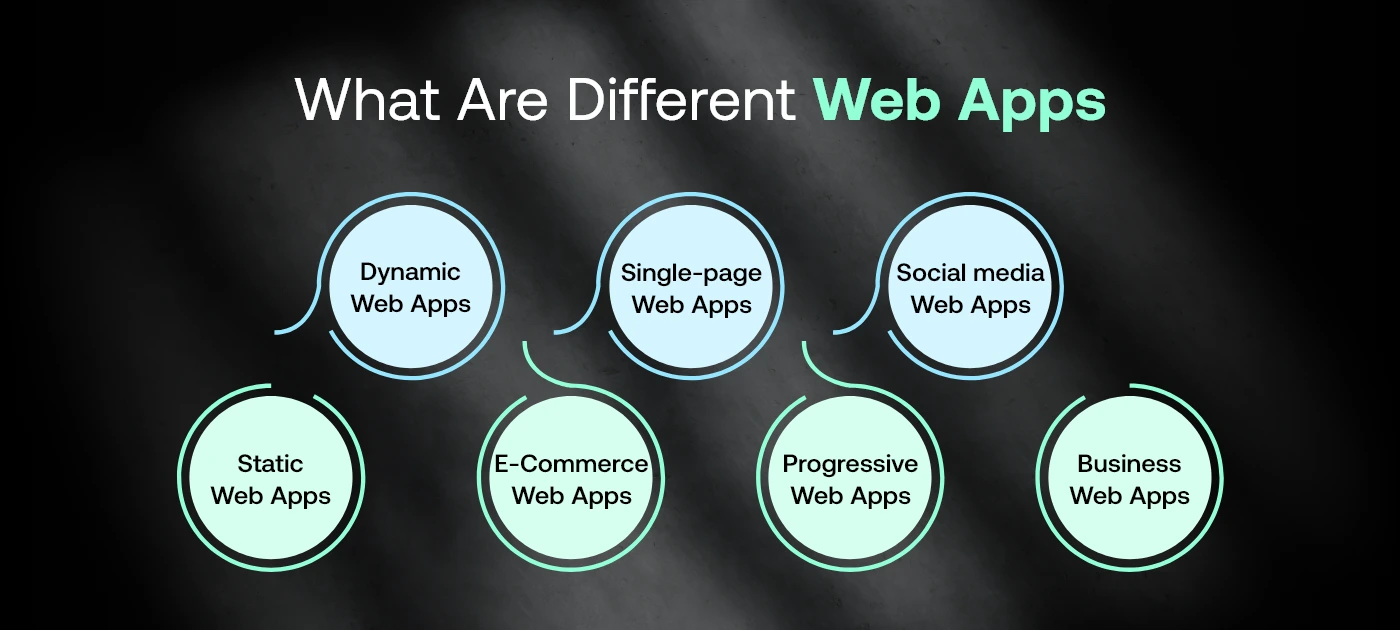
There are different types of web applications, each serving particular business requirements from internal tools and customer portals to scalable SaaS platforms and eCommerce solutions.
Examples of modern web application ideas include:
- CRM platforms
- Inventory dashboards
- Hotel booking engines
- Internal HR management systems
Web apps are particularly popular for MVPs and B2B SaaS tools where cross-device access and low maintenance are crucial.
What Is a Mobile App?
A mobile app is a software made to run on mobile devices and tablets. With the help of native tools, including Kotlin for Android phones, Swift for iPhones, or cross-platform tools like React Native or Flutter, mobile app developers create an app. Mobile app user can download the app from app stores and get it installed on their device.
What makes mobile apps powerful is their ability to tap into the device’s hardware features, camera, GPS, push notifications, sensors, and work offline in many cases. Also, read top mobile app trends to watch in 2025 and beyond.
Types of Mobile Apps
There are different types of mobile apps, built to address diverse business goals—from customer engagement and loyalty to field operations, sales enablement, and real-time service delivery.
Think of apps like:
- WhatsApp for real-time messaging
- Uber for geolocation and ride requests
- Your banking app for secure transactions
They provide smooth, immersive user experiences, making them ideal for businesses focused on high engagement or feature-rich environments. Explore tips and tricks for cost effective app development.
Web App vs Mobile App: Feature Comparison Table
This table breaks down the technical and user-experience-based differences, helping you understand which platform best suits your goals.
| Feature | Web App | Mobile App |
| Accessibility | Browser-based access | App store installation required |
| Platform | Works on any device | Platform-specific or hybrid |
| Speed | Depends on internet and browser | Faster, smoother native performance |
| Offline Capability | Limited; PWAs offer partial offline use | Full offline support in most cases |
| Development Cost | Lower to moderate | Higher (for dual-platform development) |
| Updates | Pushed via server instantly | Requires app store approvals for each update |
| Installation | Not required | Manual install necessary |
This clear comparison supports informed decision-making by providing a high-level overview of what to expect from each development approach, helping businesses choose the right solution for their web mobile application based on project requirements, scalability, performance, and long-term business goals.
Pros and Cons of Web Apps
Trying to decide between building a web app or a mobile app? One of the first things you’ll notice is how flexible web apps can be. They’re a go-to option when time, budget, and platform reach are top priorities. But of course, like any tech decision, there are pros and cons to weigh before jumping in.
Why Web Apps Are a Smart Pick
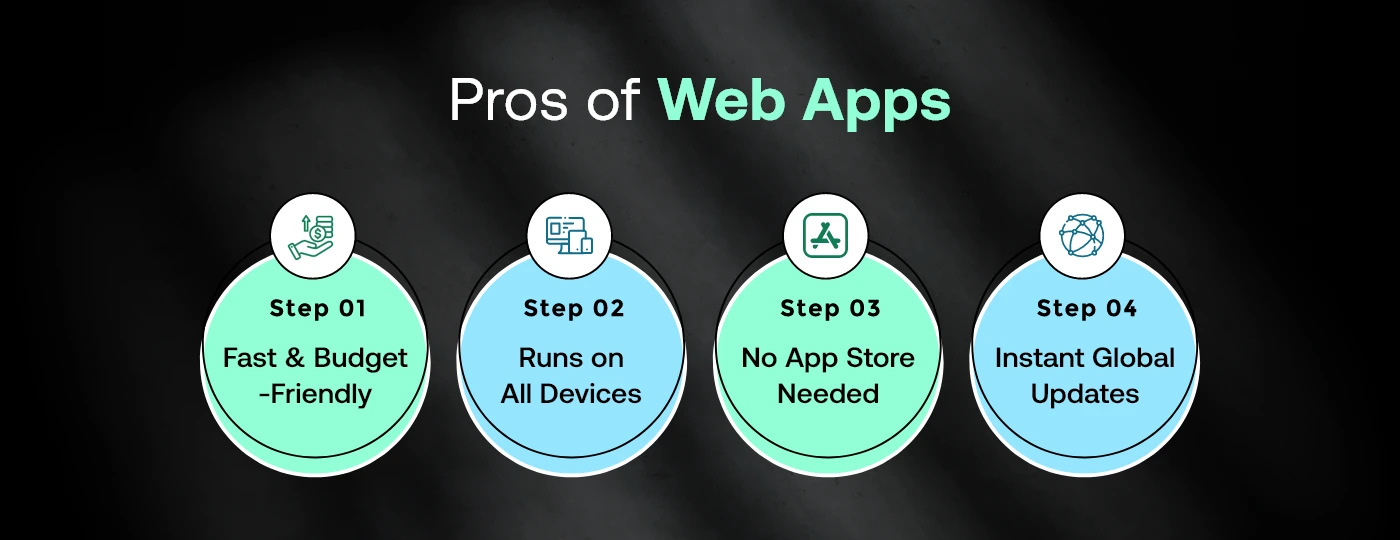
- Quick to Launch & Easy on the Budget: If speed and cost matter, say you’re testing new web application ideas or building a minimum viable product (MVP)—web apps can be developed faster and for less than their mobile counterparts.
- One Code Runs on All Devices: In the web app vs mobile app debate, this is a big win. Web apps run on desktops, tablets and phones, and don’t need platform-specific versions.
- No App Store Hassles: Web apps are browser-based, which means no need for users to download anything or wait for store approvals. Just share a link, and they’re in.
- Update Once for Everyone: Since web apps are hosted on a server, updates roll out instantly to all users. That’s one less thing to manage.
But Web Apps Aren’t Perfect. Here’s What to Watch For.
- Limited Access to Device Hardware: Unlike native mobile apps, web apps can’t fully tap into things like GPS, camera, or fingerprint sensors. If you need deep integration, this could be a deal-breaker.
- Mostly Online-Only: Unless you’re building a PWA (Progressive Web App), most online software applications need a steady internet connection to work.
- Browser Quirks: Not all browsers are created equal. A web app that works perfectly on Chrome might act up on an outdated Safari or Edge. That means extra testing to ensure a smooth experience across the board.
If you’re about to start a new online software app, or looking to take some part of your business online, working with an experienced web app design agency can take a lot of the hassle of the situation away for you. They help you morph the features into something that aligns with how people think, what’s good for your business and what works in the real world.
Be it an internal dashboard, SaaS tool or customer portal, a seasoned web app development company in USA will be able to get your idea to market faster and often for less than going native. Before you plan the development, understand web app development cost.
Pros and Cons of Mobile Apps
Does your product vision is based on delivering personalized experiences, user engagement or making use of device-specific functionality? In such cases, mobile apps are the best choice. When it comes to comparing a web app versus mobile app, this is where mobile truly excels in terms of performance, power, and presence.
What Makes Mobile Apps Win on Experience, Engagement, and Power
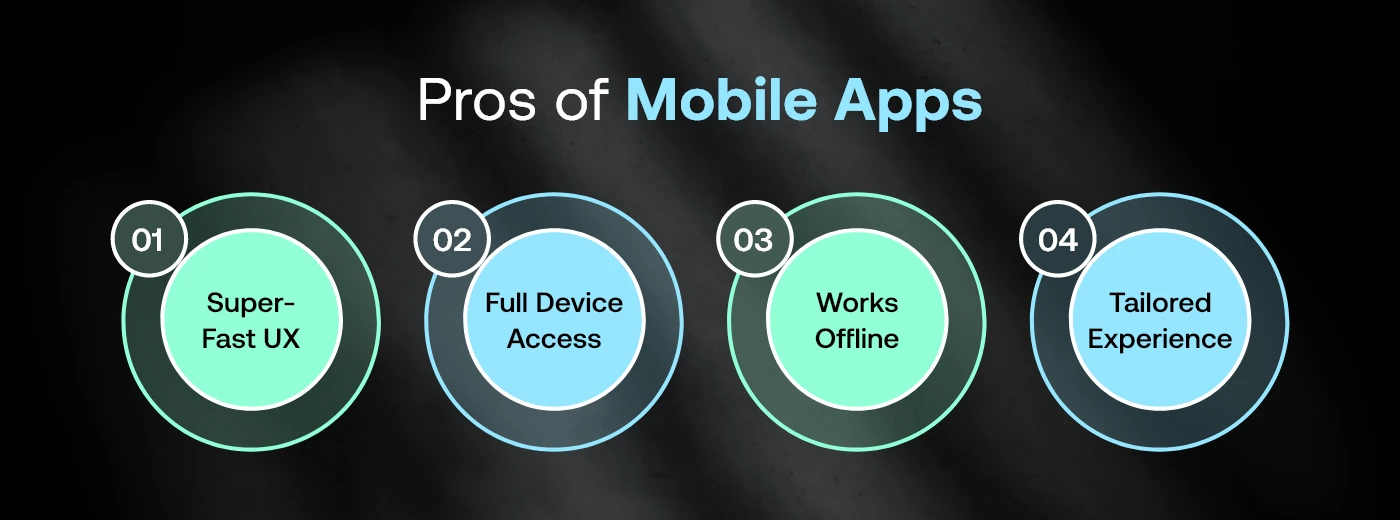
- Built for Speed and Responsiveness: Native mobile apps are designed specifically for iOS or Android. That means smooth transitions, fast load times, and interactions that feel seamless, not sluggish.
- Full Access to Device Hardware: Need to use the GPS, camera, fingerprint sensor, or push notifications? No problem. Mobile apps tap into everything your phone has to offer.
- Works Even When Offline: Unlike a lot of software applications that rely on internet connectivity, mobile apps can store data on the device. This means that if there’s no network connection, users can still access critical app features.
- Better Personalization and UX: The UI/UX of a mobile app is tailored to a specific device type, delivering increased customization, intuitive browsing and more personalized user experience.
Where Mobile Apps Demand More Effort
- Costlier to Build and Maintain: Developing apps for both platforms means you’ll need separate codebases (or a hybrid solution)—and that comes with added time and expense.
- App Store Processes Slow Things Down: Every update or new version has to be submitted and approved by Apple or Google. That can cause unexpected delays.
- More Steps for Users: Unlike a web app that opens in a click, mobile apps ask users to download, install, and often update manually—adding a bit of friction to the experience.
If you think about what are the difference between web apps and mobile apps, it’s relatively simple. Mobile apps are most effective when used for feature-rich, user-focused experiences; fitness trackers, shopping apps and social media platforms all excel as mobile apps.
Still Unsure What’s Right for Your Business?.
Let Codiant shape your product’s future, strategically, not just technically.
Our experts help startups and enterprises choose the right platform that aligns with user behavior, budget, and long-term goals.
Web App vs Website: Clearing the Confusion
A website is primarily static or content-driven—think blogs, company profiles, or landing pages. A web app, however, offers interactive features that enable users to perform tasks, edit data, or transact.
For example:
- A website might display your restaurant menu.
- A web app lets users book a table, pay, and leave feedback.
If your business needs dynamic, real-time engagement, a web app vs website comparison tilts in favor of apps.
How AI Is Transforming Web and Mobile Apps in 2026?
AI isn’t just a feature anymore it’s the foundation.
In 2026, both web and mobile apps are being rebuilt from the ground up with artificial intelligence baked into every layer. And the impact? It’s changing what users expect, what developers build & how businesses compete.
Here’s what that looks like in practice:
- On the web side: AI-powered tools like intelligent search, real-time personalization engines & automated content generation have become table stakes. Platforms like e-commerce sites and SaaS dashboards now use predictive analytics to surface the right information before users even ask for it. AI copilots embedded directly into browser-based apps are reducing task completion time dramatically.
- On the mobile side: On-device AI models are enabling experiences that simply weren’t possible two years ago think real-time language translation, gesture recognition & hyper-personalized push notifications that actually get opened. Apple’s on-device intelligence and Google’s Gemini Nano integration have made AI a native mobile capability, not an afterthought.
- But here’s the critical distinction: Web apps benefit from cloud-based AI models with virtually unlimited processing power. Mobile apps increasingly leverage edge AI faster, more private & available offline.
For businesses deciding between web and mobile development, AI introduces a new dimension to the decision-making process. The question is no longer just where your users are, it’s also about the type of AI-powered experience you want to deliver. Whether you’re building a mobile web app or a native solution, choosing the right approach can improve user engagement, performance, and long-term business growth.
The good news? Both platforms are evolving fast. The better news? You don’t have to pick just one.
Web App vs Mobile App Development Cost Breakdown in 2026
Before you commit budget, you need to know exactly where the money goes. Here’s a transparent, category-by-category breakdown.
What drives the cost difference?
Web apps are built once and run everywhere any browser, any device. Mobile apps often need two separate codebases (iOS + Android) unless you use cross-platform frameworks like React Native or Flutter. That fundamental difference ripples through every cost category below.
Cost breakdown by development type
| App Type | Basic | Mid-Level | Enterprise |
| Web App | $5,000 – $15,000 | $15,000 – $75,000 | $75,000 – $300,000+ |
| Native iOS App | $10,000 – $30,000 | $30,000 – $120,000 | $120,000 – $500,000+ |
| Native Android App | $10,000 – $30,000 | $30,000 – $120,000 | $120,000 – $500,000+ |
| Cross-Platform (React Native/Flutter) | $12,000 – $35,000 | $35,000 – $140,000 | $140,000 – $400,000+ |
| Progressive Web App (PWA) | $6,000 – $20,000 | $20,000 – $80,000 | $80,000 – $250,000+ |
Cost breakdown by feature type
| Feature | Web App Cost | Mobile App Cost | Notes |
| User auth & login | $1,500 – $4,000 | $2,000 – $6,000 | Mobile adds biometric/Face ID cost |
| Push notifications | $500 – $1,500 | $2,000 – $5,000 | Mobile requires platform registration |
| Offline mode | $3,000 – $8,000 | $1,500 – $4,000 | Easier natively on mobile |
| Camera/media access | $1,000 – $3,000 | $800 – $2,500 | Native mobile is cheaper & more capable |
| GPS/location | $1,500 – $4,000 | $800 – $2,000 | Native APIs reduce mobile cost |
| Payment integration | $2,000 – $6,000 | $3,000 – $8,000 | App Store/Play Store fees add up |
| AI/ML features | $5,000 – $20,000 | $6,000 – $25,000 | On-device AI costs more to implement |
| Real-time chat | $3,000 – $9,000 | $4,000 – $11,000 | WebSockets vs native sockets |
| Admin dashboard | $4,000 – $12,000 | $2,000 – $6,000 | Web is cheaper for data-heavy UIs |
| App Store submission | $0 | $1,000 – $3,000 | Apple review + developer fees |
Annual maintenance cost comparison
| Cost Category | Web App | Mobile App |
| Hosting & infrastructure | $1,200 – $24,000/yr | $600 – $12,000/yr |
| OS/browser compatibility updates | $2,000 – $5,000/yr | $5,000 – $15,000/yr |
| Security patches | $1,500 – $4,000/yr | $2,000 – $6,000/yr |
| App store compliance updates | $0 | $3,000 – $10,000/yr |
| Performance optimization | $1,000 – $3,000/yr | $2,000 – $5,000/yr |
| Total estimated annual maintenance | $5,700 – $36,000/yr | $12,600 – $48,000/yr |
Hidden costs most people miss
- For web apps: CDN costs, SSL certificates, browser compatibility testing across Chrome, Safari, Firefox & Edge & SEO infrastructure can add 15–25% to your base estimate.
- For mobile apps: Apple Developer Program ($99/yr) and Google Play ($25 one-time) are just the entry fees. The real hidden costs are App Store review delays, mandatory OS version updates & the fact that a rejected submission can cost you weeks of developer time.
- For both: QA testing, UX design & project management typically add 30–40% on top of development estimates and are almost always underbudgeted
So which is more cost-effective?
- Web apps win on upfront cost: Often by 40–60% compared to native mobile development. They’re faster to launch, easier to update & require no App Store approval cycles.
- Mobile apps win on long-term engagement: Higher retention, better monetization through in-app purchases & superior access to device hardware. If your business model depends on daily active users, the higher upfront investment often pays off.
The 2026 sweet spot for most startups? Start with a mobile web application, such as a Progressive Web App (PWA), to validate your product, test market demand, and expand your reach. Once you’ve gained user traction and consistent revenue, invest in native mobile apps to unlock advanced features and deliver a more optimized user experience while keeping development costs under control.
Web App vs Mobile App: Performance and UX Comparison
Performance isn’t just about speed. It’s about how your users feel when they use your product and that feeling determines whether they come back.
Web and mobile apps approach performance and user experience from fundamentally different angles. Neither is universally better. But depending on what your product does and who uses it, the gap between them can be significant.
Loading speed and responsiveness
This is where the debate gets real. Web apps depend on network conditions a slow connection means a slow experience. Mobile apps, by contrast, ship their core UI and logic locally on the device, so the initial render is near instant even before any data loads.
| Metric | Web App | Mobile App |
| Initial load time (good network) | 1.5 – 4 seconds | 0.3 – 1 second |
| Initial load time (poor network) | 5 – 12+ seconds | 0.5 – 2 seconds |
| Time to interactive | 2 – 6 seconds | 0.5 – 1.5 seconds |
| Offline availability | Limited (PWA only) | Full (with caching) |
| Animation smoothness | 50 – 60 fps | 60 – 120 fps |
| Background processing | Not supported | Fully supported |
PWAs (Progressive Web Apps) narrow this gap considerably but they still can’t fully match native mobile on raw responsiveness.
UX capabilities comparison
| UX Feature | Web App | Mobile App | Winner |
| Gestures (swipe, pinch, haptics) | Limited | Full native support | Mobile |
| Push notifications | Basic (browser-based) | Rich, reliable, always-on | Mobile |
| Camera & microphone access | Supported (with permission) | Deep native integration | Mobile |
| Keyboard & input handling | Excellent | Good (virtual keyboard issues) | Web |
| Form-heavy workflows | Excellent | Frustrating on small screens | Web |
| Data tables & dashboards | Excellent | Poor without dedicated design | Web |
| Onboarding flow | Frictionless (no install) | Requires App Store download | Web |
| Deep linking | Good | Excellent | Mobile |
| Biometric auth (Face ID, fingerprint) | Limited | Native & seamless | Mobile |
| Accessibility (screen readers, etc.) | Mature standards (WCAG) | Platform-specific (iOS/Android) | Tie |
Performance by use case
Not all apps have the same performance requirements. Here’s how each platform holds up across common product types-
| Use Case | Web App Performance | Mobile App Performance |
| SaaS dashboards & admin panels | Excellent | Poor |
| E-commerce storefronts | Good | Excellent |
| Social media & feeds | Good | Excellent |
| Banking & fintech | Good | Excellent |
| Content / media streaming | Good | Excellent |
| On-the-go field tools | Poor | Excellent |
| B2B data-heavy tools | Excellent | Poor |
| Games | Poor | Excellent |
| Communication & messaging | Good | Excellent |
| Internal enterprise tools | Excellent | Good |
The UX perception gap
Here’s something most technical comparisons skip- UX isn’t just about what the app can do it’s about what users expect it to do.
Mobile users have been trained by apps like Instagram, Uber & Spotify. Their bar for smoothness, gesture responsiveness & visual polish is sky-high. A web app that’s technically functional can still feel “clunky” on mobile simply because it doesn’t behave like a native app.
Web users, on the other hand, are comfortable with slightly longer loads in exchange for no-friction access no download, no signup wall, just open and go.
The takeaway- If your users are primarily on desktop doing complex tasks, a web app will feel perfectly natural. If they’re on the go, doing quick repeated actions on a phone, native mobile wins the UX battle every time.
Real-World Examples of Web Apps and Mobile Apps
Productivity and SaaS
- Notion (Web + Mobile)
Web supports deep workspace editing and structure; mobile enables quick notes, capture & access on the go. - Google Docs (Web App)
Complex document editing, formatting & collaboration workflows are more efficient and manageable on larger desktop screens. - Slack (Web + Mobile)
Mobile enables instant messaging and alerts; web supports integrations, threads & structured team communication workflows. - Trello (Web App)
Drag-and-drop task management and project tracking are easier to control and visualize on larger desktop interfaces.
E-commerce & Retail
- Amazon (Web + Mobile)
Mobile drives quick purchases and repeat orders; web supports detailed research, comparisons & complex buying decisions. - Shopify (Web App)
Merchant dashboards, analytics & store management require structured views, making web the preferred platform for operations. - ASOS (Mobile App)
Fashion discovery and impulse purchases perform better on mobile, where browsing feels faster, visual & more engaging. - Etsy (Web + Mobile)
Sellers manage listings and operations on web; buyers prefer mobile for browsing, discovery & quick purchases.
Finance & Banking
- QuickBooks (Web App)
Accounting workflows, reporting & financial data management are easier to handle through structured web-based interfaces. - Revolut (Web + Mobile)
Mobile supports daily transactions and tracking; web enables detailed account management and financial overview. - Stripe (Web App)
Developer tools, payment systems & dashboards are optimized for web environments requiring precision and structured workflows. - RaizFunds (Web + Mobile)
Mobile tracks funding updates and investor activity; web manages deal flow, analytics & structured fundraising workflows.
Health & Fitness
- Strava (Mobile App)
GPS tracking and activity logging depend on device sensors, making mobile essential for real-time fitness tracking. - MyFitnessPal (Web + Mobile)
Mobile simplifies quick logging; web supports detailed meal planning, tracking insights & long-term health management. - Teladoc (Web + Mobile)
Patients use mobile for consultations; clinicians rely on web dashboards for detailed medical data and management. - CalCounts (Mobile App)
Image-based food tracking and instant logging rely on mobile usage, supporting daily consistency and quick interactions.
Social & Entertainment
- Instagram (Mobile App)
Camera-first content creation, sharing & engagement are built around mobile for real-time, on-the-go usage. - YouTube (Web + Mobile)
Mobile drives content consumption; web supports creators with channel management, uploads & performance tracking. - Spotify (Web + Mobile)
Mobile dominates listening behavior; web supports background usage and productivity-driven listening environments. - ShortZe (Mobile App)
Short-form video creation, editing & sharing rely on mobile for speed, camera access & instant engagement.
When Should You Choose a Web App?
Opt for a web app when:
- You want to validate your idea fast (MVP)
- Your target audience is multi-device (desktop, tablet, mobile)
- You need to minimize launch costs
- Your app doesn’t rely heavily on offline access or native features
Use cases:
- Admin panels
- ERP tools
- Inventory and compliance management apps
When Should You Choose a Mobile App?
Go for a mobile app if:
- You need to send timely push notifications
- Your app uses device hardware (camera, GPS, etc.)
- Offline use is critical
- A seamless, high-performance user experience is key
Common in:
- Fitness & health tracking
- Social networking
- E-commerce & on-demand delivery
Web App vs Mobile App: Which One Fits Your Business Model?
Choosing between a web app and a mobile app isn’t just a technical decision it’s a business strategy call. The right platform depends on how your users interact with your product, how fast you need to launch & what kind of experience you want to deliver. Instead of asking which is better, the smarter question is- which one aligns with your business model?
Let’s break it down in a way that actually helps you decide.
For Startups & MVPs – Start with a Web App
If your goal is to validate an idea quickly, a web app is usually the smartest move. It allows you to launch faster, reach users across devices & iterate without dealing with app store approvals.
Best for:
- MVP launches
- SaaS platforms
- B2B tools and dashboards
Why it works:
You reduce development costs, test market demand faster & make changes instantly based on user feedback.
For Customer Engagement & Retention – Go Mobile
If your product relies on frequent usage, personalization, or real-time interaction, a mobile app delivers a stronger experience. Features like push notifications and offline access help keep users engaged.
Best for:
- E-commerce apps
- Social platforms
- Fitness, fintech & on-demand services
Why it works:
Mobile apps live on the user’s device, making it easier to build habits, drive repeat usage & create a more immersive experience.
For Internal Tools & Operations – Choose Web Apps
When your users are primarily employees or internal teams, web apps are more practical. They’re easy to access from any device and don’t require installations or frequent updates.
Best for:
- ERP systems
- CRM platforms
- Admin dashboards
Why it works:
You get centralized control, easier maintenance & seamless access across teams without device dependency.
For Feature-Rich, Hardware-Driven Products – Mobile Apps Win
If your app depends on device features like GPS, camera, sensors, or real-time tracking, a mobile app is the better choice.
Best for:
- Ride-hailing apps
- Delivery platforms
- Health tracking apps
Why it works:
Mobile apps can fully utilize device capabilities, offering faster performance and richer functionality.
For Budget-Conscious or Wide Reach -Web Apps First
If you’re working with limited resources or targeting a broad audience across devices, web apps offer better initial ROI.
Why it works:
One codebase, no installation barrier & lower development costs make web apps ideal for scaling early-stage products.
For Long-Term Growth – Consider Both
Many successful businesses don’t choose one they start with a web app and expand to mobile once they validate demand and understand user behavior.
Smart approach:
- Launch web app -validate -scale
- Introduce mobile app -boost engagement
There’s no one-size-fits-all answer. If speed, cost & accessibility matter most, go with a web app. If engagement, performance & user experience are your priority, a mobile app is the better investment.
The right choice is the one that aligns with your users not just your features.
Hybrid Option: Progressive Web Apps (PWA)
PWAs are browser-based apps that mimic mobile functionality. They can be installed like apps, send push notifications, and work offline. They’re a sweet spot for businesses needing mobile-like behavior without building native apps.
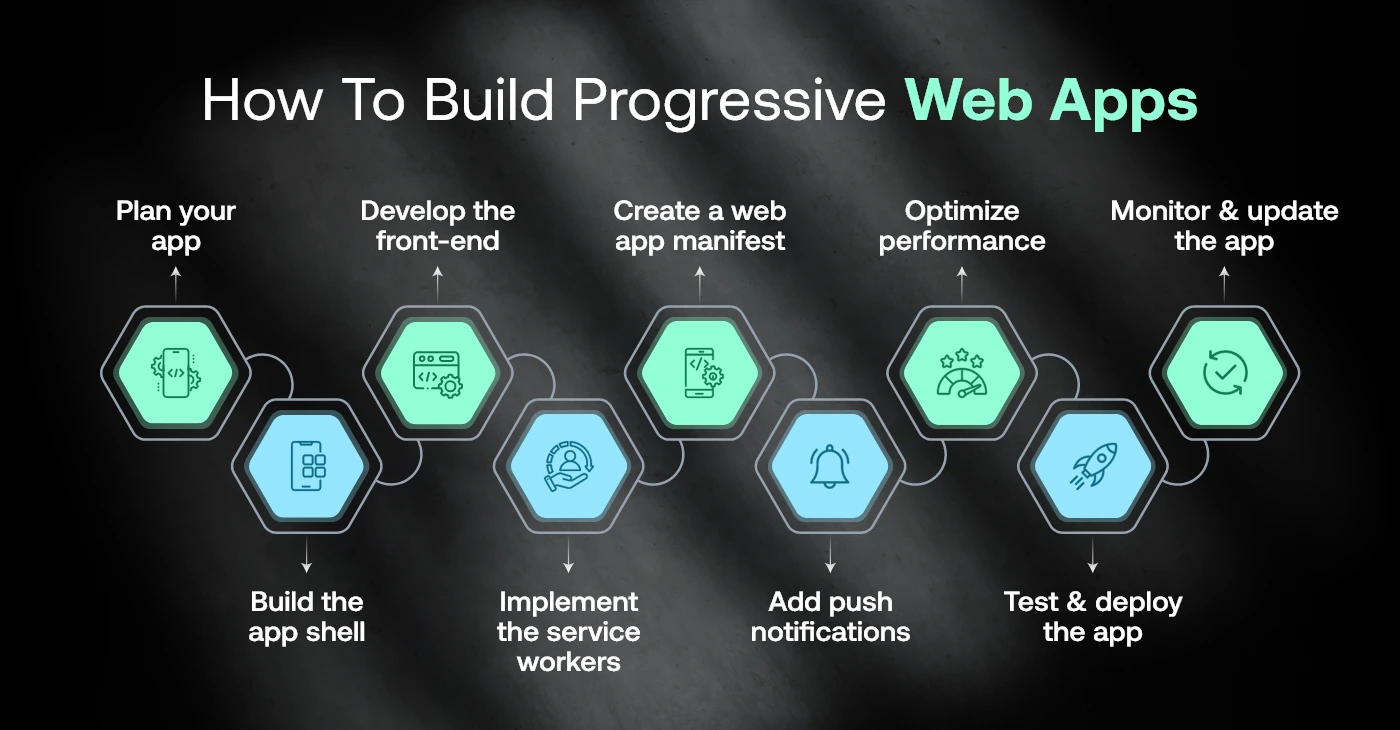
Notable PWAs:
- Twitter Lite
- Spotify Web
They are cost-effective and excellent for emerging markets or budget-conscious startups.
Future Trends in Web and Mobile App Development
Here are the future trends shaping web and mobile app development, influencing how businesses build faster, smarter & more user-centric digital experiences today.
- AI-First Applications
Apps are increasingly built with AI at the core powering personalization, chatbots, predictive analytics & automated user journeys across platforms. - Rise of Progressive Web Apps (PWAs)
PWAs continue bridging the gap between web and mobile, offering app-like experiences without installation, especially in emerging and mobile-first markets. - Cross-Platform Development Dominance
Frameworks like Flutter and React Native are reducing time and cost by enabling single-codebase apps across multiple platforms. - Voice and Conversational Interfaces
Voice search, AI assistants & conversational UI are becoming standard, reshaping how users interact with applications beyond touch. - Super Apps and Ecosystem Platforms
Businesses are moving toward all-in-one platforms that combine multiple services, increasing user retention and engagement within a single app. - Enhanced Security and Privacy Focus
With growing data concerns, apps are prioritizing advanced encryption, biometric authentication & compliance-driven security frameworks.
Web App vs Mobile App – Quick Decision Checklist
Not sure which platform fits your product? Use this quick checklist to match your business needs with the right development approach.
Choose a Web App if:
- You need to launch quickly with a lower budget and test your idea in the market
- Your users access your product across desktop, tablet & mobile devices
- Your application does not require deep device features like GPS or camera
- You want instant updates without app store approvals
- Your focus is on MVPs, SaaS platforms, dashboards, or internal tools
- Your users are mostly browser-first (B2B, admin, or operational users)
Choose a Mobile App if:
- You want to deliver a high-performance, seamless user experience
- Your product depends on device features like push notifications, GPS, camera, or sensors
- Offline access is important for your users
- You aim for high engagement, retention & personalization
- Your audience is primarily mobile-first (consumers, on-the-go users)
- You’re building products like eCommerce apps, social platforms, or on-demand services
Still Confused? Here’s the Shortcut:
- Fast launch + low cost → Web App
- Better UX + higher engagement → Mobile App
- Need both reach and experience → Consider starting with Web + scaling to Mobile
Choosing the Right Development Partner for Web & Mobile App
Your choice of development partner defines not just how your product looks, but how well it performs. A full-service web & app development company should offer:
- Expertise in both web and mobile development
- Business-centric product strategy
- Scalable architecture and future-readiness
- Post-launch support, analytics, and optimization
With the right web app design agency, your digital product can be faster, smarter, and more impactful from day one.
Conclusion
Choosing between a web app and a mobile app isn’t about which is more popular, it’s about selecting the solution that best aligns with your business goals, user expectations, and long-term growth strategy. The right choice creates the foundation for scalable performance, enhanced user engagement, and a seamless digital experience.
At Codiant, we don’t just build applications, we create high-performing digital solutions tailored to your unique business needs. Whether you’re planning your next digital product or looking to optimize an existing one, Get a free mobile app audit to gain expert insights and make informed decisions. If you’re seeking guidance from a results-driven web development agency in Saudi Arabia, your next step starts here.
The Author

Frequently Asked Questions
A web app runs in a web browser and doesn’t require installation, while a mobile app is downloaded from app stores and installed on a smartphone or tablet. Mobile apps typically provide better performance, offline access, and deeper integration with device features such as GPS, camera, and notifications.
A web app is generally more affordable because it uses a single codebase and runs through a web browser without requiring separate development for iOS and Android. Mobile app costs are typically higher due to platform-specific development, testing, and app store deployment.
Development timelines depend on the project’s complexity and features. A typical web app takes around 2–3 months, while a mobile app usually requires 4–6 months. More advanced applications with custom integrations or AI capabilities may take longer.
For many startups, a web app is a practical first step because it is faster and more cost-effective to launch. However, if your users are expected to engage frequently through smartphones, a mobile app may provide a better user experience and higher engagement.
Yes. Many businesses launch a web app first to validate their idea, reach users quickly, and reduce initial development costs. Once demand grows, the same product can be extended into a native or cross-platform mobile app with additional mobile-specific features.
Our product consultants evaluate your business objectives, target audience, budget, required features, timeline, and long-term growth strategy to recommend whether a web app, mobile app, or a combination of both will deliver the best return on investment.
Codiant develops custom web and mobile applications for businesses across healthcare, fintech, retail, logistics, education, fitness, real estate, manufacturing, travel, and other industries, helping organizations build scalable digital products tailored to their business goals.
Yes. Codiant offers ongoing application maintenance, security updates, performance optimization, bug fixes, cloud monitoring, and feature enhancements to ensure your web or mobile application continues to perform reliably as your business grows.
Featured Blogs
Read our thoughts and insights on the latest tech and business trends

Enterprise Mobile App Development: How It Can Accelerate Your Business Growth
- August 21, 2026
- Mobile App Development
Enterprise mobile app development can accelerate growth by improving three measurable areas: workflow speed, access to business systems, and customer or employee service delivery. This matters to mid-market and enterprise leaders managing distributed teams, manual... Read more
React vs Angular vs Vue: Which Should You Choose in 2026?
- August 14, 2026
- Technology
For most web products in 2026, choose React for ecosystem flexibility and broad hiring reach, Angular for standardised enterprise architecture and complex workflows, and Vue for simpler adoption and faster team onboarding. For CTOs, product... Read more

AI Agents vs RPA: What’s the Difference and When Should You Use Each?
- August 12, 2026
- Artificial Intelligence
AI agents and Robotic Process Automation (RPA) differ in three main areas: how they make decisions, the data they can process, and how they respond when a workflow change. RPA follows predefined rules to complete... Read more