AI Agents vs RPA: What’s the Difference and When Should You Use Each?
Table of Contents
Subscribe To Our Newsletter
Summarize with AI
Not enough time? get the key points instantly.
AI agents and Robotic Process Automation (RPA) differ in three main areas: how they make decisions, the data they can process, and how they respond when a workflow change.
RPA follows predefined rules to complete repetitive tasks, while AI agent solutions interpret goals, assess context, select tools, and adapt their actions within defined controls. This distinction matters to CTOs and operations leaders choosing between predictable task automation and more flexible enterprise workflows.
It also affects integration effort, governance, operating costs, and the level of human oversight required.
Codiant’s experience across 40+ AI projects shows that automation decisions work best when process variability, data structure, system access, and action risk are assessed before selecting the technology. This comparison covers AI agents, RPA, hybrid intelligent automation, suitable use cases, governance requirements, and a practical selection framework based on enterprise implementation needs.
Key Takeaways
- RPA follows fixed rules, while AI agents use three broader capabilities: contextual interpretation, multi-step planning, and controlled tool selection.
- Process variability is the main decision factor: use RPA for stable workflows and AI agents when inputs, decisions, or execution paths change.
- A controlled pilot should usually run for 4 to 8 weeks before wider deployment, although the actual timeline must be confirmed after reviewing scope, integrations, data readiness, and security requirements.
- The biggest mistake is adding agentic AI to a predictable process that a simpler workflow or RPA bot could complete more consistently.
- IBM reported in 2025 that 86% of surveyed executives expected AI agents to make process automation and workflow reinvention more effective by 2027.
- Codiant brings experience across 40+ AI projects, combining process discovery, agent development, RPA integration, testing, governance, and ongoing optimization.
What is the Difference Between AI Agents and RPA?
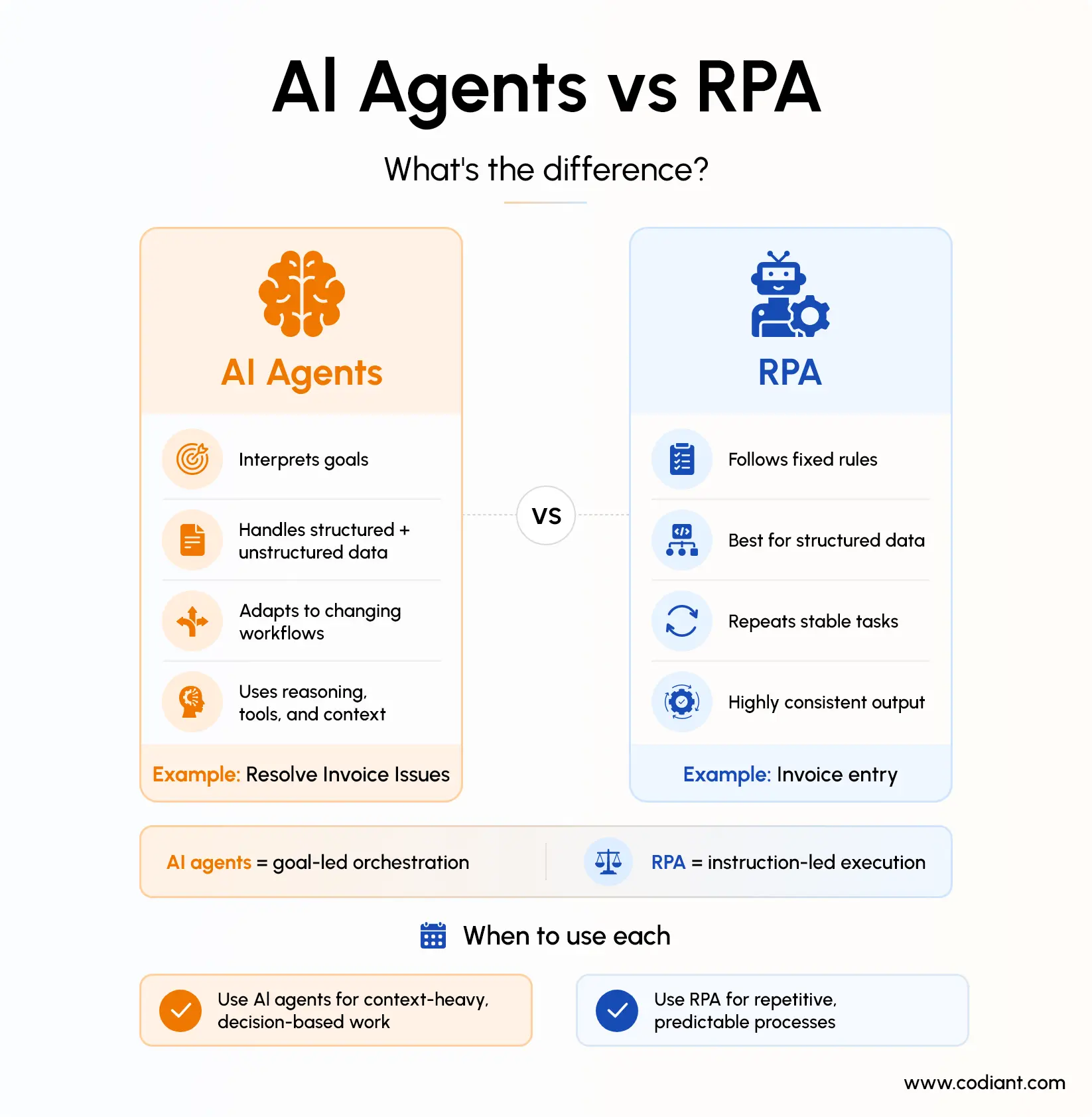
The main difference between AI agents and RPA is how they determine what to do. RPA bots execute predefined steps, while AI agents interpret a goal, assess available information, plan actions and adapt their approach as conditions change.
Robotic process automation uses software bots to imitate actions that employees perform through digital interfaces. A bot might open an application, copy information from a spreadsheet, enter it into a form, download a document or move a file. These actions are generally based on rules established during process design.
AI agents are software systems that use artificial intelligence to pursue goals and complete tasks on a user’s behalf. Depending on their architecture, they may use reasoning, planning, memory, enterprise data and external tools to decide which actions should be taken.
Consider a supplier-invoice process.
An RPA bot can:
- Open an email attachment
- Extract predefined invoice fields
- Enter them into an enterprise resource planning system
- Match values against fixed rules
- Route exceptions to a specified employee
An AI agent can potentially:
- Interpret different invoice and email formats
- Determine why information is missing
- compare the invoice with purchase records
- Contact an approved internal system for additional context
- Decide whether the discrepancy requires clarification
- Prepare a response or escalate the issue
The difference is therefore not simply “old automation versus new automation.” It is instruction-led execution versus goal-led orchestration.
AI Agents vs RPA: A Direct Comparison
| Comparison area | RPA | AI agents |
| Primary purpose | Automate predefined actions | Pursue goals and coordinate tasks |
| Operating logic | Fixed rules and workflows | Reasoning, planning and contextual decisions |
| Suitable data | Mainly structured and predictable | Structured and unstructured |
| Process variation | Works best with limited variation | Can handle multiple paths and changing inputs |
| Decision-making | Rule-based | Probabilistic and context-dependent |
| Adaptability | Requires workflow updates | Can select different actions within defined limits |
| System access | Often user interfaces, APIs or connectors | APIs, databases, tools, applications and RPA bots |
| Output consistency | Highly repeatable when systems remain stable | May vary based on context and model behaviour |
| Governance focus | Credentials, logs, exceptions and change control | Model quality, permissions, grounding, monitoring and human oversight |
| Best fit | High-volume repetitive tasks | Complex, knowledge-intensive workflows |
How Does Robotic Process Automation (RPA) Work?
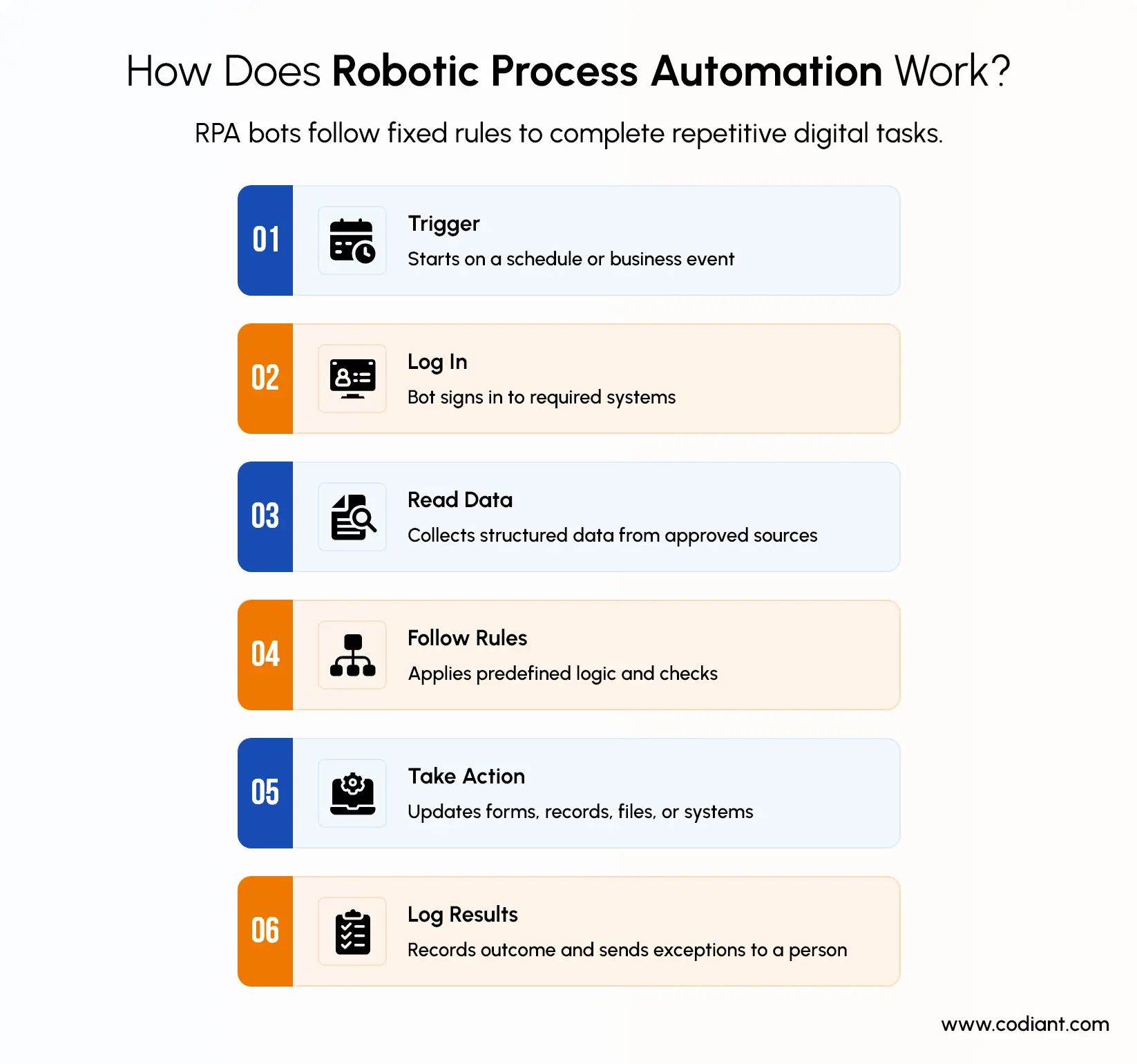
RPA works by translating a defined business procedure into executable steps. The bot interacts with applications, applies programmed rules and records whether the process completed successfully.
A typical RPA workflow includes:
- A schedule or business event triggers the bot.
- The bot signs in to the required systems.
- It retrieves structured data from an approved source.
- It performs actions in a fixed sequence.
- It applies rules to determine the next predefined route.
- It records the outcome and raises an exception when necessary.
RPA can be attended or unattended. An attended bot works alongside a person and is usually initiated within the employee’s workflow. An unattended bot runs independently on a designated machine or server according to a schedule or system trigger.
Microsoft describes unattended desktop flows as processes completed by the automation without user interaction, except where a separate approval has been designed into the workflow.
RPA is particularly useful when an organization must automate work across systems that do not have convenient APIs. The bot can interact with buttons, fields and menus in much the same way as an employee.
Not Sure Which Automation Model Fits Your Business Best Today?
Assess your processes, risks, and systems before choosing AI agents or RPA.
How Do AI Agents Work?
AI agents work by receiving a goal, gathering relevant information, deciding what actions are required, using approved tools and checking whether the goal has been completed. Unlike a basic chatbot that mainly generates a response, an AI agent can perform a sequence of tasks with a defined level of autonomy.
An AI agent generally works through five stages:
- Receives a goal: The user or another system gives the agent an objective.
- Understands the context: It reviews the request, available data, previous interactions and applicable rules.
- Creates a plan: The agent decides which steps and tools are needed.
- Takes action: It may search company data, call an API, update a system or trigger an RPA bot.
- Checks the result: It evaluates the outcome, corrects its approach when permitted or escalates the task to a person.
Google Cloud describes AI agents as software systems that use AI to pursue goals and complete tasks on behalf of users. These systems may use reasoning, planning, memory and tools to make decisions and perform actions.
What Components Does an Enterprise AI Agent Use?
An enterprise AI agent may include:
- A language or multimodal model
- Business instructions and operational policies
- Access to approved enterprise data
- Retrieval systems
- Short-term or long-term memory
- APIs and software tools
- Planning and orchestration logic
- User and system permissions
- Validation and approval controls
- Monitoring and audit logs
Several of these components also appear when teams build a generative AI application, including model selection, data preparation, retrieval systems, APIs, security controls, testing, and monitoring.
How Is an AI Agent Different from a Chatbot?
A chatbot primarily responds to a question or generates information. An AI agent can go further by planning steps, selecting approved tools and taking actions to achieve a defined goal. Agentic AI commonly refers to AI systems designed to plan and execute tasks with limited human intervention.
Businesses comparing these systems should also understand the differences between traditional AI, generative AI, and agentic AI, since each technology supports a different level of prediction, content generation, reasoning, and workflow execution.
When Should Businesses Use AI Agents Instead of RPA?
Businesses should use AI agents instead of RPA when the process cannot be represented reliably as a fixed sequence of rules. AI agents are better suited to work involving language, context, changing inputs, multiple systems or decisions that depend on the situation.
The right use case usually starts with a clearly defined operational problem. Examples of the business problems AI agents can solve include fragmented knowledge access, slow exception handling, repetitive research, and workflows that span several enterprise systems.
An AI agent may be appropriate when the process requires one or more of the following:
Understanding unstructured information
Emails, contracts, support conversations, reports, product descriptions and policy documents do not always follow a consistent template. An agent can interpret the meaning of this information before determining the next step.
Choosing between multiple possible actions
RPA can follow decision trees, but those trees must usually be defined in advance. An agent is more suitable when the correct route depends on broader context and cannot be fully expressed through fixed conditions.
Planning a multi-step task
A goal such as “investigate why this customer’s shipment is delayed and recommend a resolution” may require the system to decide which records, tools and policies should be reviewed.
Maintaining conversational context
AI agents can retain relevant information across an interaction, allowing them to ask follow-up questions and adjust subsequent actions. Agent architectures may use session state or longer-term memory to support this continuity.
Coordinating different tools
An agent can choose among approved APIs, databases, search tools, enterprise applications and automation bots. This makes it useful as an orchestration layer for processes that span several systems.
AI agents should not be selected merely because they are newer. A predictable task does not necessarily benefit from probabilistic reasoning. Adding an agent where a simple workflow is sufficient can increase cost, testing effort and governance requirements without creating equivalent business value.
Which Business Processes Are Best Suited for RPA?
RPA is best suited to high-volume, repetitive and rules-based processes that follow the same steps each time. It works particularly well when the input data is structured, the applications are stable and exceptions can be identified through predefined rules.
A process is a strong candidate for robotic process automation when:
- Employees repeat the same digital actions frequently.
- Decisions can be expressed through clear “if-then” rules.
- Information appears in consistent fields or formats.
- The process has limited variations and exceptions.
- The required output can be checked against fixed criteria.
IBM describes RPA as technology that automates repetitive office work such as extracting data, filling in forms and moving files.
Common RPA use cases include:
Finance and Accounting
RPA is suitable for invoice entry, account reconciliation, payment-status updates and standard financial reporting because these activities usually follow documented rules and use structured data.
For example, a bot can retrieve invoice values, compare them with purchase-order records and send mismatches to an employee. However, interpreting an unusual supplier dispute may require an AI agent or human review.
Human Resources
HR teams can use RPA for employee-record creation, payroll-data transfers, document generation and approved offboarding activities.
These processes are suitable because the required actions are normally triggered by structured information, such as an approved joining form or termination request. RPA should not make discretionary hiring, promotion or employee-performance decisions.
Insurance Administration
RPA can support claim registration, mandatory-field checks, policy-record retrieval and routine document routing.
It works best during the structured stages of claims processing. If a claim contains conflicting statements, unusual evidence or unclear circumstances, an AI-supported review or human assessment may be necessary.
Banking Operations
Banks can use RPA for structured back-office tasks such as account updates, report preparation, data transfers and routine compliance checks based on predefined conditions.
RPA can execute approved steps consistently, but it should not independently make complex lending, fraud or regulatory decisions that require contextual judgement.
Supply-Chain Administration
RPA can update order records, transfer shipment data, generate standard notifications and reconcile information between logistics systems.
These processes suit RPA when shipment statuses and response rules are clearly defined. Investigating the cause of an unusual delay across several systems may be better suited to an AI agent.
IT Operations
IT teams can use RPA to create user accounts, update service tickets, perform scheduled system checks and execute approved scripts.
The bot should follow defined permissions and escalation rules. Diagnosing an unfamiliar technical incident may require an agent that can interpret logs, consult documentation and recommend the next step.
When Is Agentic AI a Better Choice Than RPA?
Agentic AI is a better choice than RPA when a process requires interpreting unstructured information, making contextual decisions, planning multiple steps or selecting tools as conditions change. RPA is usually more suitable when the same predefined actions must be repeated consistently.
Choose agentic AI when the process involves:
- Emails, documents or conversations that vary in format
- Several possible routes rather than one fixed workflow
- Decisions that depend on business context
- Coordination across multiple systems or data sources
- Changing conditions during task execution
- Exceptions that cannot be covered by simple rules
Customer-Service Resolution
Agentic AI is useful when customer requests are ambiguous or require information from several systems. An agent can identify the customer’s intent, retrieve account history, interpret approved policies and recommend the next response.
RPA is better suited to the predictable execution stage, such as updating a record or submitting an approved refund. High-impact actions should remain subject to permission limits and human approval.
Sales Research and Meeting Preparation
An AI agent can gather information from approved sources, summarize account history, identify relevant products and prepare a meeting brief. This is difficult to manage through standalone RPA when every account requires different research and contextual interpretation.
RPA can still support repetitive actions such as transferring approved information into a CRM.
Procurement Document Review
Agentic AI can compare supplier documents, identify unusual terms, retrieve internal procurement policies and highlight issues for specialist review. It is more suitable than standalone RPA when documents vary and conclusions depend on meaning rather than fixed field values.
Final supplier selection, contractual approval and financial commitments should remain controlled by authorized employees.
Enterprise Knowledge Search and Synthesis
Agents can search authorized enterprise content, combine information from several sources and prepare an answer supported by the retrieved material. This is useful when employees need an explanation rather than a simple document lookup.
The organization should require source references so users can verify the agent’s response.
Incident Investigation
An AI agent can gather logs, review troubleshooting procedures, compare signals and suggest diagnostic steps. It can adjust the investigation as new evidence becomes available, while a traditional RPA bot generally follows a predefined diagnostic sequence.
Changes to production systems should require technical validation, limited permissions or human approval.
Multi-System Workflow Coordination
Agentic AI can select the appropriate tool, data source or specialist workflow for each request. This makes it suitable for processes in which the next step depends on the information discovered during execution.
The agent may coordinate the process while APIs, workflows or RPA bots perform the underlying system actions.
When Should Agentic AI Not Be Used?
Agentic AI may be unnecessary when the process is stable, rules-based and predictable. In those cases, RPA or a conventional workflow may be less expensive, easier to test and more consistent.
The appropriate level of autonomy should depend on the consequences of an error. Low-risk research may require limited supervision, while payments, customer-record changes, contractual commitments and production-system actions should require stricter controls.
Can AI Agents and RPA Work Together?
Yes. AI agents and RPA can work together in an intelligent automation workflow. The AI agent interprets requests, evaluates context and selects the next step, while the RPA bot performs predefined actions in business systems.
A combined workflow may include:
- The AI agent interprets the request.
- It retrieves information from approved sources.
- It selects the appropriate workflow.
- A human reviews the action when required.
- The agent triggers the RPA bot.
- The bot updates data or completes the transaction.
- The system returns the result to the agent.
- The agent verifies and communicates the outcome.
For example, an employee may ask an HR agent to update a dependent’s benefits information. The agent can explain the policy, collect the required details and confirm that supporting documents are available. After approval, an RPA bot can enter the validated information into the legacy HR system.
Implementing this type of hybrid workflow may require AI agent and automation solutions that connect reasoning models, enterprise data, APIs, RPA bots, approval controls, and monitoring tools within one governed architecture.
Turn Repetitive Workflows into Faster, Smarter, Controlled Business Operations Today
Combine AI reasoning and RPA execution across complex enterprise workflows securely today.
What is Intelligent Automation?
Intelligent automation combines AI, RPA and workflow technologies to interpret information, make controlled decisions and complete business tasks. It connects different automation tools within one coordinated process.
The architecture may include:
- RPA
- Workflow management
- Business rules
- APIs and system integrations
- Document processing
- Machine-learning models
- Generative AI
- AI agents
- Process mining
- Human approvals
- Analytics and monitoring
An AI agent is not the same as intelligent automation. It is one component within a broader enterprise automation solution.
For example, process mining can identify bottlenecks, an AI model can classify documents, an agent can coordinate the workflow, RPA can operate a legacy system and a human can approve high-risk exceptions.
The value comes from assigning each technology to the task it can perform most reliably.
Which Industries Benefit Most from AI Agents?
Financial services, healthcare, insurance, retail, manufacturing, logistics and professional services benefit most from AI agents. These industries manage large amounts of information, complex requests and workflows spread across multiple systems.
Financial services
Financial institutions can use AI agents for policy research, case preparation, customer-service requests and investigation workflows. Transactions and regulated decisions still require approved data, audit logs, strict permissions and human oversight.
Healthcare
Healthcare organizations can use AI agents for administrative coordination, information retrieval and documentation support. Clinical or patient-impacting decisions require specialist review, privacy safeguards and clearly assigned accountability.
Insurance
Insurance companies can use AI agents to interpret claim correspondence, retrieve policy details, summarize evidence and coordinate follow-up tasks. Human review remains important for claim decisions and high-impact exceptions.
Retail and ecommerce
Retailers can use AI agents for product discovery, customer support, order resolution, merchandising research and internal operations. Agents are particularly useful when requests require information from several systems.
Manufacturing
Manufacturers can use AI agents to retrieve maintenance records, review equipment documentation and coordinate diagnostic workflows. Technical teams should validate recommendations before equipment or production changes are made.
Logistics
Logistics companies can use AI agents to investigate delivery exceptions, combine shipment data with operational policies and recommend the next action. High-impact routing or customer decisions may still require approval.
Professional services
Professional-services firms can use AI agents for research, document review, knowledge retrieval and project administration. Access controls are essential when agents work with confidential client information.
The right industry alone does not make an AI-agent use case suitable. Organizations should also assess data sensitivity, decision impact, system permissions, regulatory requirements and the consequences of an incorrect action.
Are AI Agents Replacing Robotic Process Automation?
AI agents are not replacing RPA in every process. They are expanding the range of work that can be automated and changing how different business automation technologies are coordinated.
RPA remains useful because enterprises continue to operate predictable processes and legacy applications. When a task must follow the same approved steps every time, a deterministic bot or workflow may be easier to test and control than an AI agent.
Agents are more likely to replace parts of a process that previously required a person to:
- Interpret an email
- Search several knowledge sources
- Select a workflow
- Resolve an unfamiliar exception
- Summarize information
- Decide which tool to use
The execution stage may still depend on RPA.
The likely direction is therefore not “RPA or agents,” but a layered model:
- APIs for reliable system-to-system integration
- Workflows for structured process control
- RPA for repetitive interface-based actions
- AI models for classification and generation
- AI agents for reasoning and orchestration
- Humans for approvals, exceptions and accountability
How Should Organizations Choose Between AI Agents and RPA?
Organizations should choose RPA for stable, rules-based processes and AI agents for workflows requiring contextual understanding, flexible decisions or coordination across multiple systems. A hybrid model is suitable when an AI agent must interpret and decide while an RPA bot performs controlled system actions.
Use this decision framework before selecting an automation technology.
1. Define the intended outcome
Start by defining what the automation must achieve, who will use it and how success will be measured.
Relevant measures may include processing speed, completion rate, exception rate, cost per transaction, accuracy, employee effort, customer satisfaction and compliance performance.
2. Map the current process
Process mapping reveals whether the workflow is predictable enough for RPA or variable enough to require an AI agent.
Document:
- Applications and data sources
- Process steps
- Decisions and exceptions
- Approval requirements
- System dependencies
- Human involvement
3. Measure process variability
Choose RPA when the process follows stable steps with limited exceptions. Consider an AI agent when inputs change frequently, decisions depend on context or the process can follow several valid paths.
4. Assess the data
Data type strongly affects the technology choice.
RPA is generally better suited to structured and consistently formatted data. AI agents are more useful when the process involves emails, documents, conversations or other unstructured information.
Organizations should also confirm that the data is accurate, available and authorized for the proposed use.
5. Evaluate the risk of incorrect actions
The possible impact of an error should determine how much autonomy the automation receives.
High-impact processes involving payments, customer records, regulated decisions or production systems require stricter permissions, validation, logging and human approval.
6. Select the least complex effective solution
Use a conventional workflow or RPA bot when it can complete the process reliably. Introduce AI reasoning only when contextual interpretation, planning or dynamic tool selection creates measurable value. A newer technology is not automatically the better choice.
7. Design governance before deployment
When an agent-based solution is justified, businesses evaluating implementation partners can compare AI agent development companies in the USA based on agent architecture, integration experience, governance controls, industry knowledge, and deployment support.
Governance should define:
- Data access
- Tool permissions
- Approval thresholds
- Audit logs
- Testing requirements
- Escalation routes
- Model and prompt changes
- Incident procedures
- Ownership and accountability
For AI-based systems, governance should cover how risks are identified, measured, monitored and managed throughout the system lifecycle.
8. Begin with a controlled use case
Start with a process that has clear business value, available data, measurable outcomes and manageable consequences if the automation fails.
A controlled pilot makes it easier to validate accuracy, operating costs, user acceptance and exception handling before wider deployment.
Organizations that need external implementation support can compare AI application development companies in the USA by reviewing their technical capabilities, relevant project experience, security practices, engagement models, and post-deployment support.
9. Test the complete workflow
Testing should include normal and failure conditions.
Evaluate:
- Missing or incorrect data
- Conflicting information
- Unavailable systems
- Permission failures
- Unusual requests
- Process exceptions
- Attempted misuse
- Incorrect model outputs
10. Monitor and optimize continuously
Review completion rates, exceptions, response time, operating costs, model behaviour, user feedback and business outcomes.
Update the automation when systems, policies, data sources, risks or business requirements change.
How Codiant Supports AI Agent and RPA Implementation
Codiant helps businesses evaluate where AI agents, RPA, or a hybrid automation model can deliver measurable value. The approach begins with process discovery rather than selecting a technology first. Existing workflows, data sources, decision points, system dependencies, exception paths, and compliance requirements are reviewed before recommending an automation architecture.
Depending on the use case, the solution may include:
- RPA bots for repetitive, rules-based tasks
- AI agents for contextual decisions and workflow coordination
- APIs for reliable system-to-system communication
- Document processing for extracting information from files
- Human approvals for sensitive or high-impact actions
- Monitoring tools for tracking errors, costs, and outcomes
Organizations without sufficient internal AI capacity may also hire dedicated AI engineers for model integration, agent development, workflow orchestration, testing, and ongoing improvement.
For legacy systems without modern APIs, RPA can act as an execution layer while an AI agent interprets requests and selects the appropriate action. For structured processes, a simpler workflow or bot may be recommended instead of adding unnecessary AI complexity.
The implementation can also include proof-of-concept development, system integration, security controls, testing, deployment, and ongoing optimization. Broader AI development solutions may also include machine learning, generative AI, natural language processing, computer vision, predictive analytics, and AI-powered application development. This allows organizations to introduce automation in controlled stages while keeping business goals, reliability, and governance central to the solution.
Build the Right Automation Model for Your Business
Choosing between AI automation and robotic process automation is not a choice between innovation and outdated technology. It is an architectural decision based on how predictable the process is, what decisions must be made and how much autonomy the organization can govern safely.
RPA provides reliable execution for structured, repetitive work. AI agents introduce reasoning, planning and tool coordination for complex processes. Used together, they can support intelligent automation without forcing one technology into tasks better handled by another.
The strongest AI automation solutions begin with process assessment, measurable objectives and clear controls. Select the simplest technology that can achieve the required outcome, then add intelligence only where it produces verifiable business value.
Move from Automation Ideas to a Governed Working Solution Faster
Validate the right use case through discovery, integration, testing, and monitoring first.
The Author

Frequently Asked Questions
Traditional RPA bots follow predefined steps and rules, usually across stable application interfaces. AI agents interpret objectives, assess context, plan tasks and choose among approved actions. RPA prioritizes consistent execution, while agents extend automation to processes involving language, changing conditions and multiple possible routes.
RPA is best for frequent, rules-based processes with structured inputs, predictable outcomes and stable systems. Examples include data entry, record updates, standard reconciliations, report generation and file transfers. Processes with many undocumented exceptions or contextual decisions are generally weaker candidates for standalone RPA.
Agentic AI is more suitable when a process requires interpreting unstructured information, maintaining context, planning multiple steps or selecting tools dynamically. It should be used where this flexibility creates measurable value and where permissions, validation, monitoring and human escalation can control the risks.
Yes. An AI agent can interpret requests, gather context and select the appropriate workflow, while an RPA bot performs predefined actions in an enterprise or legacy system. This combination adds flexible reasoning without requiring every transactional action to be entrusted directly to a probabilistic AI model.
Organizations should compare process stability, data structure, decision complexity, system access, risk and required autonomy. Choose RPA for predictable execution, AI agents for contextual reasoning and a hybrid approach when both are needed. The final decision should follow process analysis rather than technology trends.
Featured Blogs
Read our thoughts and insights on the latest tech and business trends
How to Outsource Mobile App Development? A Comprehensive Guide
- August 7, 2026
- Mobile App Development
To outsource mobile app development successfully, define the product scope, budget range, target platforms, delivery responsibilities, security requirements, and acceptance criteria before evaluating development partners. This preparation helps CTOs, product leaders, and founders compare proposals... Read more
How The 1-Week Free Trial Works When Hiring Full Stack Developers
- August 6, 2026
- Staff Augmentation
A 1-week free trial gives US mid-market CTOs 7 working days to evaluate a full stack developer through real project tasks before confirming a paid engagement. This trial matters when a development roadmap requires immediate... Read more

How Mobile Apps Improve Logistics and Supply Chain Management in Australia?
- July 31, 2026
- Mobile App Development
Mobile apps improve logistics and supply chain management in Australia by digitising five high-friction workflows: dispatch, route planning, driver communication, proof of delivery, and inventory updates. For founders, CEOs, CTOs, CIOs, and operations leaders, that... Read more