Integrating NLP Into Your Existing App: From Text Analytics to Conversational Interfaces
Table of Contents
Subscribe To Our Newsletter
Natural Language Processing has moved from a niche capability to an essential part of modern software, and 2025 has clearly shown its impact.
Businesses are no longer rebuilding entire systems to keep up with user expectations – they are adding NLP to existing applications to make them smarter, faster, and easier to use.
This shift is turning static apps into intelligent, conversational, and context-aware experiences that understand user intent instead of just processing inputs.
From improving search accuracy to automating routine tasks, NLP helps teams enhance usability, streamline operations, and deliver stronger customer experiences without major architectural changes.
Integrating features like text analytics, semantic search, NLP-powered conversational interfaces, and language model integration in apps gives organizations a practical way to modernize their products.
As a result, NLP app integration has become one of the most effective paths for businesses looking to upgrade performance and efficiency.
What is NLP and Why It is Important for Modern Apps?
Natural Language Processing (NLP) is the technology that allows computers to understand and work with human language. Instead of relying on strict commands or fixed inputs, NLP enables applications to interpret text or speech the way people naturally communicate. As a result, natural language processing for apps has become a key ingredient in building modern, intelligent digital experiences.
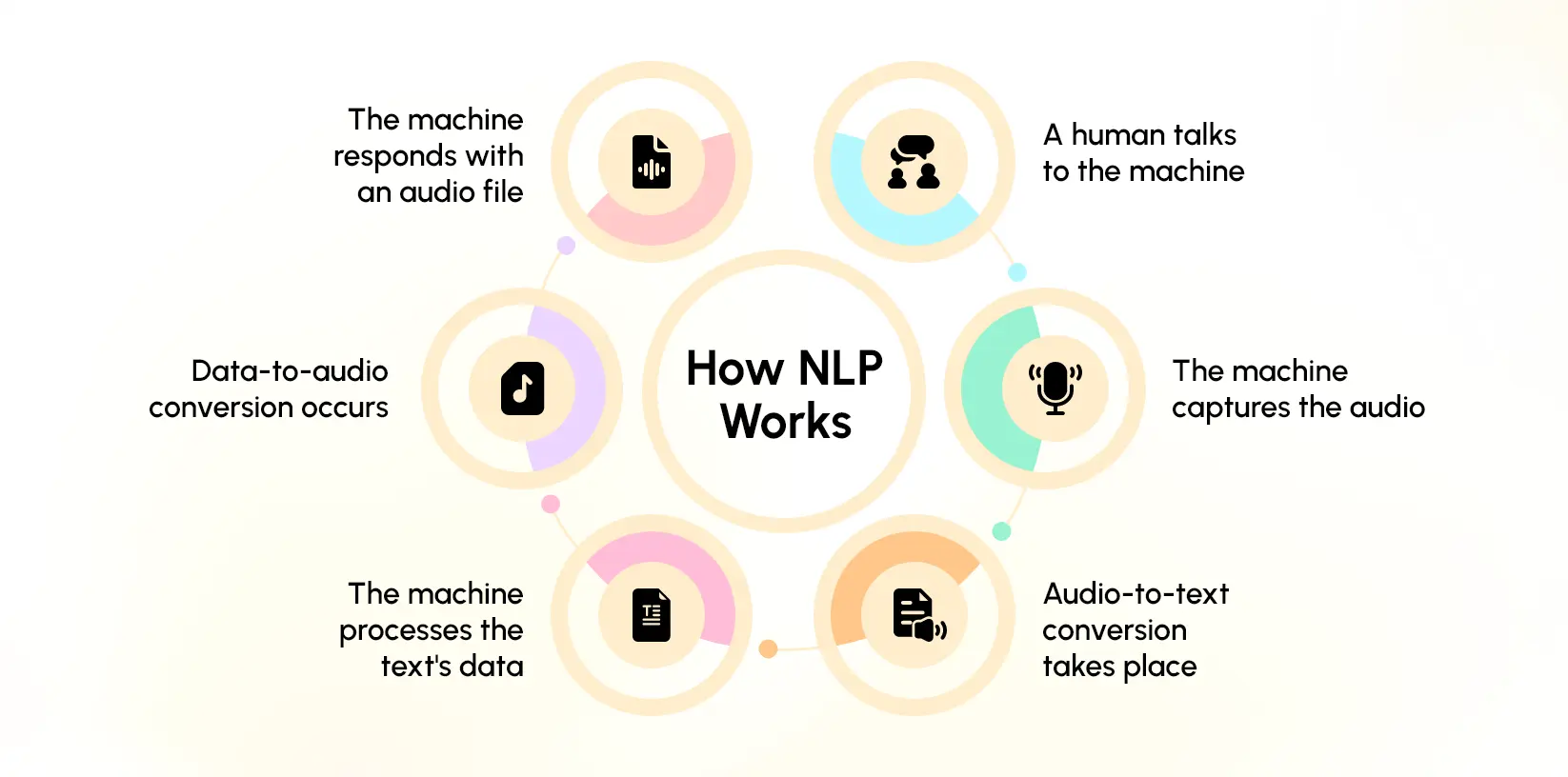
At its core, NLP breaks down and analyzes language using a series of essential functions:
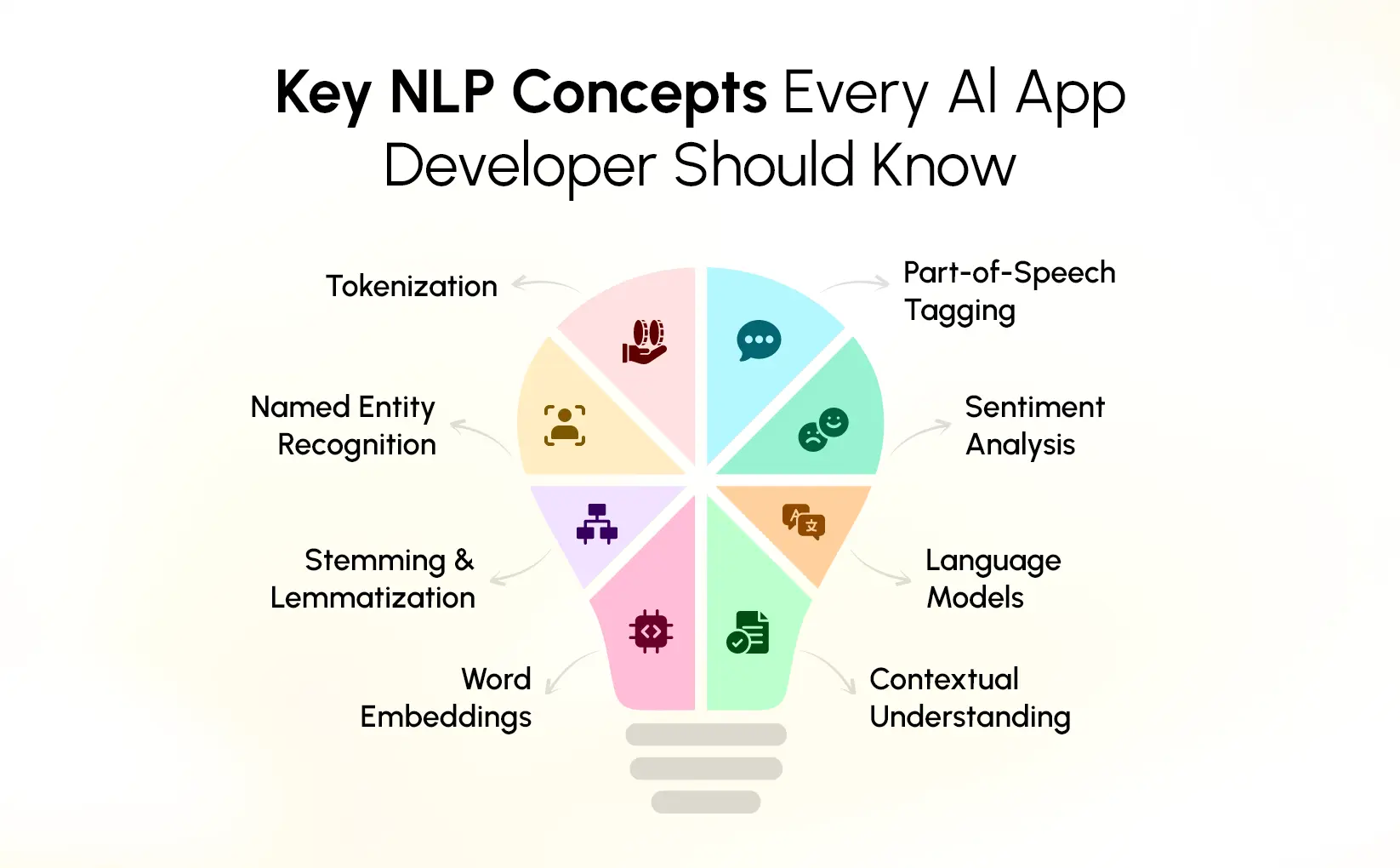
- Tokenization – Splits sentences into words or phrases so the system can process them accurately.
- Intent Detection – Identifies the purpose behind a user’s message, such as asking a question or requesting an action.
- Classification – Organizes text into categories like queries, complaints, feedback, or topics.
- Summarization – Converts long text into concise, meaningful summaries.
- Embeddings – Transforms text into numerical vectors that capture meaning, enabling semantic search and similarity matching.
- Speech-Based Inputs – Converts spoken audio into text for voice commands, dictation, or conversational interfaces.
These capabilities explain why NLP for mobile and web apps is becoming a standard expectation. Users prefer natural conversations over rigid menus and complex forms. When an app can understand questions, analyze text, and return relevant answers quickly, it feels simpler, faster, and more intuitive to use.
NLP also plays a major role across enterprise applications. Businesses handle large volumes of unstructured data – emails, documents, reviews, tickets, chat logs – and NLP helps turn that raw text into actionable insights. It improves customer support, automates internal processes, and enhances search accuracy within systems like CRMs, ERPs, and knowledge bases.
Integrating advanced models through language model integration in apps allows developers to go beyond basic text processing. Apps can interpret context, provide recommendations, personalize responses, and support conversational interactions. This transforms traditional apps into intelligent systems that guide users instead of waiting for perfectly structured inputs.
By enabling smarter interactions and faster understanding, NLP lifts both the user experience and the operational efficiency of modern applications. It turns simple interfaces into adaptive, context-aware tools that match the expectations of today’s digital users.
Transform your app from reactive to intelligent.
Use NLP to understand users, automate tasks, and build meaningful conversational experiences.
Key NLP Capabilities You Can Add to Your Existing Application
Adding NLP to an existing application doesn’t require rebuilding your entire system. Most capabilities plug into your current workflows and start delivering value almost immediately. The following NLP features are the most practical and widely adopted across product teams, customer support, operations, and enterprise applications.
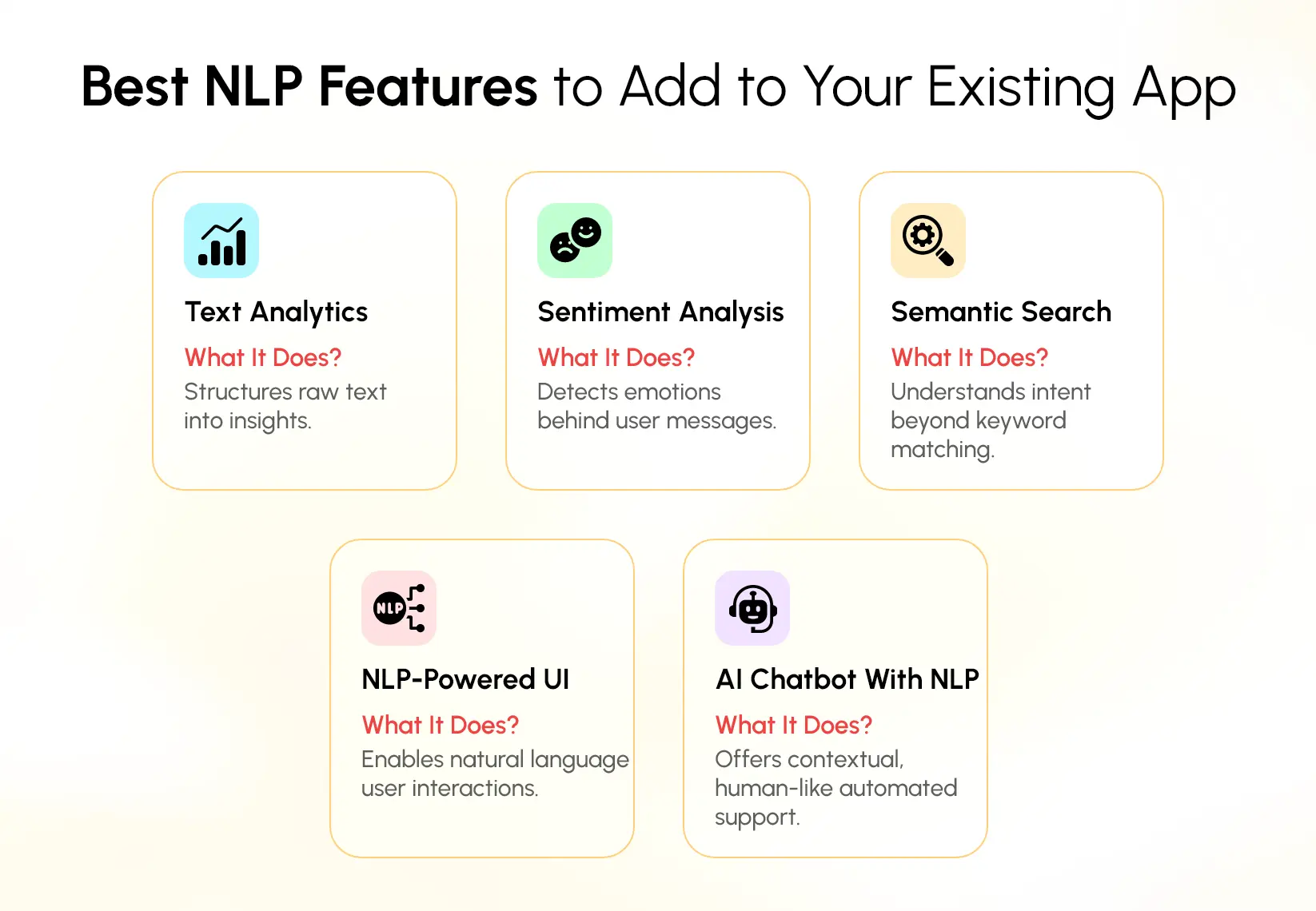
1. Text Analytics Integration
Text analytics is often the first-and simplest-step in introducing NLP into your app. It helps your system understand and organize large volumes of unstructured text, making information easier to track, prioritise, and analyse.
With text analytics integration, your application can automatically:
- Tag content based on topic, category, or urgency
- Identify recurring themes across customer reviews or employee feedback
- Detect specific entities like product names, dates, locations, or people
- Convert lengthy text into concise summaries for faster reading
These features work well in any product that collects or stores written input.
For example:
- Support teams can automatically classify incoming tickets.
- Product teams can analyse user reviews at scale.
- Internal knowledge bases can be indexed for faster search and retrieval.
- HR systems can sort employee feedback without manual effort.
Because most text analytics tools connect through APIs, this is one of the most accessible ways to begin NLP app integration. It strengthens decision-making and reduces manual work across the entire product ecosystem.
2. Sentiment Analysis App Integration
Sentiment analysis gives your application the ability to interpret emotion in written text. It tells you not just what users are saying, but how they feel when they say it.
Through sentiment analysis app integration, your system can classify text as positive, negative, or neutral in real time. This adds important context across multiple use cases:
- Customer support: Flag frustrated users and prioritise their tickets.
- HR tools: Detect negative sentiment in employee surveys or internal communication.
- Product experience: Track whether new features are being received positively.
By combining sentiment data with broader natural language processing for apps, businesses gain visibility into patterns that are often missed when manually reading messages one by one. This helps organisations react, improve, and resolve issues faster.
3. Semantic Search Integration
Search is one of the most valuable areas where NLP can significantly improve user experience. Traditional keyword-based search only matches exact words. If the phrasing doesn’t match, the results are often irrelevant.
Semantic search integration changes this by focusing on meaning instead of literal keywords. It uses embeddings and vector similarity to understand:
- The intent behind a query
- The relationship between words
- Context across sentences
As a result, users get more accurate and intuitive search results. For example, a search for “budget-friendly phones for students” can surface affordable smartphones even if the product descriptions use completely different wording.
This capability works especially well in:
- E-commerce platforms
- Document-heavy enterprise systems
- Learning platforms
- SaaS dashboards
- Internal knowledge bases
By pairing semantic search with language model integration in apps, organisations can dramatically improve discoverability and reduce time spent searching for information.
4. NLP-Powered Conversational UI
Many applications are now moving toward conversational interactions because they reduce friction and make the product easier to use. An NLP-powered conversational UI enables users to type or speak naturally while the system interprets the intent behind their request.
This capability focuses on:
- Detecting intent
- Extracting important details
- Handling follow-up questions
- Maintaining context across messages
For example, instead of navigating through multiple menus, a user can simply say, “Show me my invoices from last month,” and the system will retrieve the correct information.
These conversational flows integrate smoothly into existing apps and are becoming a standard in banking, healthcare, HR, e-commerce, and internal operations. They enhance accessibility and fit naturally into any conversational AI interface strategy.
5. AI Chatbot With NLP
An AI chatbot with NLP goes far beyond traditional rule-based chatbots. Instead of responding only to predefined scripts, it understands phrasing, intent, and the context of conversations.
This allows your chatbot to:
- Answer questions that are not phrased exactly as expected
- Guide users through tasks step-by-step
- Retrieve personalized data
- Adapt responses based on conversation flow
The difference is most noticeable in real interactions. A rule-based chatbot breaks when users deviate from the script. An NLP-driven chatbot handles natural conversations, even when phrasing changes. This creates a smoother, more reliable support experience.
These chatbots are widely used across industries-finance, education, retail, healthcare, logistics-because they reduce support load, improve turnaround time, and help users self-serve more confidently. They also fit naturally into any application looking to provide a more modern and intuitive conversational AI interface.
Implementation Roadmap: How to Add NLP to Your Existing Application
Integrating NLP into an existing application is most effective when done through a structured approach. The goal is to improve how your system interprets text, supports user interactions, and automates decisions, without disrupting ongoing operations.
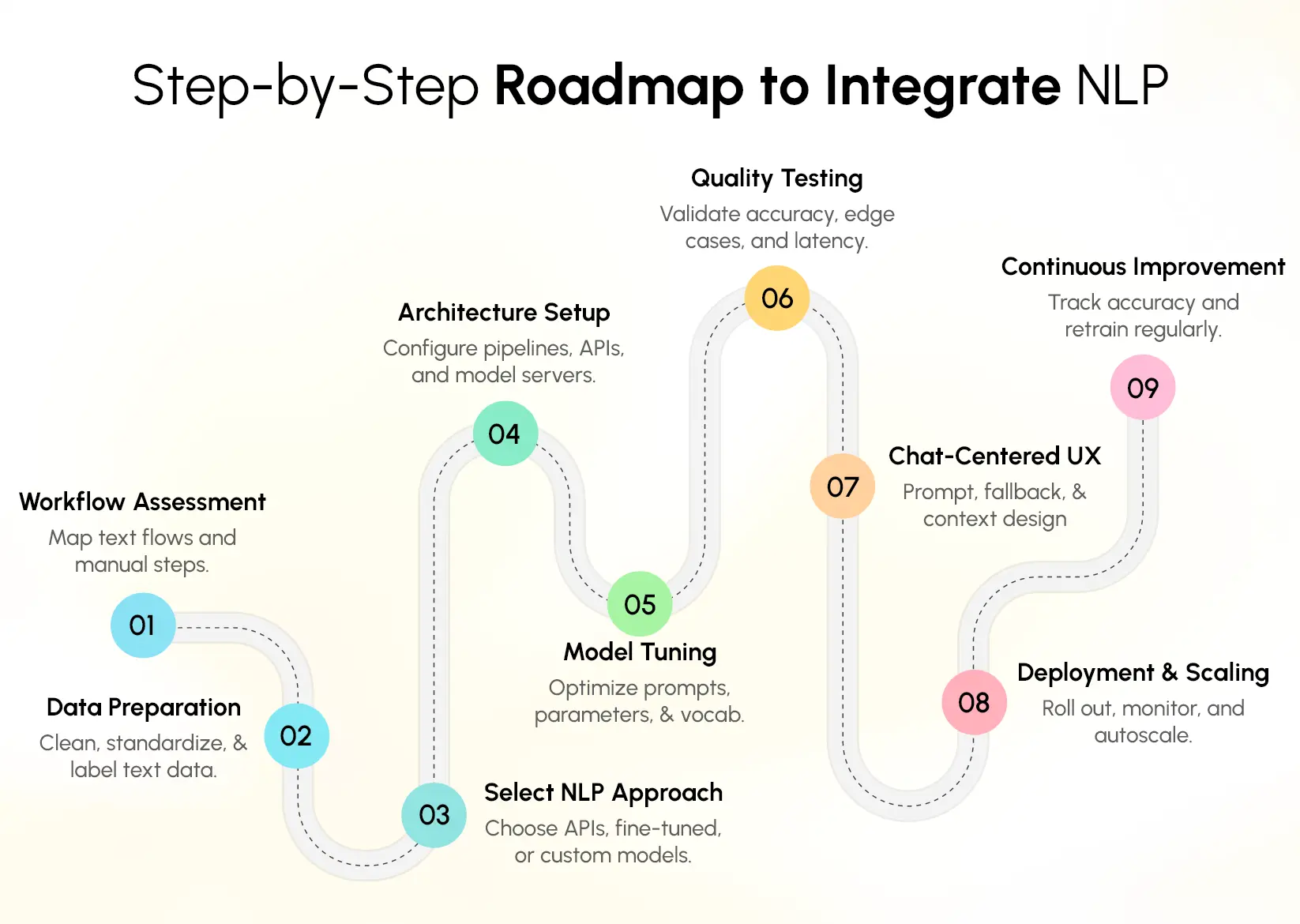
This roadmap breaks down the process into clear, practical steps that apply to mobile apps, web platforms, and enterprise systems.
1. Workflow Assessment
The first step is understanding how information currently moves inside your application. Every app has a flow – users generate text, systems process it, and decisions happen on top of that output. Before introducing any NLP components, map these flows clearly.
Identify where unstructured text appears: customer chats, emails, reviews, forms, service tickets, or documents.
Determine what portion of this text is manually processed today and what decisions depend on that information.
This step provides clarity on where NLP automation for businesses can produce meaningful improvements.
You should also review your existing data pipelines, backend infrastructure, and any third-party systems already integrated.
This helps define the right points for NLP app integration so the upgrade feels like an enhancement, not a rebuild.
2. Data Preparation
NLP systems depend heavily on the quality of the text they learn from. Once you know your workflows, focus on preparing clean, structured datasets.
Start by gathering historical text data relevant to your use case – support tickets, customer reviews, product descriptions, clinical notes, resumes, policies, or any domain-specific content.
Next, remove noise: duplicated records, unnecessary symbols, formatting errors, or irrelevant content.
Standardize spelling, remove personally identifiable information where necessary, and ensure the dataset represents different scenarios your model will face.
If your use case requires labeled data – such as sentiment, intent, or entity tagging, create or refine labels with domain experts.
Good data preparation increases model accuracy and reduces the time needed for tuning later in the integration.
3. Select the Right NLP Approach
There are three common approaches to implementing NLP:
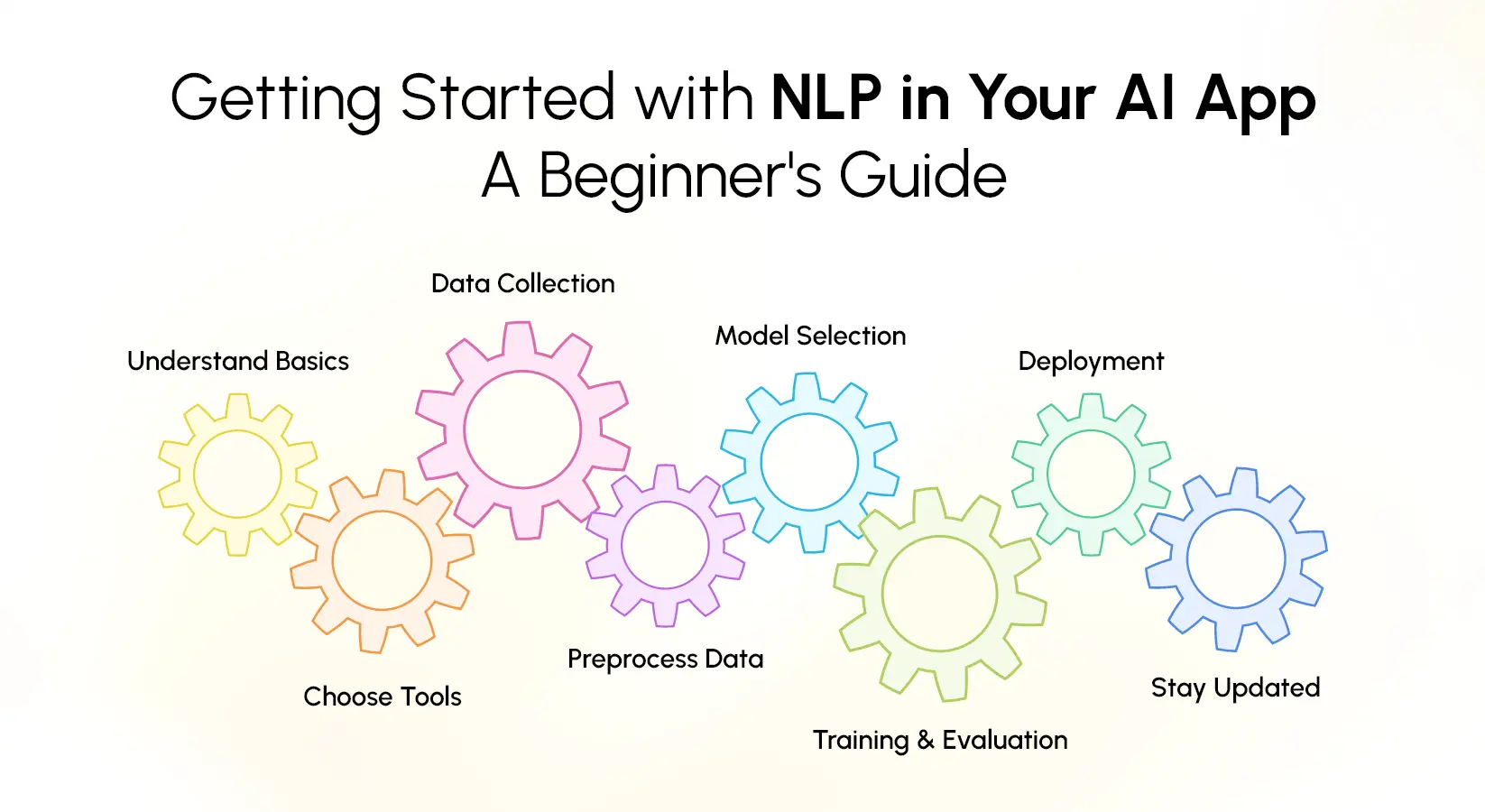
- Pre-trained NLP APIs: Useful for quick integration and broad functions like translation, summarization, text categorization, or sentiment analysis. These are ideal when speed and scalability matter. This falls under NLP API integration, where you call external endpoints to process text.
- Fine-tuned models: These build on top of pre-trained language models but adapt them to your industry vocabulary. They require more time and data preparation but give higher accuracy for specialized domains like healthcare, finance, or logistics.
- Custom models: Suitable when your use case is unique, or data privacy is critical. These models require experienced teams or specialized NLP development services to build from scratch, train, deploy, and maintain over time.
Choosing the right approach depends on your technical resources, compliance requirements, budget, and expected accuracy.
4. Architecture Setup
Once you choose the NLP method, you need to update the app architecture to support it. Most implementations follow a similar structure:
- Client sends text or voice input
- Backend receives and cleans the input
- NLP engine processes the text
- Output is formatted into a usable response
- System triggers the next actions based on the result
If you use NLP API integration, configure secure API calls, authentication keys, and rate limits. For fine-tuned or custom models, set up a model-serving environment using containers, cloud GPU instances, or local inference servers.
Add pipelines for pre-processing and post-processing, and define how responses will be stored or cached to optimize performance.
The architecture you choose should allow scaling as your app receives more user interaction.
5. Tuning & Adaptation
After the architecture is functional, adjust the NLP components to fit your domain. This includes fine-tuning model parameters, adding domain-specific dictionaries, adjusting token limits, improving entity recognition accuracy, or training on organization-specific text.
You may also need to calibrate thresholds for classification tasks, refine prompt templates for language models, or set up multi-step workflows for tasks like summarization or semantic search.
This phase ensures the NLP engine generates output that aligns with how your business works rather than generic language patterns.
6. Quality Testing
Testing NLP systems requires more than checking technical functionality. The focus should be on accuracy, consistency, and reliability across different types of input.
Test across both typical and edge-case text: typos, spelling variations, incomplete sentences, user slang, and multilingual inputs. Compare the model’s output against expected business rules.
Use quality metrics like precision, recall, F1 scores, intent accuracy, entity extraction accuracy, and latency benchmarks. If outputs fail to meet requirements, refine the model or expand the training dataset.
Functional testing, integration testing, and security testing must all be part of this stage to ensure the model fits seamlessly into your existing application.
7. UX for Conversational Features
If your integration includes chat-based interactions, voice commands, or text-driven automation, the user interface needs adjustments.
A conversational experience must be easy to follow, responsive, and context-aware.
Define clear input formats, fallback states, guided prompts, and response styles. The UI should support error handling – such as re-asking questions or presenting alternative suggestions – when the model is uncertain.
This step ensures the conversational feature aligns with your brand tone and delivers a consistent experience across mobile and web platforms.
Good UX design prevents user confusion and improves the adoption of NLP-powered features.
8. Deployment & Scaling
Once the NLP system performs well in testing, deploy it into the production environment. This can be a phased rollout using a pilot group or a full deployment depending on the risk profile.
For API-based solutions, scaling depends on API throughput. For custom or fine-tuned models, set up auto scaling policies, container orchestration, and performance monitoring.
Ensure your logs capture inputs, errors, response times, and usage patterns. This helps maintain uptime and performance, especially for real-time tasks such as chatbots, semantic search, or automated classification.
As user load grows, your infrastructure should be able to scale horizontally or vertically without compromising processing speed.
9. Monitoring & Continuous Improvement
NLP systems need ongoing monitoring because language patterns change, and real-world input may differ from training data. Track performance metrics such as accuracy, error rates, user satisfaction, and latency.
Schedule periodic reviews of model output, and re-train or fine-tune when accuracy begins to drift. Enhance training datasets based on new real-world examples.
Add additional rules or filters where needed. Over time, continuous refinement strengthens the reliability of your system and keeps automation effective.
Monitoring also helps detect security issues, misuse patterns, or unexpected input behaviors early.
By maintaining oversight, you ensure the long-term success of NLP automation for businesses and keep your solution scalable as user needs evolve.
Read more: How to Choose the Right AI Solutions for Your Existing App
Successful NLP Integration Examples from Top Brands
Businesses across industries have added NLP into their existing applications to improve search, automate manual reviews, and deliver faster, more natural user experiences. Here are real companies using NLP integration effectively.
1. Amazon – Semantic Search for Better Product Discovery
Amazon improved its product search by integrating NLP models that understand user intent, spelling variations, and incomplete phrases.
When customers type unclear queries like “phone with great battery,” the system reads context, not just keywords.
This upgrade reduced irrelevant results and helped shoppers find products faster, improving conversions without changing the platform’s core structure.
2. Duolingo – Automated Feedback and Smart Explanations
Duolingo uses NLP to evaluate learner responses, identify grammar mistakes, and generate corrective feedback instantly. Instead of relying only on pre-written rules, the app analyses how learners phrase answers and provides guidance that matches real user input. This allowed Duolingo to scale learning assistance without rebuilding the lesson engine.
3. Airbnb – Smarter Search and Better Host–Guest Communication
Airbnb added NLP to make listing search more intuitive. The system interprets queries like “pet-friendly home near beach with parking” and identifies listings that match multiple criteria, even if hosts don’t use those exact keywords.
Airbnb also uses NLP to highlight message intent in host–guest chats, helping support teams respond more efficiently.
4. Grammarly – Real-Time Writing Assistance
Grammarly integrates NLP and large language models to analyse grammar, sentence clarity, tone, and intent.
The app reads full context rather than checking isolated words, allowing it to suggest precise rewrites.
The platform continuously improved its writing suggestions without overhauling the original editor interface, proving how NLP enhances an existing app experience.
5. Spotify – Personalized Recommendations and Voice Understanding
Spotify uses NLP to categorize songs, analyse lyrics, understand search queries, and support voice commands.
Its recommendation engine identifies themes in text data – such as moods, genres, and contexts – to create better playlists.
NLP also enables listeners to use natural speech like “play relaxing evening songs,” which the system interprets accurately.
6. LinkedIn – Resume Parsing and Job Matching
LinkedIn applies NLP to parse job descriptions and user profiles, extract key skills, and match candidates with relevant openings.
Instead of keyword matching, the platform analyses meaning and context, which improves match quality and reduces irrelevant recommendations. This addition strengthened LinkedIn’s job discovery features while retaining its existing workflow.
7. Shopify – Review Analysis and Merchant Insights
Shopify uses NLP to automatically categorize customer reviews, detect sentiment, and surface common product issues to merchants.
The platform identifies patterns such as frequent size complaints or delivery concerns and presents them as insights.
This helped store owners improve products and customer service without manually scanning thousands of reviews.
8. Notion – Smart Search and AI-Powered Writing Support
Notion uses NLP to enhance document search and provide AI assistance inside pages. Users can type ambiguous or partial phrases, and the search engine still retrieves relevant notes.
NLP also powers rewriting, summarizing, and content generation features inside the existing Notion workspace, improving productivity without changing the platform’s foundation.
Want to add similar NLP capabilities to your app?
Our team can help you integrate text analytics, semantic search, or conversational interfaces without rebuilding your product.
Why Integrate NLP Instead of Rebuilding Your App?
Rebuilding an entire application is expensive, time-consuming, and disruptive. For most teams, the smarter approach is to add NLP to your existing application and enhance it step by step. This lets you modernize your product without rewriting systems that already work.
1. Faster Time to Market
Building a new application from scratch often requires long development cycles, new architecture decisions, and extensive testing. NLP integration takes a different path.
You can introduce features such as semantic search, sentiment analysis, document tagging, or conversational interfaces in small, manageable phases.
This means your team can release improvements quickly, gather feedback, and expand NLP capabilities over time-all without halting ongoing operations.
2. Automate Manual, Repetitive Workflows
Most applications still rely on human effort for tasks like categorizing messages, analyzing feedback, extracting key information, or routing support tickets.
With NLP automation for businesses, these tasks become automated:
- User messages are classified instantly
- Important keywords and entities are extracted
- Documents are summarized automatically
- Tickets route to the right team without manual review
The result is a noticeable reduction in manual workload, allowing teams to focus on strategic responsibilities instead of repetitive text processing.
3. Improve Search Accuracy and Overall User Experience
Traditional search features struggle when users phrase things differently or use natural language. NLP solves this by understanding meaning, intent, and context.
A semantic search engine helps users find the right information faster, even with vague queries.
NLP also boosts customer support by identifying the user’s intent, suggesting relevant resources, or generating auto-responses.
This improves response time, accuracy, and user satisfaction across your app.
4. Lower Costs by Keeping Your Existing Architecture
Rebuilding a platform often means changing databases, APIs, backend workflows, and deployment pipelines. NLP integration avoids that.
You keep your current architecture intact and enhance it with intelligent capabilities.
This lowers app development cost, reduces engineering effort, and minimizes risk.
For enterprises, NLP solutions for enterprise apps make modernization possible without replacing existing systems.
5. Strong Industry Use Cases Already Proven to Work
NLP integration is not experimental technology. It’s already driving measurable impact across sectors:
- E-commerce: smarter search, customer sentiment insights, conversational shopping
- Healthcare: automated transcription, clinical note analysis, patient query assistance
- Finance: fraud analysis, document processing, automated support
- Logistics: intent-based shipment tracking and faster support responses
- HR tech: resume parsing, candidate ranking, feedback review automation
These examples show that meaningful improvements don’t require a full rebuild – only intelligent extensions.
Real-World Use Cases: NLP Integration Across Industries
Natural Language Processing is no longer a niche capability—it has become a core layer in how companies automate communication, process unstructured data, and enhance user experience.
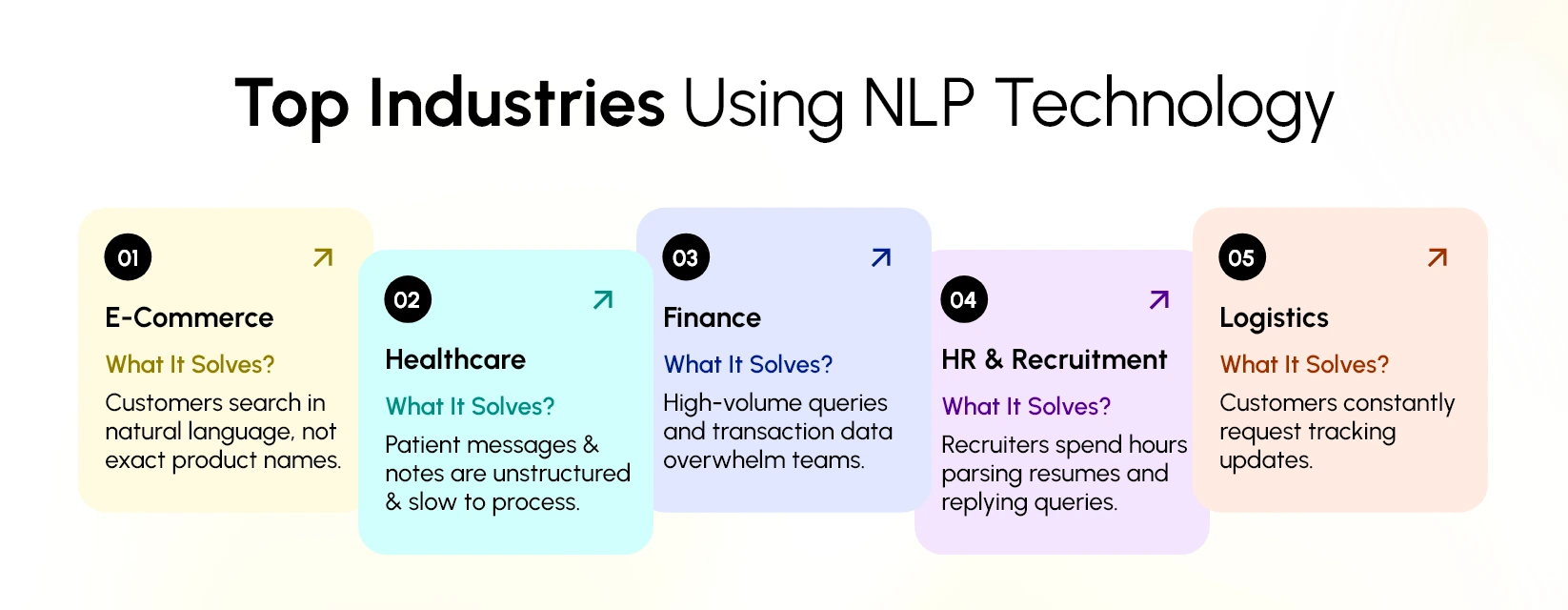
From e-commerce brands to HR teams, organizations are using NLP solutions for enterprise apps to streamline operations without replacing their existing systems. Below are the most widely adopted use cases across industries.
1. E-commerce: Better Search and Clearer Customer Understanding
E-commerce platforms succeed when customers find what they want quickly. The problem is that users rarely search with exact product names. They type vague, conversational, or incomplete queries.
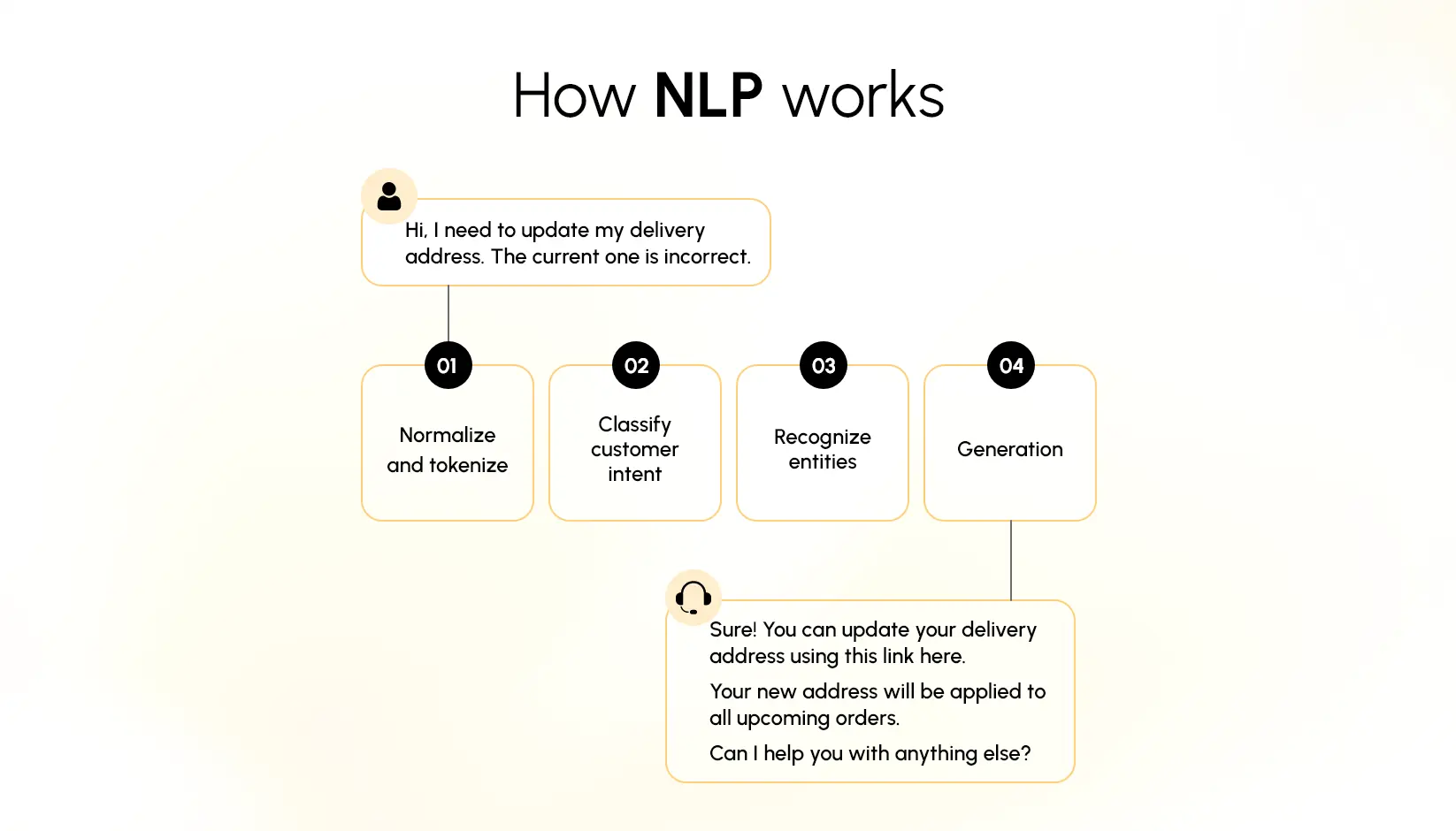
This is where NLP for mobile and web apps makes a clear difference.
How NLP Helps
- Semantic Search: Understands user intent and context instead of literal keywords. A query like “running shoes for flat feet” returns relevant matches, not broad categories.
- Customer Sentiment Analysis: Automatically sorts thousands of reviews into positive, negative, and neutral groups.
- Feedback Classification: Identifies recurring issues, product defects, or improvement opportunities.
Business Impact
- Improves search accuracy
- Reduces customer frustration
- Increases product discovery and conversion rates
2. Healthcare: Faster Query Handling and Structured Clinical Notes
Healthcare workflows are text-heavy—patient questions, chat requests, intake forms, discharge summaries, and physician notes. Manually processing this data slows teams down and introduces risk.
With NLP solutions for enterprise apps, healthcare systems convert unstructured text into structured, usable information.
How NLP Helps
- Patient Query Understanding: Automatically routes messages such as “I need a follow-up appointment” or “Prescription is missing” to the correct department.
- Clinical Note Extraction: Identifies symptoms, diagnoses, medications, and treatment plans from physician notes.
- Documentation Support: Highlights missing details to ensure complete records for billing and compliance.
Business Impact
- Reduces administrative burden on clinical staff
- Improves accuracy in EHR documentation
- Speeds up patient response and care coordination
3. Finance: Fraud Detection and Automated Conversations
Financial institutions manage high volumes of customer interactions and transaction-related text. NLP helps them detect anomalies and automate routine communication securely.
How NLP Helps
- Fraud Detection: Analyses transaction descriptions, user messages, and dispute notes for suspicious patterns.
- AI Chatbot With NLP: Handles repetitive customer questions—balances, loan status, account issues—without relying on rule-based scripts.
- Document Classification: Sorts KYC forms, bank statements, and contracts faster than manual teams.
Business Impact
- Cuts investigation time
- Minimizes repetitive workload for support teams
- Improves customer satisfaction through quicker responses
4. Logistics: Real-Time Tracking Answers and Clearer Shipment Updates
In logistics, customers frequently ask: “Where is my package?” or “Has it cleared customs?” Responding manually slows operations.
Using NLP for mobile and web apps, logistics platforms automate these interactions.
How NLP Helps
- Intent Recognition: Understands user messages and extracts the tracking intent.
- Automated Status Retrieval: Fetches shipment details from backend systems and returns a simple, clear response.
- Exception Explanation: Converts carrier notes like “In transit, terminal delay” into language customers can understand.
Business Impact
- Shortens response times
- Reduces load on call centers
- Improves customer transparency during delays
5. HR and Recruitment: Smarter Screening and Candidate Matching
Recruiters often spend hours reviewing resumes, shortlisting candidates, and responding to basic queries. NLP reduces this manual load significantly.
How NLP Helps
- Resume Parsing: Extracts skills, experience, education, and job history into structured fields.
- Candidate Matching: Compares resume data with job descriptions to highlight best-fit profiles.
- AI Chatbots With NLP: Answers candidate questions about roles, application status, or interview schedules.
Business Impact
- Cuts screening time dramatically
- Improves quality of shortlists
- Keeps candidates engaged without manual follow-ups
Cost Breakdown: How Much It Takes to Integrate NLP
Integrating NLP into your existing application involves a mix of software, model, and operational costs. While the budget varies by project size, most expenses fall into five predictable categories. Understanding these helps teams plan realistically and avoid unexpected spending.
1. API-Based Cost
Using cloud NLP APIs is the fastest and least expensive path. Providers bill per request or per 1,000 tokens processed. For startups and mid-sized apps, this keeps the integration lightweight without needing new infrastructure.
- Typical monthly spend: USD 300–3,000
- High-volume enterprise apps: USD 5,000–15,000+
Best for teams that want to add NLP to existing applications with minimal development effort.
2. Custom Model Development Cost
Building a domain-specific NLP model requires deeper investment. This includes data preparation, experimentation, training, evaluation, and deployment.
- One-time development estimate: USD 15,000–120,000+
Organizations choose custom models when their workflows are too specialized for off-the-shelf APIs. This path often requires dedicated NLP development services for building and maintaining the system.
3. Infrastructure Costs
Hosting NLP models requires compute, storage, logging, and monitoring. Cloud providers charge based on GPU/CPU usage, storage, and bandwidth.
On-premise setups require hardware purchases.
- Typical monthly cost: USD 500–5,000
- High-performance enterprise setups: USD 10,000+
4. Tuning & Maintenance Costs
NLP accuracy improves over time, not at launch. You’ll need periodic retraining, pipeline updates, and bug fixes.
- Annual maintenance: 15–25% of initial project cost
API-based systems require less upkeep; custom models require continuous monitoring.
Cost Overview Table
| Cost Component | Typical Range | Best For |
| API-Based NLP | USD 300–15,000/month | Fast, low-cost integration |
| Custom NLP Models | USD 15,000–120,000+ (one-time) | Domain-specific features |
| Infrastructure | USD 500–10,000/month | Apps with high inference load |
| Maintenance | 15–25% yearly | Systems needing continuous updates |
5. Typical Total Cost Ranges
- Small apps (API-driven): USD 500–3,000/month
- Mid-sized apps (API + light custom): USD 20,000–80,000 one-time + infra
- Enterprise custom NLP systems: USD 150,000+
Most companies begin with APIs to validate value, then scale into custom NLP when the need for accuracy, control, or security increases.
Where NLP Fits in the App Architecture?
Integrating NLP into an existing application requires a clear understanding of where it sits in the overall system design. Instead of replacing your current architecture, NLP acts as an intelligence layer that enhances the way your app processes text, conversations, and unstructured information.
This section explains how NLP fits into a modern app stack and what components matter when you plan the integration.
High-Level Architecture
At a high level, NLP integration follows a predictable flow:
Client → Middleware → NLP Engine → Post-Processing → App Logic
The client layer—your mobile app, web interface, CRM, chatbot, or internal portal—captures text or voice input and sends it to the backend. The backend prepares the request, applies business rules, and forwards it to an NLP engine.
The NLP model (API-based or custom) processes the input, generates structured insights, and returns the output. Finally, the application transforms the model’s response into user-facing actions such as recommendations, summaries, search results, or replies.
This architecture ensures your existing app remains intact while simply adding an intelligent processing layer on top of it.
NLP API Integration
Most applications integrate NLP using APIs rather than deploying models from scratch. NLP APIs abstract the complexity of model training, optimization, and deployment. Your system sends a structured payload—such as text, a query, or an audio transcript—and the API returns results such as sentiment, entities, intent, embeddings, or a conversational response.
API-based integration fits naturally into microservice architectures. Each NLP function can be a stateless, scalable service that handles specific tasks like summarization, semantic search, classification, or chatbot interactions. This approach reduces development time and ensures consistent performance across platforms.
Cloud APIs vs Custom Models
Businesses typically choose between two options:
Cloud NLP APIs
These include services like OpenAI, Google Cloud NLP, AWS Comprehend, or Azure Cognitive Services. They require no training, scale automatically, and provide predictable performance.
Cloud APIs are ideal when you need fast implementation, general-purpose language understanding, and reliable uptime.
Custom NLP Models
Custom models are trained on your organization’s domain-specific data – customer queries, product catalogs, support tickets, internal documents, or compliance text.
They deliver higher accuracy when your app needs industry-specific terminology or workflows.
Custom models require more engineering effort, GPU resources, and ongoing monitoring. They are usually deployed through containers, private endpoints, or on-premise servers.
Selecting between cloud APIs and custom models depends on accuracy needs, data sensitivity, compliance requirements, and budget.
Middleware + Caching
Middleware is the layer that connects your app logic with the NLP engine. It performs essential tasks such as:
- Input validation
- Rate limiting
- Routing to different NLP endpoints
- Security enforcement
- Logging and monitoring
Caching is equally important. Embeddings, classification results, and frequently repeated queries can be cached to reduce API calls, lower costs, and improve response speed. This is especially useful in enterprise systems dealing with high query volumes.
Vector Databases
Many NLP capabilities – especially semantic search, recommendation engines, and conversational memory – depend on vector databases.
These databases store embeddings generated by language models and make it possible to search by meaning rather than keywords.
Platforms like Pinecone, Weaviate, Milvus, and Elastic enable fast similarity search and context retrieval. In app architecture, the vector database sits next to your NLP engine and plays a major role in tasks like knowledge retrieval, document analysis, and personalized recommendations.
Real-Time vs Batch Processing
NLP workloads can be processed in two ways:
Real-time for chatbots, sentiment feedback, semantic search, or conversational UI where the user expects an instant response.
Batch processing for large-scale document categorization, review mining, automated tagging, or summarizing reports.
Choosing the right mode impacts architecture decisions such as queue services, streaming pipelines, and compute scaling.
When to Use Off-the-Shelf vs Custom NLP Development Services?
Use off-the-shelf NLP APIs when you need quick integration, broad language capabilities, and general-purpose processing. These are ideal for startups, mid-sized apps, and features like sentiment analysis, text analytics, language detection, and basic chat interfaces.
Choose custom NLP development services when your app deals with specialized vocabulary, regulatory requirements, or large volumes of proprietary data. Custom development is also suitable when accuracy, personalization, or domain adaptation is a priority.
Common Challenges in NLP Integration and How to Solve Them
Integrating natural language processing for apps delivers strong value, but the process also brings its own set of technical and operational challenges.
Addressing them early makes NLP app integration smoother, predictable, and easier to scale across your product. Below are the most common issues teams face and practical ways to resolve them.
1. Data Quality Issues
NLP systems depend heavily on the quality of the text they are trained on. If your existing application stores inconsistent, noisy, unstructured, or incomplete data, the NLP output will suffer. This is especially visible in tasks like sentiment detection, entity extraction, or topic classification.
Solution:
Start with a structured data-cleaning pipeline. Standardize text formats, remove irrelevant characters, handle duplicates, and normalize spelling variations. For enterprise apps, introduce domain-specific dictionaries and controlled vocabularies to reduce ambiguity. Periodic audits help maintain data consistency as the dataset grows.
2. Latency During Real-Time Processing
Adding NLP to workflows such as chat, search, or ticket routing often requires real-time or near-real-time performance. Large models can introduce delays, especially when hosted on external APIs or executed on underpowered servers.
Solution:
Use a combination of optimized inference, model distillation, and caching. Keep frequently requested embeddings or responses in memory. For high-throughput environments, consider hosting lightweight models on edge infrastructure while reserving complex tasks for cloud-based inference. Load balancing and batching also help reduce response times.
3. Privacy and Compliance Concerns
Apps in healthcare, finance, and HR must meet strict compliance requirements. Text data often contains personal or sensitive information, and sending it to third-party NLP APIs can raise security concerns.
Solution:
Apply encryption at every stage at rest, in transit, and during processing. Mask identifiable data before sending it to external endpoints. For sensitive domains, choose on-premise or private cloud NLP models instead of public APIs. Ensure your integration aligns with standards such as HIPAA, GDPR, SOC 2, or industry-specific regulations.
4. Multilingual Support
Many applications serve users from diverse regions. A model trained primarily on English may fail to understand idioms, grammar structures, or domain-specific terminology in other languages. This limits the effectiveness of multilingual search, chat, or feedback analysis.
Solution:
Select multilingual NLP models or fine-tune language-specific versions using your own datasets. Maintain language-aware preprocessing, such as tokenization rules for languages that lack whitespace, or normalization for languages with complex accents. Add continuous evaluation to detect performance gaps across languages.
5. Model Accuracy and Domain Fit
General-purpose NLP models do not always perform well in specialized environments such as medical, legal, technical, or financial apps. Misclassification or incorrect interpretations can affect user trust and decision-making.
Solution:
Fine-tune models with domain-specific examples sourced from your app’s historical data. Include custom entities, terminology, and intents that match your workflows. Evaluate accuracy regularly using targeted validation datasets and improve the model through incremental training.
Related reading: How to Build AI Agents That Can Speed Up Your Work and Reduce Other Expenses
Upcoming Trends in NLP for Apps
The next phase of NLP for mobile and web apps is moving toward faster processing, deeper context understanding, and greater personalization.
As businesses continue to upgrade existing applications rather than build new systems from scratch, NLP capabilities will evolve in five key directions.
1. On-device NLP
More models will run directly on users’ devices rather than relying only on cloud APIs. This reduces latency, improves privacy, and enables offline functionality.
Lightweight models will make features like semantic search, summarization, and intent detection accessible without constant connectivity.
For apps that require fast responses—such as an AI chatbot with NLP – on-device processing will become a major advantage.
2. Multimodal NLP
Apps are shifting from text-only inputs to a mix of voice, images, documents, and screen content.
This means NLP will work alongside computer vision and audio models to analyze information in multiple formats.
A conversational AI interface will no longer rely solely on typed chat; it will understand screenshots, receipts, product labels, and voice notes.
3. Real-time retraining
Static models are no longer enough. Applications will adopt real-time or near-real-time model updates based on ongoing user data.
This allows search relevance, classification accuracy, and chatbot responses to improve continuously without waiting for periodic retraining cycles.
Businesses will treat NLP as a living system that adjusts to new patterns as they appear.
4. Personalized conversational AI
NLP systems will increasingly adapt to individual user behavior. Preferences, tone, frequently asked questions, and past actions will help shape more tailored responses.
Instead of generic interactions, users will receive guidance that matches their context, history, and goals.
5. Agentic NLP
The next step is NLP systems that can take actions, not just generate text. These agent-based models will schedule tasks, retrieve information, update records, and complete workflows inside the app.
This moves the experience beyond simple Q&A toward automated execution based on natural language commands.
These trends show that NLP is becoming a core layer of intelligent app experiences, reshaping how users search, interact, and complete tasks.
Conclusion
Integrating NLP into an existing application is becoming one of the most practical ways to improve user experience, streamline workflows, and bring more intelligence into everyday interactions. With effective NLP app integration, products can interpret intent, analyze text accurately, and support users in a more intuitive, human-like manner.
These capabilities lead to faster processes, clearer insights, and a noticeably smoother experience for both customers and internal teams. As more businesses move toward smarter, data-driven digital products, adopting natural language processing for apps is emerging as a strong competitive advantage.
It reduces manual effort, improves decision-making, and turns traditional interfaces into intelligent, context-aware systems. Successful adoption often depends on careful planning, the right technical stack, and reliable NLP development services that understand both the product and the underlying workflows.
Partnering with a team experienced in NLP and AI integration helps ensure that the transition is seamless, secure, and aligned with long-term product goals – something companies like Codiant have been consistently supporting across industries.
Transform Your App into an Intelligent Experience
Add NLP-powered search, insights, and conversations that elevate user engagement and operational efficiency instantly.
The Author

Frequently Asked Questions
You can integrate NLP using APIs, pre-trained language models, or custom-built models. These connect to your app through backend services without changing your existing architecture.
Popular use cases include semantic search, sentiment analysis, automated support chatbots, text classification, document tagging, and voice-to-text processing.
NLP helps apps understand context, detect intent, extract key information, and respond naturally – making text analytics more accurate and conversations more human-like.
You can use NLP APIs such as OpenAI, Google Cloud NLP, AWS Comprehend, Azure Cognitive Services, or open-source libraries like spaCy and Hugging Face.
Yes. NLP can be added as a layer on top of your existing backend, allowing you to enhance features without rewriting the whole app.
Common additions include semantic search, chatbots, keyword extraction, topic classification, summarization, sentiment analysis, and conversational interfaces.
You typically need a backend service, APIs or model endpoints, proper data handling, and basic infrastructure to process text, queries, or audio.
Basic integrations take 2–4 weeks, while more advanced conversational or domain-specific NLP solutions may take 6–12 weeks depending on complexity.
Industries like e-commerce, healthcare, finance, logistics, HR, and customer support gain the most through better search, faster insights, and automated communication.
Key challenges include handling unstructured data, ensuring accuracy, managing latency, supporting multiple languages, and maintaining data privacy.
Featured Blogs
Read our thoughts and insights on the latest tech and business trends
How Much Does It Cost to Develop a Generative AI App?
- February 20, 2026
- Artificial Intelligence
The demand for generative AI apps in daily business is growing rapidly. Businesses are deploying them to field customer inquiries, generate news stories, design graphic images, summarize reports and support teams that streamline faster decision making. What were... Read more
Top iPhone App Development Companies in USA in 2026
- February 18, 2026
- Mobile App Development
In a Nutshell The USA remains one of the strongest hubs for premium iPhone app development in 2026, especially for fintech, healthcare, retail, and SaaS brands. Choosing the right iOS partner goes beyond portfolios; the... Read more

How to Choose the Right AI Development Partner in the USA (Enterprise Guide 2026)
- February 12, 2026
- Artificial Intelligence
In a Nutshell Enterprise AI success starts with clear business goals, not vague plans like “we need AI.” The best AI development partners deliver real production systems, not just impressive demos or prototypes. Industry alignment... Read more