
Fashfx: AI-Powered Fashion Content Creation Platform
Fashfx is an AI fashion studio that transforms product images, sketches, swatches, and model shots into virtual try-ons, campaign visuals, and fashion videos.
Book a Demo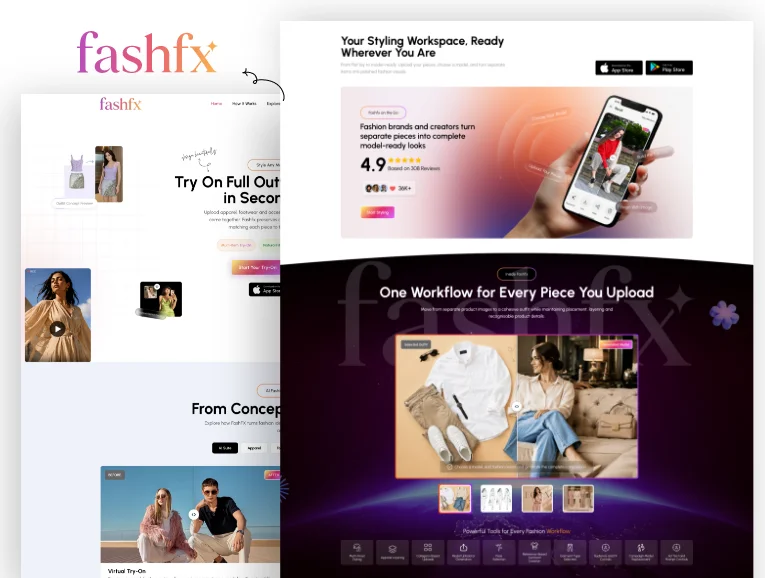
About the project
Fashfx is an AI-powered fashion visualization and content creation platform developed for fashion brands, designers, retailers, ecommerce teams, marketers, creative agencies, and content creators.
The platform converts existing fashion assets into new visual content. Users can upload garments, footwear, jewellery, accessories, sketches, fabric swatches, product photographs, or model images. Fashfx then helps them create realistic on-model looks, garment concepts, product campaigns, refreshed layouts, and short fashion videos.
Its key features include:
- Multi-item virtual try-on
- Product-to-model image generation
- Sketch-to-garment visualization
- Swatch-to-collection generation
- AI model creation
- Model replacement and pose transfer
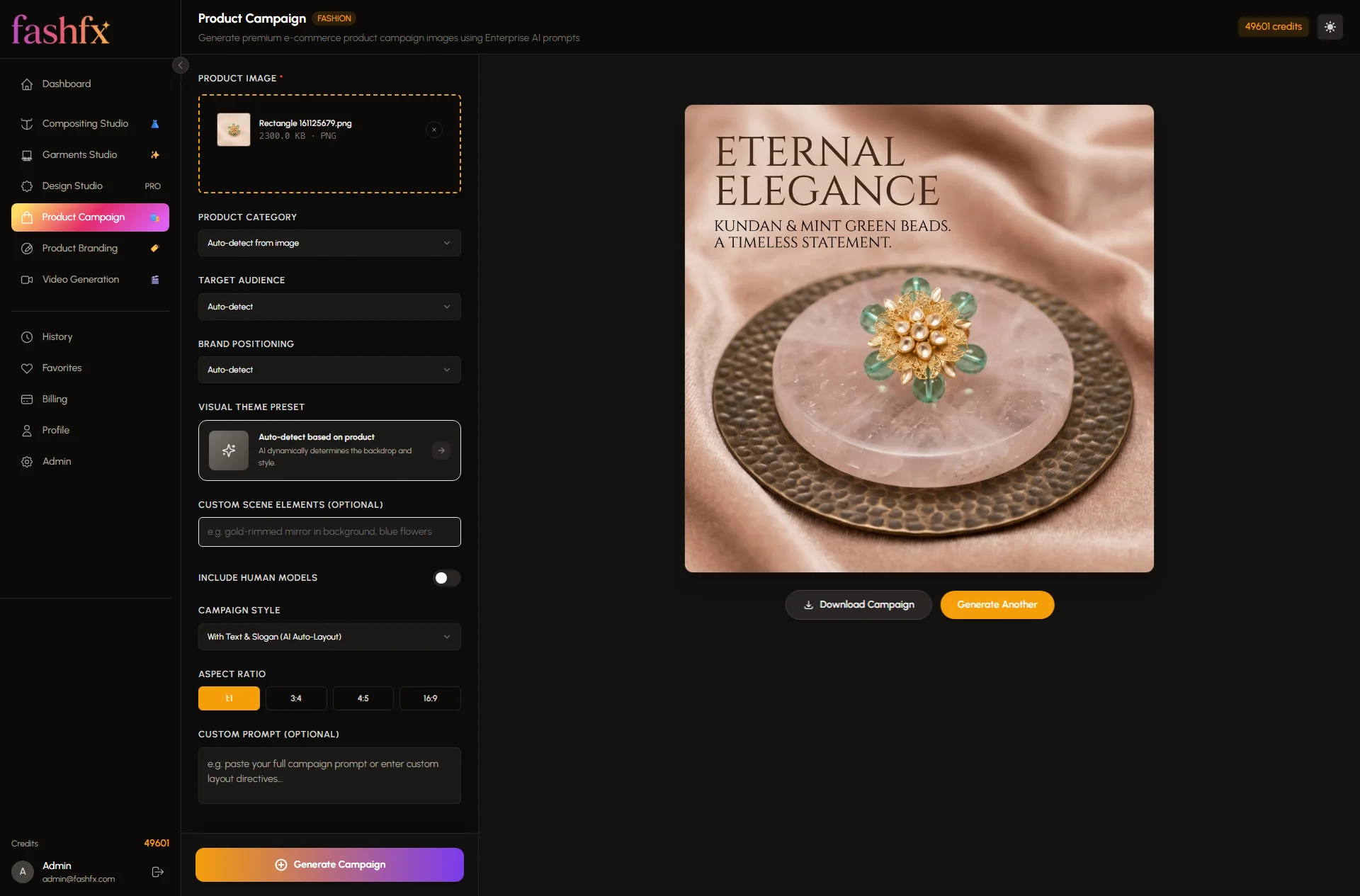
- AI product campaign generation
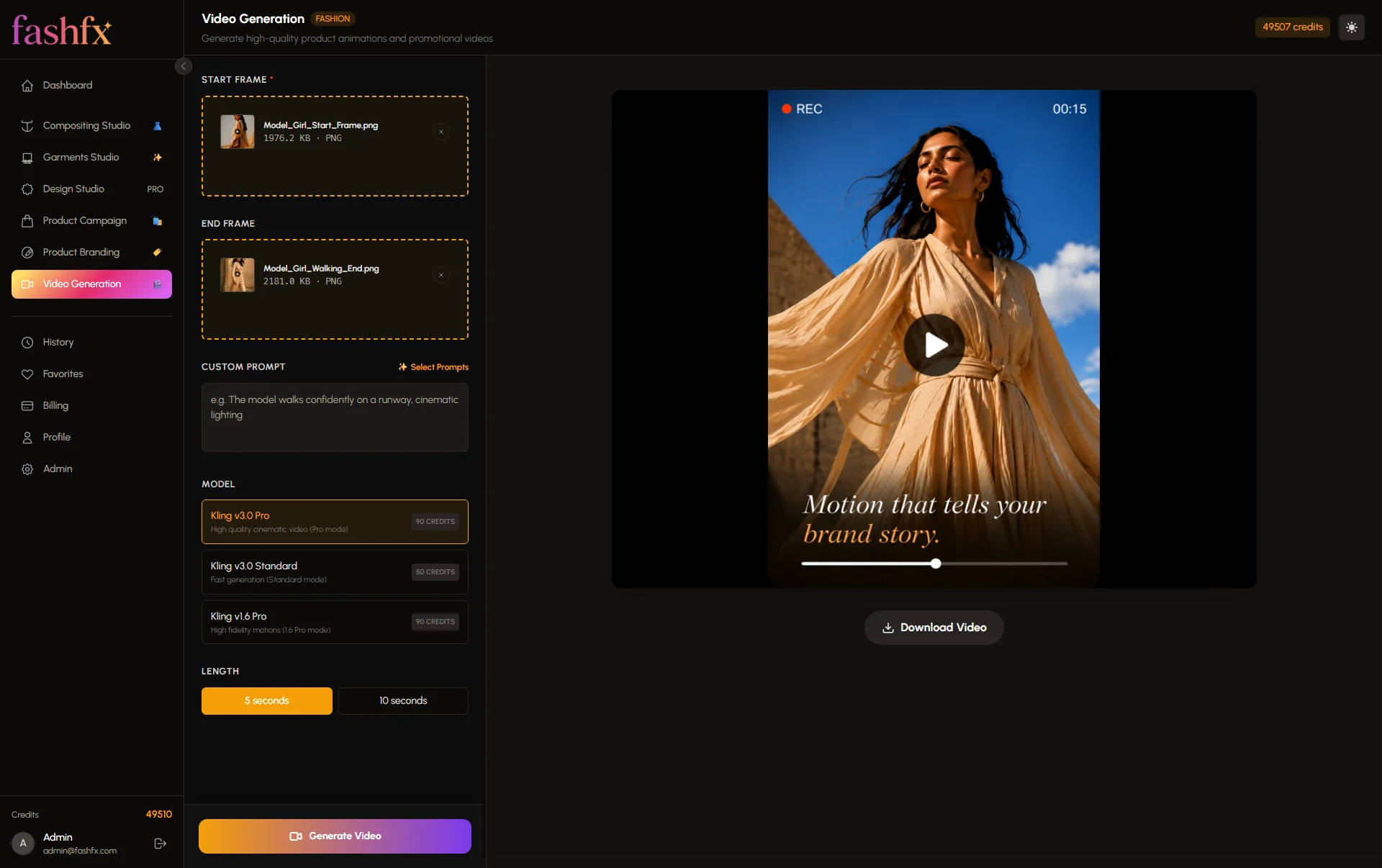
- Static-image-to-video generation
- Apparel, footwear, jewellery, and accessory styling
Challenge
Fashion content production requires model shots, detail images, lifestyle visuals, ads, lookbooks, and videos. Traditional workflows involve samples, studios, specialists, editing, and costly reshoots. With rising content demand , fashion teams need a connected AI workflow that supports the entire journey from garment concept to campaign content.
Codiant planned Fashfx to address this gap through a fashion-specific platform that could:
- Accept different fashion inputs, including sketches, swatches, products, and model images.
- Support apparel, footwear, jewellery, and accessories.
- Produce both static images and motion content.
- Preserve visible product characteristics throughout the generation process.
- Reduce the number of tools required across design, ecommerce, and marketing workflows.
- Make complex AI generation accessible through guided steps.
Approach
Codiant approached Fashfx as a fashion workflow product rather than a general-purpose image generator. The proposed product direction connected four major activities: garment visualization, product styling, campaign creation, and fashion video generation.
The work was organised around five priorities:
Fashion Workflow Research
The team examined how designers, ecommerce managers, merchandisers, and marketing teams move from an initial product asset to publishable fashion content.
Feature Prioritization
Features were evaluated according to the production problem they solved. Virtual try-on supported product visualization, garment generation supported early design decisions, the design studio supported campaign refreshes, and video generation supported motion-led marketing.
Cross-Functional Collaboration
Product strategists, UX designers, AI engineers, application developers, quality analysts, and fashion-domain contributors collaborated to translate creative production tasks into guided digital workflows.
Iterative Development
The platform was divided into individual studios and generation flows so that each capability could be designed, tested, and refined independently.
Accuracy and Usability
The experience focused on keeping uploads simple while allowing users to control models, poses, styling direction, product categories, garment types, and campaign prompts.
Discovery phase
Market Research
Research indicated that fashion teams were operating in an environment of rapidly growing content demand.
Adobe reported in 2026 that 90% of surveyed marketing teams believed their workflows could support rapid or high-frequency campaigns. However, 69% said doing so created strain, remained challenging, or was not possible.
The adoption of AI-generated fashion content also demonstrated that these workflows could operate at scale.
The Gap
The market contained tools for AI fashion models, product photography, image enhancement, background generation, and short-form videos. However, publicly available product information showed that many platforms concentrated on one primary content outcome.
Fashfx identified an opportunity to connect multiple fashion-specific workflows within one platform, from concept and garment creation to model visuals, campaigns, and videos.
Audience Struggles
Disconnected Production Tools
Teams may need separate applications for product-to-model generation, garment visualization, campaign editing, and video creation.
Repeated Creative Setup
Changing a model, pose, background, layout, or campaign theme can require new production work.
Limited Early Visualization
Designers may have sketches or fabric swatches but lack realistic visuals for reviewing the collection before samples are produced.
High Content Demand
Ecommerce, social media, paid advertising, marketplaces, and seasonal campaigns require different formats and creative variations.
Competitor Comparison
| Fashion Workflow | Fashfx | Botika | Vmake | ZMO.AI |
|---|---|---|---|---|
| Product-to-model images | Verified | Verified | Verified | Verified |
| Multi-item outfit try-on | Verified | Not publicly confirmed | Not publicly confirmed | Not publicly confirmed |
| Apparel, footwear, jewellery, and accessory styling | Verified | Partial | Partial | Partial |
| Sketch-to-garment generation | Verified | Not supported | Not publicly confirmed | Not publicly confirmed |
| Swatch-to-collection generation | Verified | Not publicly confirmed | Not publicly confirmed | Not publicly confirmed |
| AI model creation or selection | Verified | Verified model selection | Verified | Verified |
| Campaign model replacement | Verified | Partial | Partial | Partial |
| Pose transfer and campaign layout editing | Verified | Not publicly confirmed | Not publicly confirmed | Not publicly confirmed |
| Static fashion image to video | Verified | Not publicly confirmed | Verified | Partial |
| Product campaign and ad generation | Verified | Partial | Verified | Verified |
| Concept-to-campaign fashion workflow | Verified | Partial | Partial | Partial |
Botika focuses strongly on creating and enhancing on-model fashion photography from existing garment, flat-lay, mannequin, or model images. Its official documentation states that it does not generate new clothing from text or custom prompts.
Vmake provides image and video tools, including AI fashion models, UGC-style content, product videos, video enhancement, templates, and social content creation.
ZMO.AI provides AI model generation, product photography, image creation, backgrounds, and product-video capabilities through its broader creative platform.
Fashfx publicly documents a broader fashion-specific workflow covering sketches, fabric swatches, multiple products, on-model styling, campaign editing, and video generation.
Opportunity
The opportunity was to build an AI fashion workspace capable of supporting visual decisions throughout the content lifecycle.
Instead of limiting the product to one output, Fashfx could help different teams use the same fashion assets in different ways:
- Designers could convert sketches and swatches into realistic garment concepts.
- Merchandisers could test coordinated outfits across multiple product categories.
- Ecommerce teams could create on-model catalog visuals from product images.
- Marketing teams could generate lifestyle scenes and campaign variations.
- Social teams could convert approved images into short fashion videos.
- Agencies could produce more creative directions without rebuilding every asset.
This positioned Fashfx as a connection point between fashion design, product visualization, ecommerce merchandising, and campaign production.
Execution Timeline
1. Research & Discovery
2. Structure & Concept
3 Weeks3. Design & Prototyping
4 Weeks4. Development & Testing
6 WeeksResearch Phase
The recommended research focus covers the content journey from design input to published visual. Each user group enters that journey with different assets and expectations.
Designers begin with sketches, technical flats, swatches, and garment ideas. Ecommerce teams work with product photographs and catalog requirements. Marketing teams need campaign concepts, social formats, layouts, and videos. Agencies manage several clients, visual directions, and approval cycles.
Visual Research
Visual benchmarking should examine:
- Fashion ecommerce dashboards
- Professional photo-editing applications
- AI generation interfaces
- Digital asset management systems
- Lookbook and campaign-building tools
- Mobile fashion applications
The interface direction should keep the uploaded product visible throughout the workflow. Controls should be grouped by fashion task, while before-and-after previews should help users evaluate the generated result.
User Persona Development

Priya Sharma
31
Independent Fashion Designer
Mumbai, India
Persona Snapshot:
Priya develops small seasonal collections and needs a faster way to present garment ideas before producing complete physical samples.
Goals:
Turn sketches into realistic garment references.
Explore one fabric across several silhouettes.
Compare styling directions before sample production.
Present clearer collection concepts to buyers and collaborators.
Challenges:
Creating samples for every early idea requires time and resources.
Flat sketches do not always communicate fabric behaviour or styling intent.
External visualization support can slow down approvals.
Revisions may require new illustrations or mockups.
How Fashfx Helps:
- Sketch-to-garment generation converts drawings into realistic clothing concepts.
- Swatch-to-collection workflows help explore one textile across several garments.
- Model styling provides clearer collection presentations.
- Multiple visual directions can be reviewed before final production decisions.
Rachel Morgan
35
Ecommerce Merchandising Manager
London, United Kingdom
Persona Snapshot:
Rachel manages product launches across an online fashion store and requires consistent catalog images for frequent inventory updates.
Goals:
Create on-model images for new products.
Maintain visual consistency across product categories.
Prepare coordinated outfit looks.
Reduce delays between product availability and content publication.
Challenges:
Product images arrive in different styles and formats.
Organising model shoots for every product creates scheduling pressure.
Footwear and accessories are often produced through separate workflows.
Catalog updates require several image variations.
How Fashfx Helps:
- Product-to-model generation creates on-model visuals from product images.
- Multi-item styling combines apparel, footwear, jewellery, and accessories.
- Model controls support different looks, body types, and poses.
- Generated assets can support catalogs, product pages, and launches.
Ideation
Research and persona findings led to a product concept organised around specific fashion jobs rather than a single open-ended generator.
The ideation process prioritised:
- Visual workflows for different input types
- Guided controls instead of prompt-only interaction
- Dedicated studios for garments, compositing, design, campaigns, and video
- Persistent input previews
- Before-and-after comparisons
- Clear regeneration and refinement options
- Multi-category outfit creation
- Download-ready outputs
The experience was designed to reduce the distance between an uploaded fashion asset and a usable visual result.
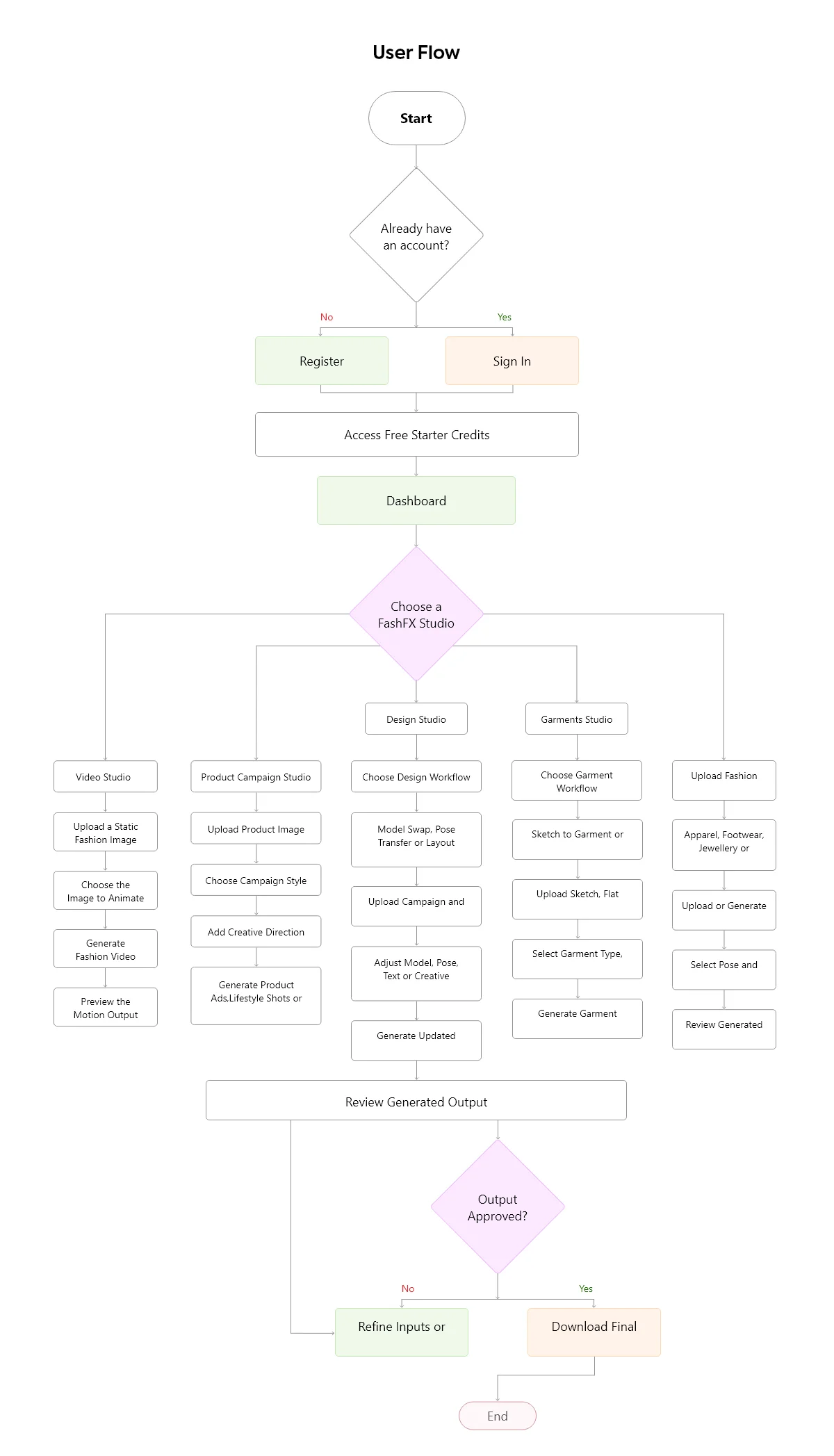
User flow
Feature concepts
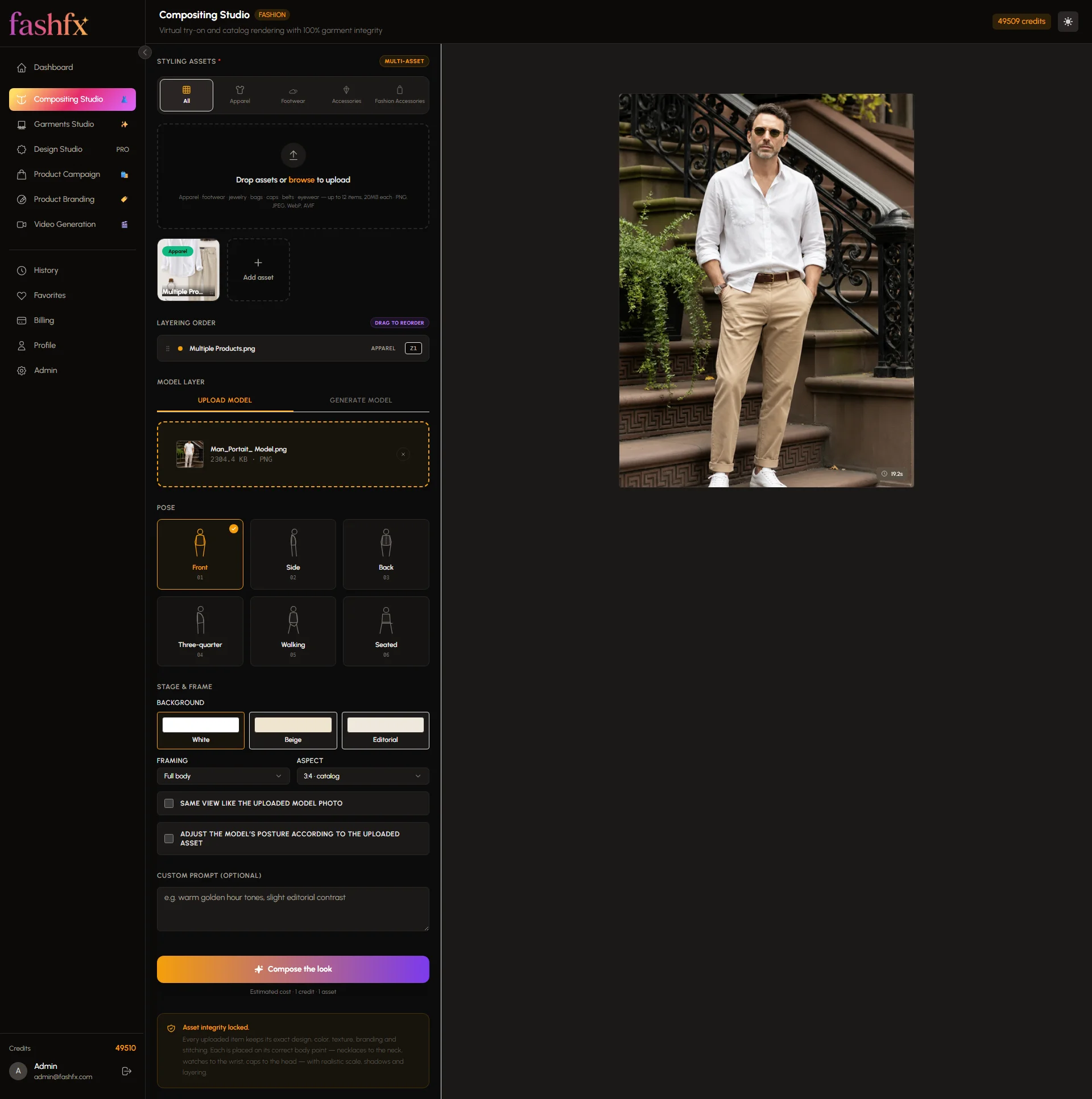
1. Multi-Item Virtual Try-On
Style the Complete Look in One Workflow: Users can upload apparel, footwear, jewellery, bags, and other accessories before applying the complete selection to a chosen model. Fashfx positions and layers the items according to the model’s pose and proportions.
2. Product-to-Model Generation
Move from Product Image to Model-Ready Visual: A garment or fashion product can be placed on a selected model to create on-model imagery for catalogs, ecommerce stores, lookbooks, and campaigns.
3. Sketch-to-Garment Generation
Turn Early Ideas into Realistic Fashion Concepts: Designers can upload sketches, flat drawings, or fashion illustrations and convert them into realistic garment visuals with visible structure and fabric-like detailing.
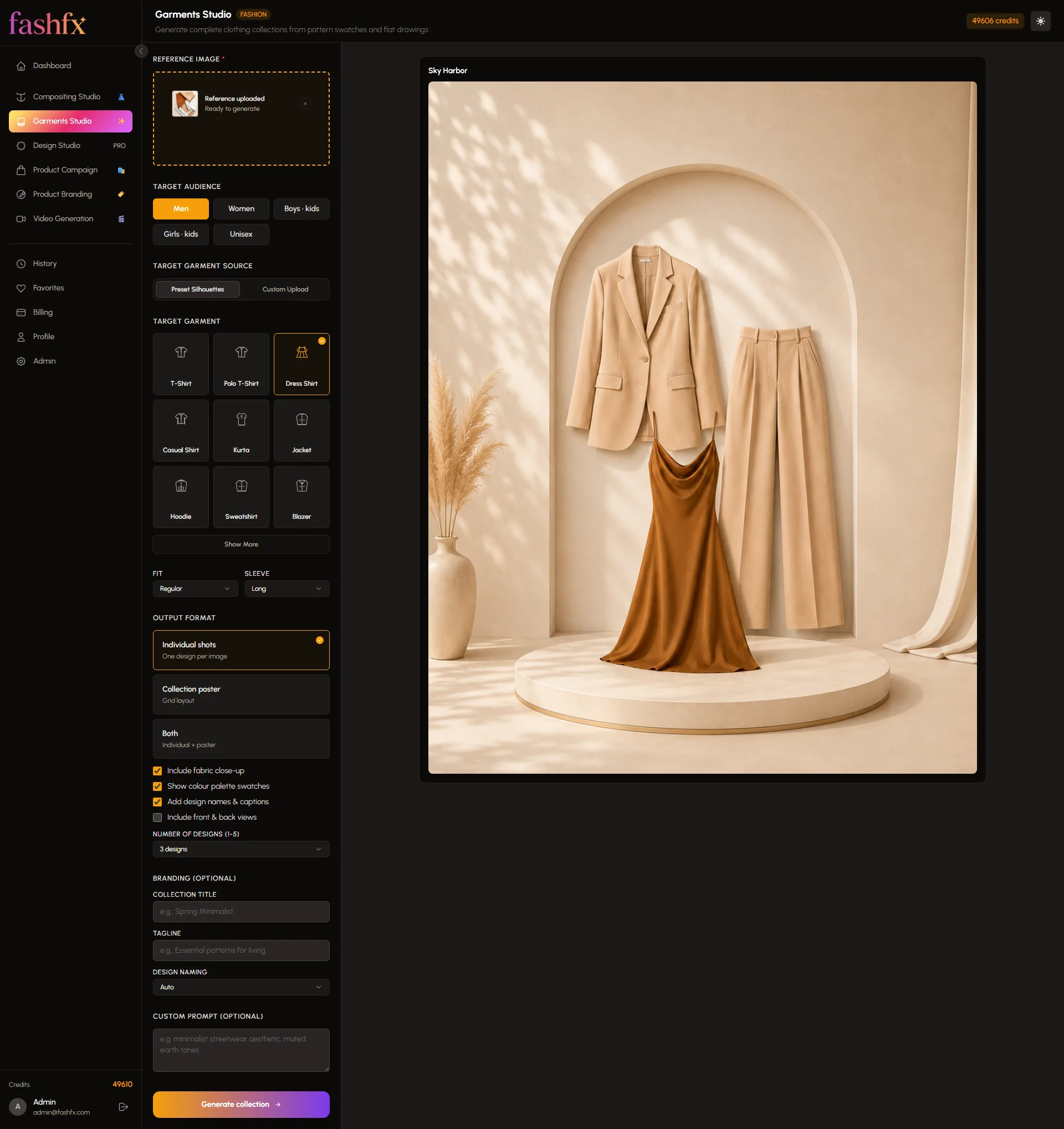
4. Swatch-to-Collection Generation
Explore More Designs from One Fabric: A fabric swatch can be used as the visual foundation for different garment types, helping designers compare silhouettes and collection directions.
5. AI Model Creation
Create the Right Model for Every Fashion Direction: Users can generate or select models with different looks, body types, poses, and visual characteristics for product styling and campaign work.
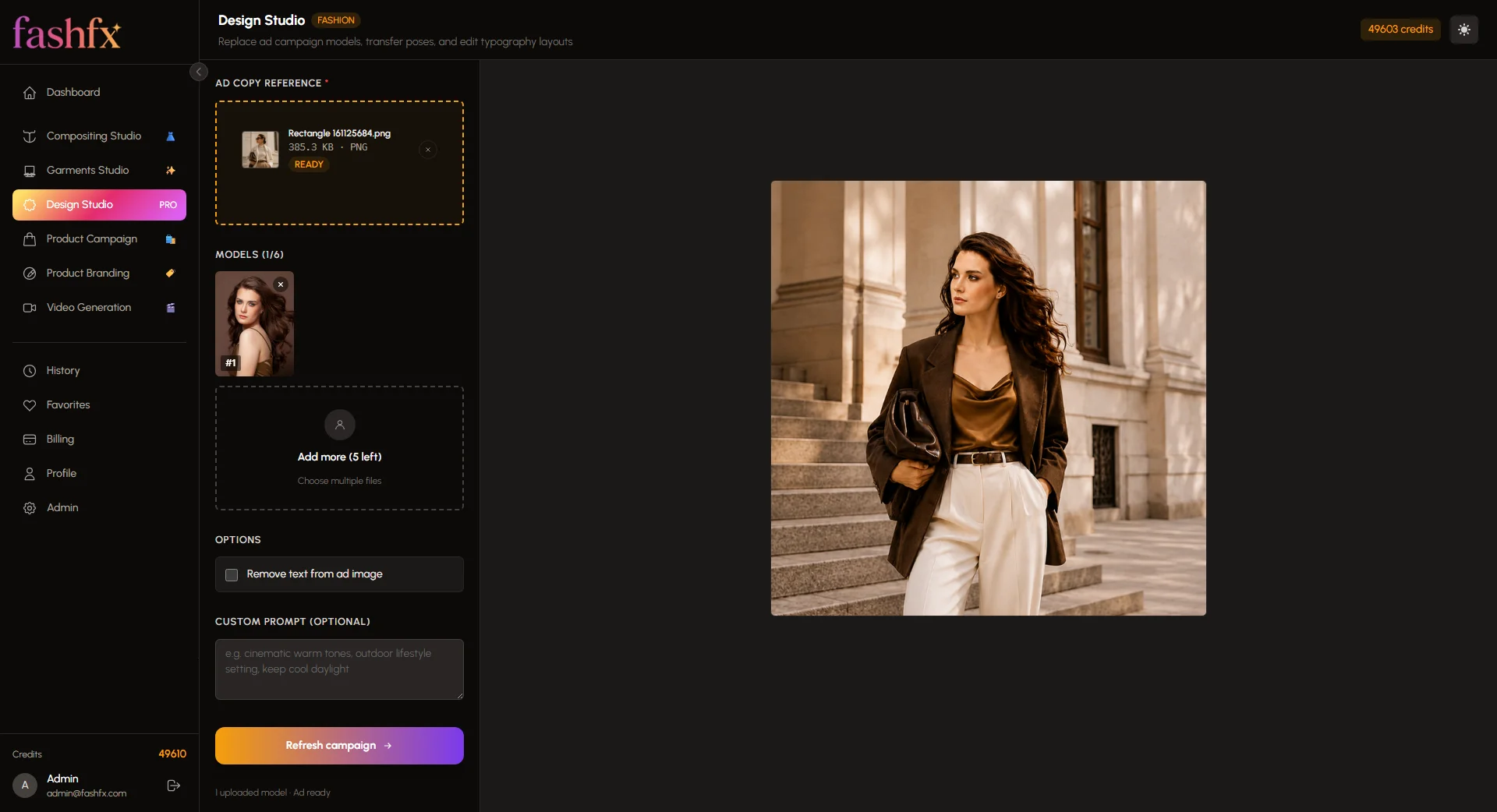
6. Model Swap and Pose Transfer
Refresh Campaigns Without Rebuilding the Composition: Fashfx can replace a model or adapt a pose while retaining the broader styling direction, lighting, composition, and product focus of the original campaign asset.
7. AI Product Campaign
Turn One Product into Multiple Campaign Assets: Users can upload a product image and create lifestyle scenes, premium product advertisements, launch visuals, and social-ready campaign creatives.
8. AI Fashion Video Generation
Bring Approved Fashion Images into Motion: Static fashion images can be converted into short videos for advertisements, reels, product promotions, and campaign storytelling.
High fidelity designs
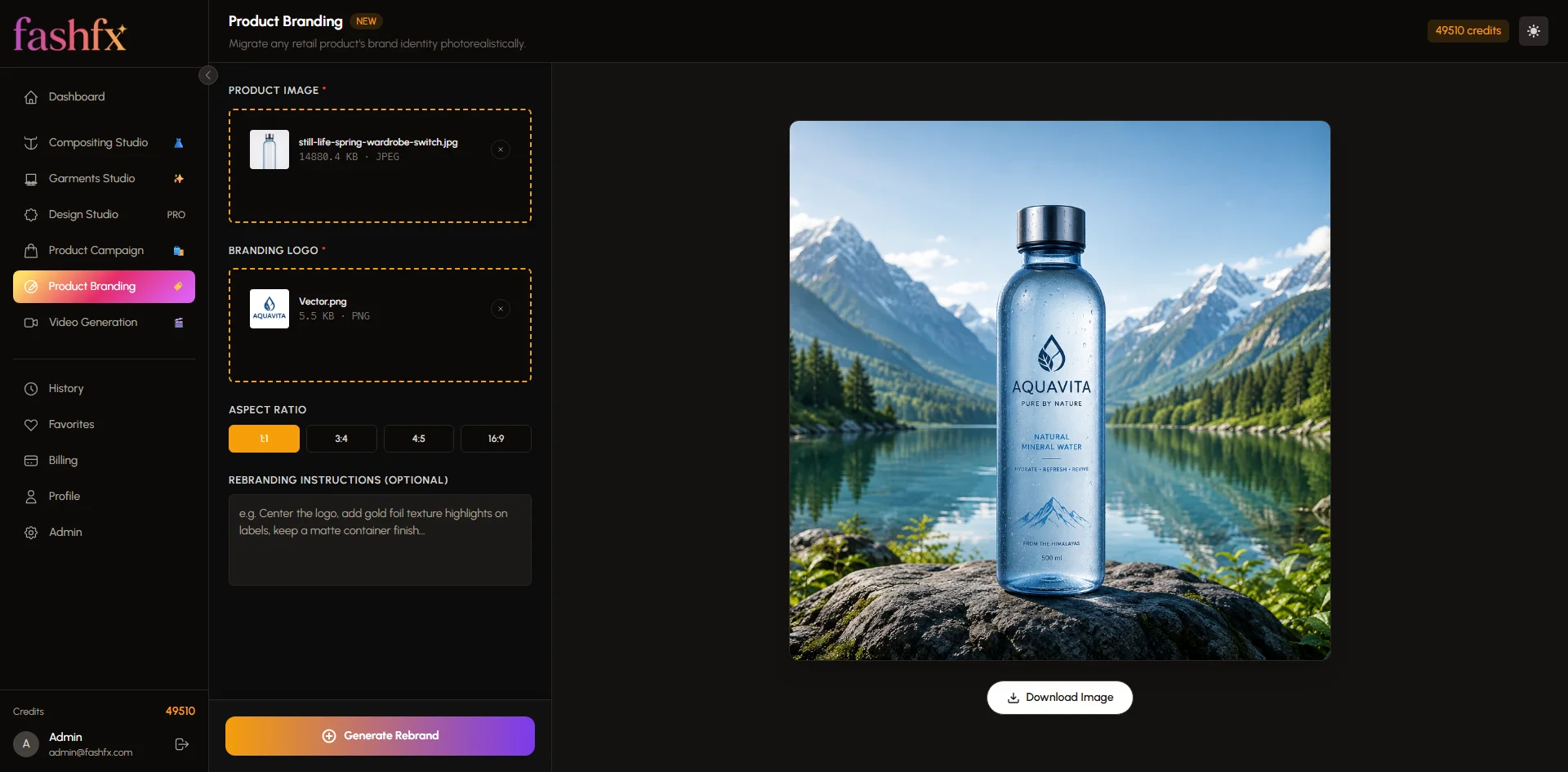
The landing page introduces the complete Fashfx value proposition through fashion transformations, studio categories, before-and-after visuals, use cases, testimonials, and pricing options.
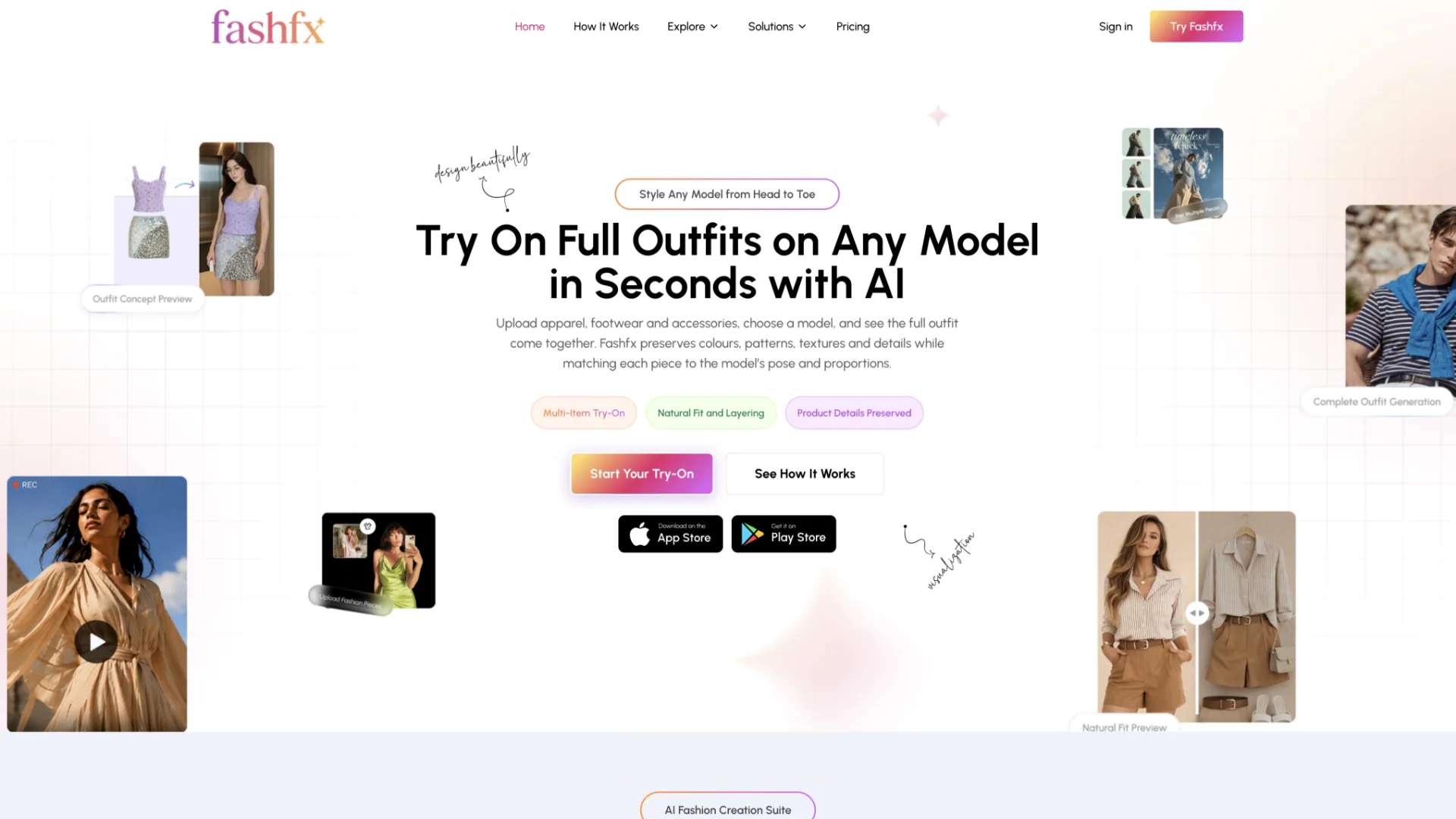
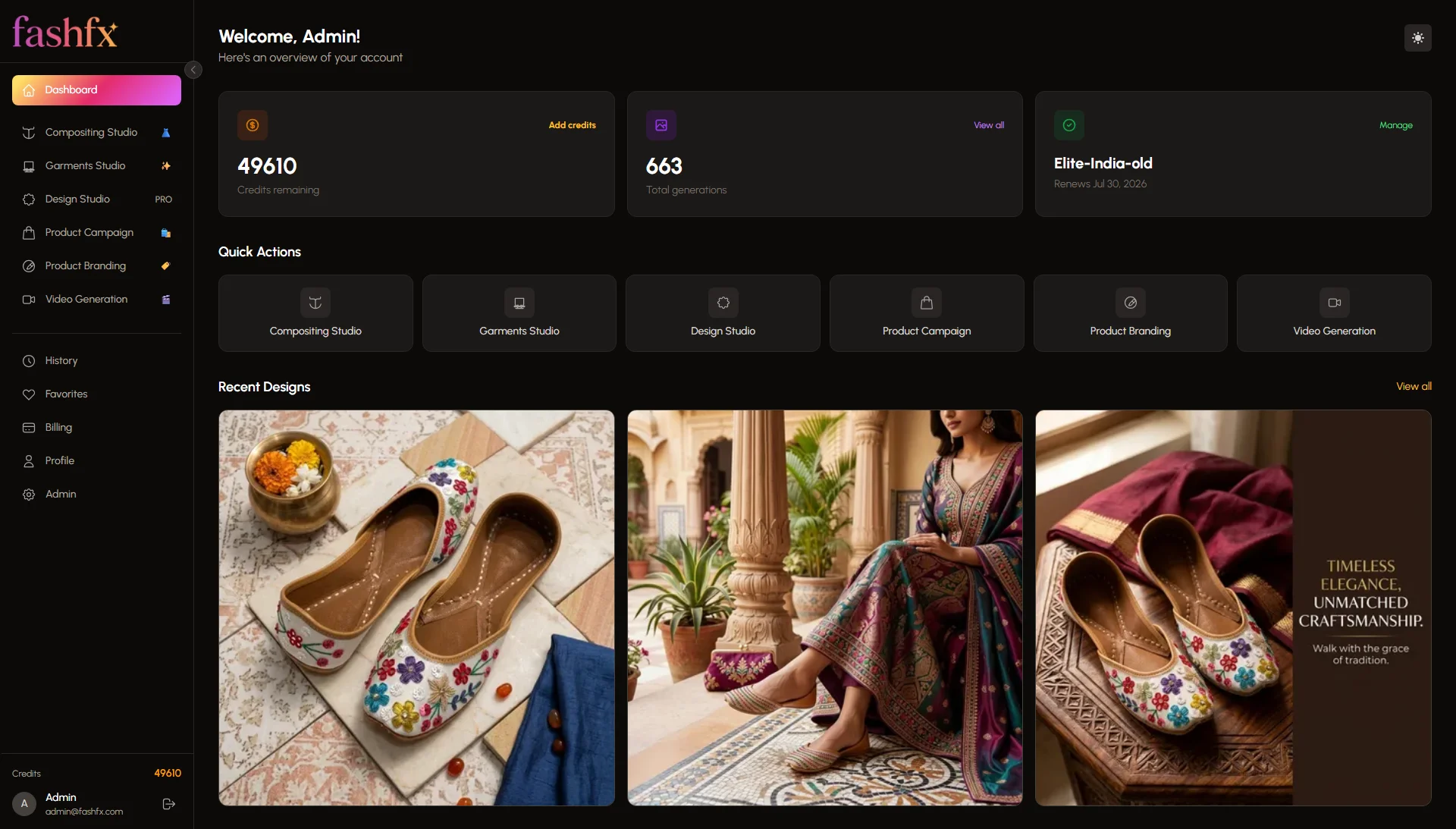
The central dashboard helps users select a studio, access recent projects, review generation history, and begin a new fashion workflow.
Development
We have used the most suitable technologies that would meet the requirements of this product. We have chosen this tech stack on the basis of scalability and efficiency.
 Next.js
 Tailwind CSS
 Redis
Redis
 Prisma ORM
 Figma
Figma
 Illustrator
 Photoshop
 Node.js
 OpenAI
 Google GenAI SDK
The result
Fashfx was delivered as a live AI fashion visualization platform available through the web and mobile applications.
The final product connects several previously separate content tasks:
- Fashion sketches can become realistic garment concepts.
- Fabric swatches can support collection visualization.
- Product images can become on-model shots.
- Multiple fashion products can form complete styled outfits.
- Existing campaign visuals can receive new models, poses, and layouts.
- Product photographs can become campaign creatives.
- Static images can become short fashion videos.
For designers, this creates a clearer way to present and evaluate early fashion ideas. For ecommerce teams, it supports the production of on-model and coordinated product visuals. For marketing teams and agencies, it creates more ways to adapt approved assets across campaign formats.