Enterprise Mobile App Development: How It Can Accelerate Your Business Growth
Table of Contents
Subscribe To Our Newsletter

Summarize with AI
Not enough time? get the key points instantly.
Enterprise mobile app development can accelerate growth by improving three measurable areas: workflow speed, access to business systems, and customer or employee service delivery. This matters to mid-market and enterprise leaders managing distributed teams, manual approvals, fragmented data, or services that cannot remain tied to desktop systems.
A well-scoped app creates value when it removes a documented operational constraint and connects securely with the systems employees, customers, and partners already use.
At Codiant, experience across 1,500+ delivered projects informs how enterprise applications are planned around integrations, user roles, scalability, and measurable business outcomes.
In a Nutshell
- Enterprise mobile app development connects three critical areas that is, people, workflows, and business systems through secure, role-based mobile applications.
- The most important evaluation criterion is whether the app removes a measurable operational constraint rather than simply adding mobile features.
- A credible cost estimate requires at least five defined inputs: platforms, integrations, user roles, compliance requirements, and backend scope.
- The biggest mistake is beginning development before validating workflows, system dependencies, security risks, and user adoption requirements.
- Codiant has delivered 1,500+ projects, bringing enterprise mobility, integration, and scalable software engineering experience to each engagement.
- IBM reports 60% of workers use mobile devices, reducing delays and helping increase operational capacity.
What is Enterprise Mobile App Development?
Enterprise mobile app development is the process of designing, building and maintaining mobile applications that support an organization’s internal operations, customer services or partner ecosystem. Unlike a general consumer app, an enterprise app is usually connected to business systems, governed by organizational security policies and designed for specific roles or workflows.
Examples of custom enterprise mobile apps include:
- A field-service app that assigns jobs and records technician activity
- A warehouse application for barcode scanning and stock updates
- A sales app connected to customer relationship management software
- A healthcare application that gives authorised staff access to patient workflows
- A logistics app that tracks deliveries, drivers and proof of service
- An employee app for leave requests, approvals and company communication
- A customer portal for orders, payments, support and account management
Also read: 100 Mobile App Ideas You Should Invest In Today
Companies building a new mobile-led venture rather than an internal workforce application should first validate the problem, target users, MVP scope and business model through a structured mobile app startup planning process.
Enterprise mobile app development may therefore serve employees, customers, vendors, distributors or multiple user groups within one connected platform.
The goal is not merely to reproduce desktop software on a smaller screen. Effective business mobile app development redesigns the workflow for mobile conditions, including smaller screens, interrupted connectivity, short interaction times and location-specific tasks.
Turn Enterprise Workflows into Faster, Scalable Mobile Business Operations Today
Build secure mobile workflows that connect teams, systems, data, and decisions faster.
How Can Enterprise Mobile App Development Accelerate Business Growth?
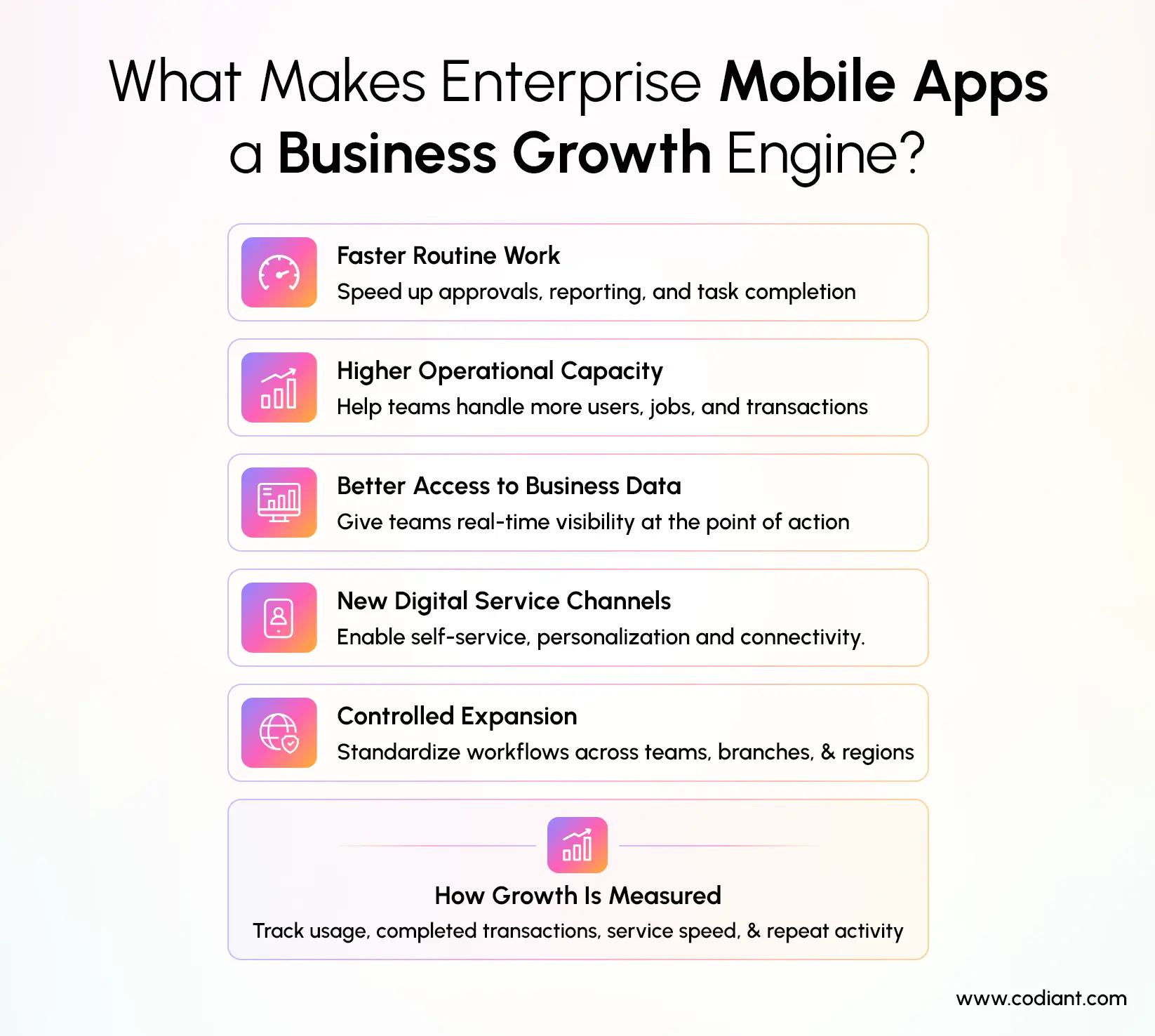
Enterprise mobile app development can accelerate business growth by helping an organisation complete work faster, serve more users and make operational data available at the point of action. Growth occurs when the app removes a constraint that previously limited productivity, service capacity, customer experience or decision-making.
McKinsey describes digital transformation as rewiring how an organisation operates so it can continuously deploy technology at scale to improve customer experience and lower costs. An enterprise mobile application can support that transformation by placing digital workflows directly in the hands of employees and customers.
1. It reduces the time required to complete routine processes
Mobile approval flows can allow managers to review requests without waiting to return to a desktop. Field employees can submit reports from the work location instead of recording information on paper and entering it again later.
This does not automatically reduce costs. The result depends on adoption, workflow design and whether the application genuinely removes duplicate work. Businesses should compare the current process with the proposed mobile process before development begins.
2. It increases operational capacity
When repetitive steps are automated or simplified, employees can complete more work without a proportional increase in administrative effort. A service company, for example, may use an app to schedule jobs, capture customer signatures and update billing systems from one workflow.
The app becomes a growth enabler when this additional capacity allows the company to serve more customers, territories or transactions.
3. It improves access to business information
Mobile access can help authorised users check inventory, order status, customer history, task progress or performance data while making decisions. This reduces dependence on phone calls, emails and manually prepared reports.
The information is only valuable when it is current and reliable. Enterprise app development services must therefore address data ownership, synchronisation rules and integration accuracy.
4. It creates new digital service channels
Customer-facing enterprise applications can support ordering, account management, payments, service requests and personalised communication. Where sufficient consented user data is available, AI-powered mobile app personalization can tailor recommendations, notifications, content and feature visibility according to user behaviour and interactions.
Product roadmaps should also account for mobile app trends shaping 2026, including AI-driven personalization, edge computing, stronger privacy controls, 5G-enabled capabilities and evolving device formats.
Growth should still be measured against defined indicators, such as active users, completed transactions, service resolution time or repeat purchases. Downloads alone do not demonstrate business value.
5. It supports controlled expansion
A scalable application can standardise how teams work across locations. New employees, branches or service regions can use the same workflows, permissions and reporting structure instead of developing separate processes.
This makes enterprise software development part of the organisation’s operating model rather than a one-time technology project.
How Do Enterprise Mobile Apps Improve Business Operations?
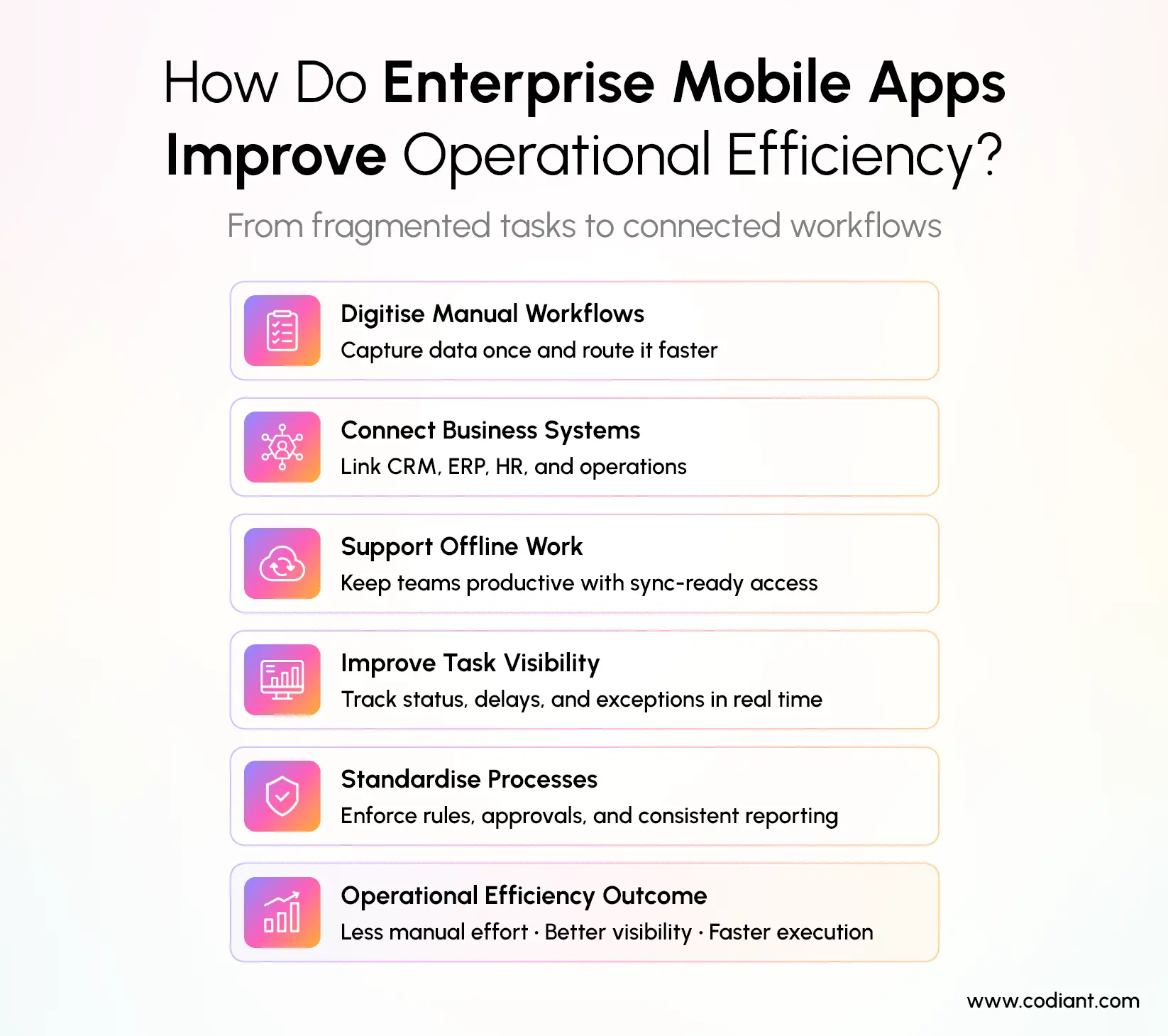
Enterprise mobile apps improve business operations by converting fragmented activities into connected digital workflows. They can give employees immediate access to tasks, records and approvals while sending completed information back to the organisation’s central systems.
1. They digitise manual workflows
Paper forms, spreadsheet trackers and email-based approvals often require information to be transferred between systems. A mobile app can collect structured data once and route it to the relevant team or application.
For example, a site inspector can select a location, complete a checklist, attach photographs and submit the report from one interface. The organisation can then validate, store and analyse the information without repeating the original entry.
2. They connect mobile users with enterprise systems
An enterprise app may integrate with customer relationship management, enterprise resource planning, human resources, warehouse management, payment, identity or analytics platforms.
The mobile interface does not necessarily replace these systems. It can act as a task-focused access layer that allows people to perform specific actions without navigating the entire desktop platform.
3. They support work in areas with unreliable connectivity
Offline functionality allows selected data and workflows to remain available when the user does not have a stable connection. Microsoft’s mobile-offline documentation explains that properly configured applications can allow users to interact with synchronised data without internet access, although the app must be kept lightweight and designed around clearly defined mobile scenarios. (Microsoft Learn)
Offline capability requires more than storing information locally. The development team must define which records are downloaded, how updates are queued and what happens when two users change the same information before synchronisation.
4. They improve task visibility
Dashboards, status indicators and alerts can help managers see unfinished work, delayed requests and operational exceptions. Employees can also receive notifications when a task is assigned, changed or approaching its deadline.
Notifications should be selective and role-specific. Excessive alerts can cause users to ignore information that is genuinely important.
5. They standardise processes
A custom enterprise application can enforce required fields, approval sequences, validation rules and permission levels. This reduces variation between employees or locations and creates more consistent data for reporting.
Standardisation must not make the app inflexible. The system should accommodate authorised exceptions and changing business rules without requiring a complete redevelopment.
Why Should Businesses Invest in Enterprise Mobile Applications?
Businesses should invest in enterprise mobile applications when mobile access can solve a documented operational, workforce or customer problem. The strongest investment cases are based on measurable constraints, such as delayed approvals, duplicate data entry, slow field reporting or limited access to customer services.
An enterprise application may be worth considering when:
- Employees regularly work away from desks
- Customers need faster access to services or account information
- Teams rely on paper, spreadsheets or messaging apps for critical processes
- Data must move between several disconnected systems
- Managers lack real-time visibility into operational activity
- Existing software is difficult to use on mobile devices
- The company needs to standardise processes across locations
- Security policies require controlled access to corporate data
Businesses should not invest simply because competitors have launched apps. A project should begin with a defined user group, business outcome and baseline measurement.
For example, instead of setting the objective to “build a workforce app,” the organisation could aim to “reduce the time between task completion and report availability.” That objective can be measured before and after deployment.
What Features Should an Enterprise Mobile App Include?
An enterprise mobile app should include the features required to complete its intended workflow securely and reliably. The exact feature set depends on the users, operating environment, connected systems and regulatory obligations.
1. Role-based access control
Users should only see the information and actions relevant to their responsibilities. An employee, supervisor, customer and system administrator may require different dashboards, permissions and approval rights.
Role rules should be enforced by the backend rather than relying only on what the mobile interface displays.
2. Secure authentication
Enterprise apps commonly require single sign-on, multi-factor authentication, session controls and integration with an organisational identity provider.
The correct authentication design depends on the organisation’s identity infrastructure and risk profile.
3. Enterprise system integrations
Integrations allow the app to exchange information with existing platforms such as ERP, CRM, HRMS, WMS, EHR, payment or document-management systems.
Development teams must determine:
- Which system is the authoritative data source
- Whether integration occurs in real time or on a schedule
- Which actions the app can create or update
- How failed transactions are handled
- What happens when a connected system is unavailable
- How integration activity is logged and audited
4. Offline access and data synchronisation
Offline access is important for field service, logistics, construction, utilities and other environments where reliable connectivity cannot be assumed. The app should store only the data needed for the approved offline workflow and synchronise it securely when connectivity returns.
Conflict-resolution rules should be defined during development, not after users begin creating inconsistent records.
5. Workflow automation
The app can route requests, assign tasks, apply business rules and trigger notifications. Automation should focus on repeatable processes with clear decision logic.
Processes that rely heavily on judgement may still need human review. The application should make responsibility visible instead of hiding decisions inside an unexplained automated flow.
6. Search and filtering
Employees need to find relevant records quickly, especially when the system contains large volumes of customers, products, cases or transactions.
Search permissions must follow the same access policies as the underlying records. A user should not discover restricted information through search results.
7. Dashboards and analytics
Operational dashboards can show current activity, completion rates, service levels and exceptions. Management reporting should use clearly defined metrics and traceable data sources.
The app should distinguish between real-time information, delayed data and calculated estimates so users understand what they are viewing.
8. Push notifications and alerts
Notifications can inform users about new tasks, approvals, changes or exceptions. Users should receive alerts based on their role, urgency and preferred channel.
Sensitive information should not be exposed unnecessarily on a locked device’s notification screen.
9. Security controls
NIST states that mobile devices are permanent fixtures in enterprises and are used to access organisational networks and process sensitive data. Its guidance covers centralised management, endpoint protection and the full device lifecycle for company-owned and personally owned devices.
The OWASP Mobile Application Security Verification Standard organises mobile security requirements across areas including secure storage, cryptography, authentication, network communication and interaction with the underlying platform. These controls provide a practical reference for security architecture and testing.
10. Audit trails
The application should record significant activities such as logins, approvals, record changes, exports and administrative actions. Logs help organisations investigate errors, demonstrate accountability and support compliance reviews.
Audit information must be protected from unauthorised modification and retained according to the organisation’s policy.
11. Device and application management
Enterprise mobility solutions may use mobile application management, mobile device management or unified endpoint management to apply organisational policies.
Android Enterprise supports work profiles, fully managed devices and dedicated-device scenarios. Administrators can apply controls such as restricting applications, managing certificates and separating work data from personal data.
Apple also supports managed, custom, unlisted and proprietary in-house application distribution models. The appropriate model depends on whether the app is public, organisation-specific or limited to an internal audience.
12. Scalable backend architecture
The backend should support expected users, transactions, data growth and integration traffic. Scalability requirements should be based on forecasted usage rather than an undefined request to “support millions of users.”
The architecture should also define performance targets, availability requirements, backup procedures and recovery responsibilities.
How is an Enterprise Mobile App Different From a Consumer App?
An enterprise mobile app is built around organisational processes, systems and security policies, while a consumer app is generally designed for a broad public audience and individual user behaviour.
| Area | Enterprise mobile app | Consumer mobile app |
| Primary users | Employees, customers, partners or vendors | General consumers |
| Main objective | Improve operations or deliver business services | Attract, engage or monetise users |
| Integrations | ERP, CRM, HRMS, identity and operational systems | Usually public APIs and consumer services |
| Access | Often role-based or restricted | Usually open registration |
| Distribution | Public, private, managed or in-house | Primarily public app stores |
| Security | Based on corporate policies and compliance needs | Based on consumer privacy and platform requirements |
| Device control | May use MDM, MAM or UEM | Usually controlled by the individual user |
| Success measures | Process time, accuracy, adoption and service performance | Downloads, engagement, retention and revenue |
The categories can overlap. A banking, insurance or retail application may be customer-facing while still requiring enterprise-grade integrations, identity controls and compliance processes.
How Does the Enterprise Application Development Process Work?
Enterprise application development usually progresses through discovery, architecture, design, engineering, testing, deployment and continuous improvement. Each phase should reduce uncertainty before the organisation commits further time and budget.
Businesses that require support across product strategy, UI/UX, mobile engineering, backend development, testing, deployment and maintenance can evaluate the scope covered by end-to-end mobile app development services.
1. Business discovery
The team identifies the users, current workflow, operational problem and desired result.
Discovery should document:
- User roles and locations
- Current process and systems
- Known delays or failure points
- Security and compliance requirements
- Required integrations
- Expected usage
- Success metrics
- Scope exclusions and assumptions
2. Technical and integration assessment
Architects evaluate the existing environment and determine how the mobile application will communicate with business systems.
This stage may reveal that legacy systems lack suitable APIs, identity services need modification or data ownership is unclear. Identifying these constraints early can prevent inaccurate schedules and budgets.
3. Mobile UX and prototyping
Designers map the shortest practical route for users to complete each task. Interactive prototypes allow employees and decision-makers to review the proposed flow before full development begins.
Enterprise UX should account for real working conditions. A warehouse employee wearing gloves, for example, may require a different interaction model from an office manager reviewing a dashboard.
4. Application and backend engineering
Developers build the mobile interface, backend services, integrations, databases and administrative controls. Enterprise software development may use native or cross-platform mobile technologies depending on performance, device and maintenance requirements.
When the application includes recommendation engines, predictive analytics, natural-language processing or image recognition, the standard workflow should be extended through a step-by-step AI app development process covering problem definition, data preparation, model selection, integration and evaluation.
Work is often divided into prioritised releases so the organisation can validate essential workflows before adding secondary functionality.
5. Security and compliance implementation
Security should be incorporated throughout architecture and development rather than added during final testing. The team should define authentication, authorisation, data protection, logging, device controls and incident-response responsibilities.
Requirements must be adapted to the organisation’s jurisdiction, industry and data. We cannot confirm which regulations apply without knowing the business, location, users and information processed.
6. Testing and pilot deployment
Testing should cover functionality, integrations, devices, operating systems, performance, accessibility, security and offline behaviour where applicable.
A controlled pilot with representative users can reveal workflow and adoption issues that laboratory testing may not identify.
7. Deployment and lifecycle management
The application may be distributed publicly, privately or through enterprise device-management infrastructure. After release, teams should monitor performance, errors, user behaviour, security events and operating-system changes.
An enterprise app is an ongoing product. Maintenance should include patches, compatibility updates, integration monitoring and prioritised improvements.
Related reading: How Long Does It Take to Develop an App in 2026?
Know Your Enterprise App Budget Before Development Costs Escalate Unexpectedly
Define scope, assumptions, exclusions, integrations, and responsibilities before requesting formal final estimates.
How Much Does Enterprise Mobile App Development Cost?
Enterprise mobile app development can cost from $10,000 to more than $200,000, but an accurate estimate requires a defined scope, integration plan, security model, supported platforms and delivery responsibilities. Clutch’s July 2026 pricing data places mobile app projects across four reported value bands: under $10,000, $10,000–$49,999, $50,000–$199,999 and $200,000 or more. These are general mobile app benchmarks rather than guaranteed prices for enterprise applications.
Enterprise Mobile App Development Cost Benchmarks
| Pricing benchmark | Reported cost or rate | How businesses should interpret it |
| Most commonly reported project range | $10,000–$49,999 | The most frequent range among mobile app projects reviewed on Clutch; it is not specific to enterprise applications. |
| Higher project-value band | $50,000–$199,999 | A recognised Clutch pricing category that may include projects with broader functionality, integrations or platform requirements. |
| Large project-value band | $200,000+ | Clutch’s highest published project band; complex enterprise programmes may enter this category, but scope must be assessed individually. |
| Average app development project | $90,780.11 | The average across projects in Clutch’s dataset, not a standard quotation or minimum enterprise budget. |
| Typical agency rate | $25–$49 per hour | A broad marketplace rate; supplier location, seniority and specialist requirements can change the final rate. |
| Average project timeline | About 11 months | The reported average across mobile app projects, although a focused first release may take less time and a multi-system platform may take longer. |
Enterprise applications can exceed general marketplace benchmarks when they require legacy-system integrations, multiple user roles, offline synchronisation, regulated data, dedicated cloud infrastructure or complex administrative controls.
What Affects Enterprise Mobile App Development Cost?
The final cost is usually determined by:
- Product discovery and business analysis
- Number of supported platforms and device types
- Native or cross-platform development
- User roles and permission levels
- Backend services and database architecture
- Number and condition of existing APIs
- ERP, CRM, HRMS or other enterprise integrations
- Offline functionality and synchronisation rules
- Authentication and identity-management requirements
- Security and regulatory compliance
- Data migration and legacy-system modifications
- Testing across devices, operating systems and user roles
- Cloud infrastructure and deployment model
- Post-launch monitoring, support and optimisation
The number of integrations alone does not determine cost. Connecting to a documented, stable API will generally require less work than integrating with a legacy system that lacks suitable interfaces, consistent data or current technical documentation.
What Should an Enterprise App Estimate Include?
A credible enterprise application development estimate should clearly separate included work, excluded costs and planning assumptions.
| Estimate area | Items that should be defined |
| Included scope | Discovery, UI/UX design, mobile engineering, backend development, integrations, testing and deployment |
| Platforms | iOS, Android, tablets, rugged devices or cross-platform delivery |
| Integrations | Named enterprise systems, required data flows and integration responsibilities |
| Security | Authentication, permissions, encryption, audit logging and security testing |
| Infrastructure | Cloud setup, environments, monitoring, backups and deployment pipelines |
| Exclusions | Third-party licences, cloud consumption, device purchases, legacy-system upgrades and future enhancements |
| Assumptions | Expected users, transaction volumes, API availability, supported operating systems and data-migration ownership |
| Post-launch work | Warranty, maintenance, operating-system updates, monitoring and feature optimisation |
For example, a proposal may include product design, iOS and Android development, backend APIs, integration testing and production deployment while excluding cloud usage charges, third-party software licences, device procurement and changes required within the client’s legacy systems.
Without documented requirements, assumptions and exclusions, we cannot confirm an accurate enterprise mobile app development cost. A discovery and technical assessment should be completed before the project is assigned a final budget or delivery schedule.
How Should You Choose an Enterprise App Development Company?
Choose an enterprise app development company based on its ability to understand business workflows, integrate systems and maintain the application securely, not only its ability to build mobile screens.
Before expanding an internal team or appointing external specialists, organisations should determine whether product scope, operational demand and delivery pressure indicate the right time to hire mobile app developers.
During evaluation, ask the company to explain:
- How it conducts product discovery
- How it validates business requirements
- Which similar workflows or integrations it has delivered
- How it approaches architecture and security
- How estimates and scope changes are managed
- Which team members will be assigned
- How quality is measured
- How releases are reviewed
- Who owns the source code and technical documentation
- How post-launch monitoring and support work
Businesses comparing an internal team with an external development partner should assess the benefits and trade-offs of outsourcing mobile app development against hiring time, specialist access, project control and long-term product ownership.
A reliable provider should be willing to identify uncertainty. Be cautious when an enterprise app development company offers a fixed cost or guaranteed delivery date before reviewing integrations, security requirements and workflow complexity.
The right partner should also explain when a mobile app is unnecessary. In some cases, improving a responsive web application, configuring an existing enterprise platform or simplifying the process may deliver greater value than building a new custom app.
Turn Mobile Access Into Measurable Business Value
Enterprise mobile app development can accelerate business growth when it makes an important process faster, more accessible or easier to scale. The strongest applications connect users with existing business systems, protect organisational data and provide a clear improvement over the workflow they replace.
Codiant provides enterprise app development services for organisations seeking secure, scalable and workflow-focused mobile products. Begin with discovery to define the users, integrations, success metrics, assumptions and technical risks before committing to full development.
Create A Mobile Experience Built Around Real Operational Challenges Today
Design workflows for field conditions, user roles, connectivity, and business priorities securely.
The Author

Frequently Asked Questions
Enterprise mobile app development can help growing businesses standardise workflows, provide mobile access to business systems and support more customers or employees without proportionally increasing administrative work. The actual benefit depends on user adoption, process design, integration quality and whether the app solves a measurable business constraint.
Enterprise mobile apps can integrate with existing systems through APIs, middleware, integration platforms, webhooks or custom connectors. Before development, the team should identify the authoritative data source, available interfaces, authentication method, synchronisation frequency and error-handling process.
Industries with distributed employees, field activity, physical assets or time-sensitive services often have strong mobile use cases. These include healthcare, logistics, manufacturing, retail, construction, financial services, utilities, hospitality and field services; Android specifically identifies inventory management, field service, logistics, kiosks and hospitality check-in as dedicated-device scenarios.
An enterprise mobile app may take several months to design, build, integrate and test, but the timeline cannot be confirmed without scope. Clutch reports an average mobile app project duration of approximately 11 months across the projects in its dataset, although a focused initial release may take less time and a large multi-system enterprise platform may take longer.
Enterprise mobile apps commonly use Swift/SwiftUI for iOS, Kotlin/Jetpack Compose for Android, and Flutter or React Native for cross-platform development. Backend stacks may include Java, .NET, Node.js, or Python, supported by cloud services, databases, APIs, identity management, and CI/CD tools. The right stack depends on integration needs, security, existing systems, scalability, developer expertise and maintenance goals. Enterprises should choose technologies that deliver reliable performance, secure data handling, seamless integrations, and business value for users now.
Featured Blogs
Read our thoughts and insights on the latest tech and business trends

How Much Does It Cost to Build an MVP in 2026? A Complete Pricing Guide
- September 10, 2026
- Digital Transformation
MVP development cost typically ranges from $5,000 for a basic web-based product to $150,000 or more for a complex, cross-platform solution. A custom MVP with user accounts, a backend, essential integrations and a polished interface... Read more

How Much Does It Cost to Hire a Dedicated AI/LLM Developer in 2026?
- September 8, 2026
- Artificial Intelligence Staff Augmentation
Hiring a dedicated AI or large language model (LLM) developer typically costs $35–$60 per hour for general AI engineering and $50–$200 per hour for specialised machine learning work, with enterprise pricing rising for advanced RAG,... Read more
HIPAA-Compliant App Development in 2026: How to Build Securely and Avoid Preventable Fines
- September 4, 2026
- Mobile App Development
HIPAA-compliant app development in 2026 requires six foundations: complete ePHI mapping, documented risk analysis, role-based access, encryption, signed business associate agreements, and continuous security monitoring. This matters most to healthcare CTOs, product leaders, and compliance... Read more